

Every email sent across the internet, whether it is a personal message, a business proposal, a password reset link, or an online purchase confirmation, relies on a standardized system to reach its destination. Behind the scenes, a protocol called SMTP enables email servers to communicate with each other and transfer messages across networks. SMTP, which stands for Simple Mail Transfer Protocol, is the foundation of modern email delivery. When a user clicks the Send button in an email client such as Outlook, Apple Mail, or Gmail, the email client submits the message to the sender’s outgoing mail server using SMTP. The SMTP server then relays the message to the recipient’s mail server. Without SMTP, email communication as we know it would not exist. Although email has evolved significantly over the past few decades, SMTP remains the industry standard for email transmission. Major email providers, including Microsoft 365, Google Workspace, Amazon SES, and SendGrid, all use SMTP either directly or as part of their underlying email delivery infrastructure. The protocol has proven reliable, scalable, and capable of handling the billions of emails exchanged worldwide every day. One reason SMTP continues to play such an important role is its ability to support communication between different email systems. A user sending an email from a Gmail account can seamlessly communicate with someone using Outlook, Yahoo Mail, or a privately hosted mail server because all of these systems follow the same SMTP standards. This interoperability has helped make email one of the most universal forms of digital communication.
While SMTP is responsible for sending emails, it is only one component of the broader email ecosystem. Other protocols, such as IMAP and POP3, are responsible for receiving and managing messages after they arrive. Understanding how these protocols work together can help users troubleshoot email issues, configure mail clients correctly, and improve the reliability of business communications.
For website owners, developers, system administrators, and business users, understanding SMTP is particularly valuable. Many common email-related problems, such as message rejections, delayed deliveries, authentication failures, or emails landing in spam folders, are directly connected to SMTP configuration and email delivery practices. Concepts such as SMTP authentication, DNS records, sender reputation, and email security have become increasingly important as providers work to reduce spam and protect users from malicious activity. In this guide, we will explore what SMTP is, how it works behind the scenes, the purpose of SMTP servers and ports, and the differences between SMTP, IMAP, and POP3. We will also examine modern email security mechanisms, common SMTP errors, and the best practices that help organizations achieve reliable email delivery and better inbox placement.

What is the SMTP Protocol?
SMTP, or Simple Mail Transfer Protocol, is the standard email sending protocol used to transmit messages between email clients and mail servers, as well as between mail servers themselves. First introduced in the early 1980s, SMTP established a common set of rules that enabled different email systems to exchange messages reliably across networks. Although many internet technologies have evolved dramatically over the years, SMTP remains the foundation of modern email communication and is still used by virtually every email provider and messaging platform today. Whenever an email is sent from a desktop application, a webmail interface, a website contact form, or an automated application, SMTP initiates and manages the message transfer process.
To understand SMTP more easily, think of it as the Internet’s postal service. The protocol does not store messages permanently or display them to users. Instead, its primary responsibility is to accept outgoing messages, determine their destination, and transfer them to the appropriate destination. This process involves communication between multiple systems that work together as part of the overall email delivery system. The user’s email client, often called a Mail User Agent (MUA), creates and submits the message. An SMTP server, commonly referred to as an outgoing mail server, receives messages and passes them to a Mail Transfer Agent (MTA). The MTA then performs email routing, identifies the recipient’s mail server through DNS and mail exchange (MX) records, and transfers the message to its destination. Finally, a Mail Delivery Agent (MDA) places the email into the recipient’s mailbox, where it can later be accessed using IMAP or POP3.
Many people use the terms SMTP protocol and SMTP server interchangeably, but they are not the same thing. SMTP is the set of standards and communication rules that define how email is transmitted, while an SMTP server is the software or service that implements those rules. For example, Microsoft 365, Google Workspace, Amazon SES, and SendGrid all operate SMTP servers, but each follows the SMTP protocol when exchanging messages with other systems. This distinction is important because SMTP defines how email delivery should work, whereas SMTP servers are the systems that carry out the process.
The continued success of SMTP comes from its simplicity, interoperability, and widespread adoption. Because nearly every email provider follows the same protocol standards, messages can be exchanged between completely different platforms without requiring special integrations or proprietary technologies. Whether an email is sent from a personal Gmail account, a corporate Microsoft 365 mailbox, or a custom mail server hosted by an organization, SMTP provides the common language that enables global email communication.

How SMTP Works Behind the Scenes
The process of sending an email may appear almost instantaneous to users, but several steps occur behind the scenes before a message reaches its destination. When a user clicks the Send button, the email client establishes a connection with the configured SMTP server and begins an SMTP conversation. This communication starts with a handshake in which the client introduces itself using the HELO or EHLO command, and the server responds with its capabilities. Once the connection is established, the client specifies the sender using the MAIL FROM command and identifies the recipient using the RCPT TO command. After the server accepts the sender and recipient information, the DATA command signals that the message’s contents will follow. The server then receives the email headers and body, and returns a confirmation that the message has been accepted for delivery.
A simplified SMTP session might look similar to the example below:
Although the exchange appears simple, a significant amount of processing takes place after the message is accepted. The sending SMTP server must determine where the recipient’s mailbox is located. To accomplish this, it performs a DNS lookup and retrieves the domain’s Mail Exchange (MX) records. These records identify the mail servers responsible for receiving email for the destination domain. For example, if a message is being sent to [email protected], the sending server queries DNS to discover which mail server accepts email for example.net and then establishes a server-to-server SMTP connection to transfer the message.
Before accepting the email, the receiving server typically performs several validation checks. Modern mail systems often verify SPF, DKIM, and DMARC records, evaluate the reputation of the sending IP address, check whether the server is listed in any real RBLs, and apply spam filtering rules. If the message passes these checks, it is accepted and delivered to the recipient’s mailbox. If a temporary issue prevents delivery, such as a network interruption or an unavailable destination server, the message is usually placed into a queue. SMTP servers periodically retry queued messages for a predefined period before ultimately generating a delivery failure notification if delivery remains unsuccessful.
To see how this works in practice, imagine a user sending a password reset email from a website. The application submits the message to its SMTP server, which identifies the recipient’s mail provider via MX records and forwards it accordingly. The recipient’s mail server evaluates the sender’s authentication records, reputation, and content before accepting the email and placing it in the user’s inbox. This entire process often takes only a few seconds, yet it involves multiple systems working together to ensure reliable message transfer and delivery.
Understanding SMTP Ports and Secure Email Transmission
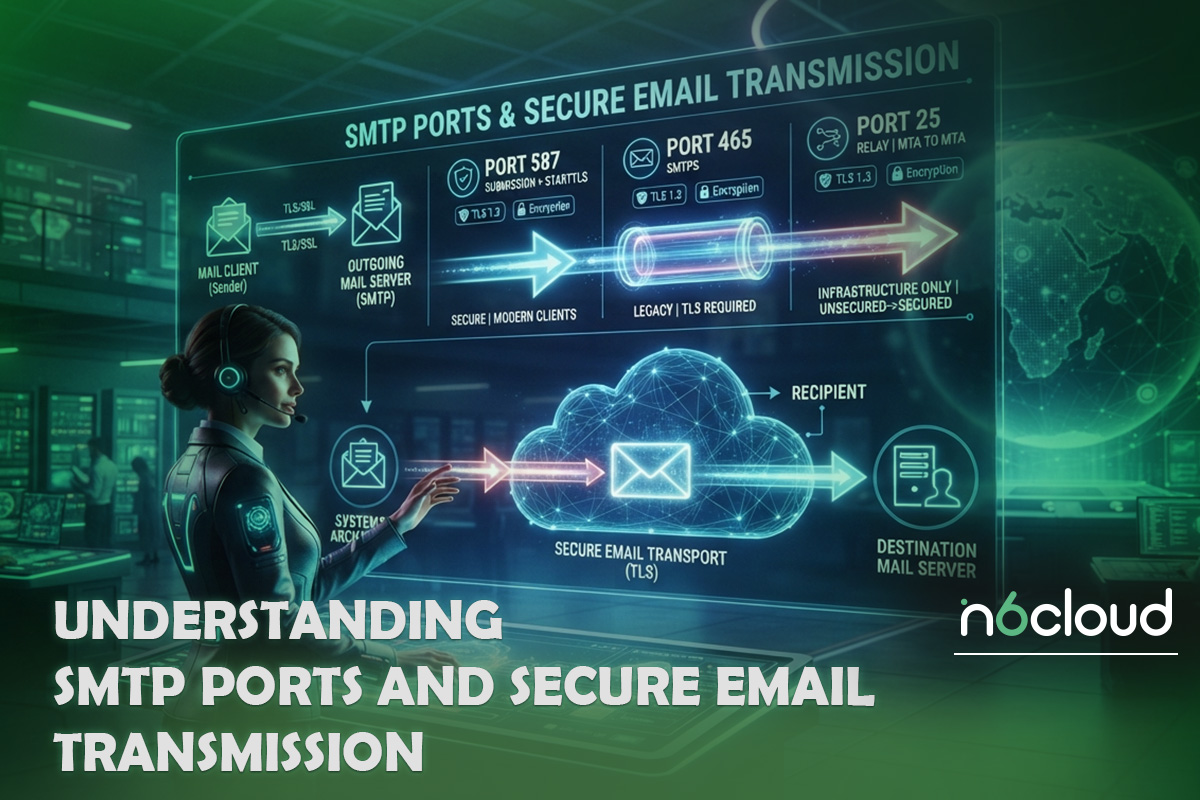
SMTP uses network ports to establish communication between email clients and mail servers. A port can be thought of as a designated communication channel that allows specific types of network traffic to reach the correct service on a server. Over the years, several SMTP ports have been adopted for different purposes, and understanding their roles is important when configuring email clients, applications, or mail servers.
Port 25 is the original SMTP port and remains the standard port for server-to-server email delivery. When one mail server transfers a message to another, the communication typically occurs over port 25. However, because this port has been widely abused by spammers and malware, many Internet service providers now restrict outbound connections on residential and business connections to port 25. As a result, port 25 is generally reserved for email relay between mail servers rather than for end-user email submission.
To address the limitations of port 25, port 587 became the standard submission port for sending authenticated email. When users configure an email application such as Outlook, Thunderbird, or Apple Mail, port 587 is usually the recommended choice. This port is designed for client-to-server communication and typically requires SMTP authentication before messages can be sent. By requiring valid credentials, mail providers can verify the sender’s identity and reduce the transmission of unauthorized email.
Port 465 is another commonly used SMTP port and is associated with encrypted SMTP communication. Unlike port 587, which usually starts with an unencrypted connection before upgrading to encryption via STARTTLS, port 465 establishes an encrypted SSL/TLS connection immediately upon opening. Although its history has been somewhat complicated due to changing standards, port 465 is now widely supported by modern email providers and remains a popular option for secure email submission.
Regardless of the port being used, encryption has become an essential part of modern email communication. Most reputable mail providers require TLS encryption to protect credentials and reduce the risk of interception during message transmission between systems. Without encryption, usernames, passwords, and message content could potentially be exposed to attackers monitoring network traffic. While TLS does not encrypt an email throughout its entire journey or while it is stored in a mailbox, it significantly improves security during transmission between clients and servers and during server-to-server communication.
In most situations, port 587 is the preferred choice for email clients and applications because it supports modern authentication mechanisms and encrypted communication. Port 465 remains a valid alternative when SSL/TLS connections are preferred from the start of the session, while port 25 is primarily intended for communication between mail servers. Understanding these differences can help prevent configuration errors and ensure that email systems operate securely and reliably.

SMTP Authentication and Email Security
When SMTP was originally developed, the Internet was a much smaller and more trusted environment than it is today. The protocol was designed primarily to facilitate message transfer between systems and did not include robust mechanisms for verifying senders’ identities. As email became one of the world’s most widely used communication methods, attackers began exploiting these limitations to send spam, phishing messages, and fraudulent emails. To address these challenges, modern email systems rely on SMTP authentication and additional security technologies that help verify senders and protect email infrastructure from abuse.
SMTP authentication, often referred to as SMTP AUTH, requires users or applications to prove their identity before they are allowed to send messages through an SMTP server. In most cases, this involves providing a username and password associated with an email account or application. When authentication is successful, the SMTP server permits message submission and can associate outgoing emails with a specific user or service. This approach prevents unauthorized users from using the server to relay email and helps providers track and control abusive activity. Many organizations further strengthen account security by enforcing strong password policies and multi-factor authentication, reducing the risk of compromised accounts being used to distribute spam or malicious content.
Authentication alone is not sufficient to secure email communication. Modern SMTP deployments typically use TLS encryption to protect connections between email clients and mail servers, as well as between mail servers themselves. TLS helps prevent attackers from intercepting credentials and email content while data is being transmitted across networks. Although TLS does not provide end-to-end encryption for email messages, it significantly improves the security of the email transmission process and has become a standard requirement for most reputable email providers.
Beyond authenticating users, modern email systems must also authenticate domains. Three technologies play a central role in this process: SPF, DKIM, and DMARC. Sender Policy Framework (SPF) allows domain owners to specify which servers are authorized to send email on behalf of their domain. DomainKeys Identified Mail (DKIM) adds a cryptographic signature to outgoing messages, allowing receiving servers to verify that the email has not been altered during transit. Domain-based Message Authentication, Reporting, and Conformance (DMARC) builds upon SPF and DKIM by defining policies for handling authentication failures and providing reporting capabilities that help organizations detect abuse and impersonation attempts.
These technologies have become critical because email providers increasingly evaluate authentication records before deciding whether to accept a message, place it in the inbox, or route it to the spam folder. Even if an SMTP server is functioning correctly, poor authentication practices can significantly reduce delivery success. Organizations that properly configure SPF, DKIM, and DMARC not only improve email security but also strengthen their sender reputation and increase the likelihood that legitimate messages reach their intended recipients.
Protecting SMTP accounts and servers from abuse is equally important. Attackers frequently target email credentials through phishing campaigns, malware, password reuse attacks, and automated brute-force attempts. Once a compromised account begins sending large volumes of spam, the server’s IP address and domain reputation can quickly deteriorate, leading to delivery problems for all users sharing that infrastructure. For this reason, administrators often implement rate limits, login monitoring, anomaly detection, and outbound spam controls to identify suspicious activity before it causes widespread deliverability issues. These measures help maintain the integrity of the email system while ensuring that SMTP remains a reliable and trusted method of communication.

SMTP vs IMAP vs POP3
Many people assume that a single protocol handles every aspect of email communication, but modern email systems rely on multiple protocols that perform different tasks. SMTP is responsible for sending and relaying messages, while IMAP and POP3 are designed for retrieving and managing emails after they reach the recipient’s mailbox. Understanding the distinction between these protocols is important because they often work together within the same email account, even though they serve completely different purposes.
SMTP is a send-only protocol. Its responsibility begins when a user or application submits an email and ends when the message is successfully delivered to the destination mail server. Once delivery is complete, SMTP’s role is essentially finished. It does not provide a mechanism for users to browse their inbox, read messages, organize folders, or synchronize email data across devices. These functions are handled by receiving protocols such as IMAP and POP3.
Internet Message Access Protocol (IMAP) is the most widely used protocol for accessing email today. Unlike SMTP, which focuses on message transfer, IMAP allows users to view and manage messages stored on a mail server. Because emails remain on the server, users can access the same mailbox from multiple devices while maintaining synchronization across all of them. Actions such as reading a message, moving it to a folder, or deleting it are reflected everywhere the account is connected. This makes IMAP particularly suitable for modern environments where users regularly switch between smartphones, tablets, laptops, and webmail interfaces.
Post Office Protocol version 3 (POP3) takes a different approach. Instead of synchronizing messages with the server, POP3 typically downloads emails to a local device. In its traditional configuration, messages may be removed from the server after download, allowing users to store and manage email locally. While this approach can reduce server storage requirements and provide offline access, it is less convenient for users who access the same mailbox from multiple devices. As a result, POP3 has become less common in business environments, although it is still supported by many mail providers for compatibility purposes.
The differences between these protocols can be summarized as follows:
In practice, most users interact with all three technologies without realizing it. For example, when an employee sends an email from Outlook, SMTP submits and delivers the message. Later, when that employee opens Outlook on a laptop or mobile phone to view incoming messages, IMAP synchronizes the mailbox contents from the server. Understanding the distinct roles of SMTP, IMAP, and POP3 makes it easier to configure email clients correctly and troubleshoot communication issues when they occur.

Common SMTP Errors and How to Troubleshoot Them
Even when an SMTP server is configured correctly, email delivery problems can still occur. Network connectivity issues, authentication failures, DNS misconfigurations, reputation problems, and security policies can all prevent messages from reaching their intended destination. Fortunately, SMTP provides detailed response codes that help administrators and users identify the cause of a problem. Understanding the meaning of these codes is often the first step toward resolving delivery issues and restoring normal email functionality.
One of the most common SMTP errors is the 550 response code. Although the exact wording may vary between mail providers, a 550 error generally indicates that the receiving server has rejected the message. This can occur because of failed authentication, invalid recipient addresses, missing SPF or DKIM records, poor sender reputation, or the sending server being listed on an RBL. In some cases, mail servers also return 550 errors when an unauthorized user attempts to relay email through the server. Reviewing the complete error message and checking authentication records, DNS settings, and blacklist status can often reveal the underlying cause.
Another frequently encountered error is the 421 Service Unavailable response. Unlike a 550 error, which is typically a permanent rejection, a 421 response usually indicates a temporary problem. The receiving server may be overloaded, undergoing maintenance, experiencing connectivity issues, or intentionally limiting connections from a specific sender. Because SMTP servers are designed to queue messages and automatically retry delivery, temporary failures often resolve themselves without user intervention. However, repeated 421 errors may indicate a broader connectivity issue causing delivery delays and warranting investigation.
Timeout errors are also common in SMTP environments. These errors occur when a connection cannot be established or when one side of the communication takes too long to respond. Firewalls blocking SMTP ports, incorrect routing, DNS resolution failures, and network interruptions can all cause timeouts. Administrators often use tools such as Telnet, OpenSSL, or PowerShell to test connectivity and verify that the appropriate SMTP ports are reachable. For example, attempting a connection to port 587 can quickly confirm whether a mail server is accepting authenticated SMTP connections.
Incorrect SMTP settings remain among the most common causes of email delivery failures, particularly for end users. A mistyped server hostname, an incorrect port number, invalid credentials, or a mismatch between encryption settings and server requirements can prevent an email client from sending messages successfully. Many providers also block outbound connections on port 25 to reduce spam, which can create additional confusion when older configurations are used. Verifying the server address, authentication method, encryption settings, and selected port usually resolves these issues.
When troubleshooting SMTP problems, it is important to look beyond the error code itself. DNS records, SPF, DKIM, DMARC policies, reverse DNS records, firewall rules, server reputation, and blocklist status all influence whether a message is accepted and delivered. Because modern email systems perform numerous validation checks before accepting mail, successful delivery depends not only on SMTP functionality but also on the overall health and reputation of the sending infrastructure. A systematic approach that reviews both SMTP configuration and deliverability factors is usually the most effective way to diagnose and resolve email-related issues.

Best Practices for Reliable SMTP Email Delivery
Successfully sending an email does not necessarily mean it will reach the recipient’s inbox. Modern email providers evaluate numerous technical and reputational factors before deciding whether to accept, reject, quarantine, or filter a message into a spam folder. As a result, organizations that rely on email for business communication, transactional notifications, or marketing campaigns must focus not only on SMTP functionality but also on email deliverability.
One of the most important deliverability requirements is proper DNS configuration. Every mail server should have a valid reverse DNS (PTR) record that resolves the server’s IP address to a hostname. In addition, that hostname should resolve back to the same IP address through a forward DNS lookup. Many receiving mail servers consider missing or incorrect PTR records suspicious because they are commonly associated with spam activity. Mail servers should also identify themselves using a valid, fully qualified domain name (FQDN) in their HELO or EHLO commands, as generic or invalid hostnames can negatively affect delivery.
Domain authentication plays a critical role in establishing trust between sending and receiving servers. SPF records specify which servers are authorized to send email on behalf of a domain, helping prevent spoofing attempts. DKIM adds a digital signature that allows receiving servers to verify a message’s integrity, while DMARC builds on SPF and DKIM by defining policies for handling authentication failures. Together, these technologies have become fundamental requirements for reliable email delivery, and many major providers treat missing or invalid authentication records as a strong indicator of potentially malicious activity.
Sender reputation is equally important. Email providers continuously evaluate the behaviour of sending IP addresses and domains, monitoring factors such as spam complaints, bounce rates, delivery consistency, and user engagement. A server that suddenly begins sending large volumes of unsolicited messages can quickly develop a poor reputation, causing future emails to be filtered or rejected. Organizations should regularly monitor their reputation, avoid sending to outdated mailing lists, promptly remove invalid recipients, and investigate unusual spikes in delivery failures or complaints.
Real-time block lists (RBLs) are another significant factor in the email delivery process. Receiving mail servers often consult one or more RBL providers to determine whether a sending IP address has been associated with spam or other abusive activity. Being listed on a reputable blocklist can result in immediate message rejection, regardless of whether the SMTP server itself is functioning correctly. Regularly checking blacklist status, monitoring outbound mail activity, and responding quickly to abuse reports can help prevent deliverability problems caused by blocklist listings.
Security and abuse prevention are also essential components of a healthy SMTP environment. SMTP accounts should be protected with strong passwords, and administrators should monitor authentication logs for signs of unauthorized access. Outbound rate limits, relay restrictions, and automated abuse detection mechanisms can help prevent compromised accounts from sending large volumes of spam. Organizations deploying new mail servers or dedicated IP addresses should also gradually increase sending volume over time, a process commonly known as IP warming, to establish a positive reputation with major email providers.
Finally, all SMTP communications should be protected using TLS encryption whenever possible. While encryption alone does not guarantee inbox placement, it helps protect credentials and message transfers and demonstrates adherence to modern security standards. When combined with proper DNS configuration, domain authentication, reputation management, and anti-abuse controls, TLS contributes to a more trustworthy email infrastructure and significantly improves email delivery reliability.
Conclusion
SMTP has remained the foundation of email communication for more than four decades, enabling billions of messages to be exchanged every day between individuals, businesses, and applications worldwide. Although the process of sending an email appears simple from a user’s perspective, SMTP coordinates a complex series of actions involving email clients, mail servers, DNS lookups, authentication checks, and server-to-server communication to ensure messages reach their intended destinations.
Understanding how SMTP works is valuable not only for system administrators and developers but also for business owners and everyday users who rely on email for communication. Concepts such as SMTP authentication, TLS encryption, SPF, DKIM, DMARC, sender reputation, and RBL monitoring have become essential components of modern email delivery, helping providers combat spam, prevent abuse, and improve inbox placement.
While SMTP is responsible for sending messages, it works alongside protocols such as IMAP and POP3 to create the complete email ecosystem that users depend on every day. By implementing proper SMTP configuration, authentication standards, and deliverability best practices, organizations can improve the reliability, security, and effectiveness of their email communications while ensuring that legitimate messages consistently reach their recipients.