
Your choice of hosting is the quietest and most consequential decision you make as a blogger. It rarely shows up in a screenshot or a portfolio, yet it sits underneath every page load, every search ranking, and every reader who decides whether to stay or leave. In 2026, with Google leaning harder on real user experience and readers expecting near-instant page load times, the gap between good hosting and mediocre hosting is measured in lost traffic and revenue. This guide compares the leading options for bloggers, explains how the infrastructure actually works, and gives you a decision framework you can apply to your own site.
It is written for people who already know their way around a content management system and want depth rather than a recycled list. We will connect hosting choices to concrete performance metrics, weigh the real trade-offs of each option, and point out where N6 Cloud fits for Canadian and international bloggers who care about speed, security, and data sovereignty.

Blog Hosting in 2026: Architecture, Performance, and SEO Impact
What Is Blog Hosting vs Blog Platforms?
It helps to separate two ideas that often get blurred. Blog hosting is the server infrastructure that stores your files and serves them to visitors. A blog platform is the software you use to write and publish. You can mix and match the two, or buy them bundled together, and that distinction drives most of the decisions in this guide.
On one side sit hosting providers who give you a server and let you install whatever platform you like. This is the self-hosted route, most commonly with WordPress.org, and it gives you complete control and ownership. On the other side sit SaaS publishing platforms such as Medium and WordPress.com, which combine the software and the hosting into a single subscription. They are simpler to start, but you give up control and, with Medium, build your audience on someone else’s domain rather than your own.
The platform you pick also affects performance. WordPress is the most flexible and widely supported option, though it can slow down under heavy plugin loads. Ghost is leaner and faster by default because it carries no plugin bloat, runs fewer database queries, and is built specifically for publishers who want newsletters and memberships. Webflow is a visual, no-code builder that produces fast pages on a modern architecture, but its blogging tools are secondary to its design features. Choosing among them is less about which is “best” and more about matching the platform to how you actually work.
Why Hosting Matters for SEO and Performance
Search engines reward pages that load quickly and stay available, and hosting influences both. Google’s Core Web Vitals are metrics that make user experience measurable. The three that matter are Largest Contentful Paint (LCP), which tracks how quickly the main content appears and is considered good under 2.5 seconds; Interaction to Next Paint (INP), which measures responsiveness and should stay under 200 milliseconds; and Cumulative Layout Shift (CLS), which measures visual stability and should stay under 0.1. Google judges these at the 75th percentile of real visitors, so a page has to be fast for most people, not just on a lucky test run.
This is where Time to First Byte (TTFB) comes into play. TTFB is not itself a Core Web Vitals, but it is the foundation on which everything else is built, because it measures how long your server takes to send the first byte of a response. A slow server response directly delays LCP, since nothing can render until the browser starts receiving data. In 2026, the widely cited benchmark is a TTFB under 200 milliseconds, and hosting is the single biggest lever you have over that number. Industry analyses of Core Web Vitals consistently report organic traffic gains of 12 to 20 percent after meaningful performance improvements, which is why this is a commercial issue, not just a technical one.
Two more hosting-driven factors round out the SEO picture. Crawlability and indexing depend on your site being reachable and quick to respond when search engine bots arrive, because a sluggish or timing-out server wastes crawl budget and slows how fast new posts get indexed. Uptime and ranking stability matter because a host that drops offline during a crawl sends the wrong signal, and repeated outages can chip away at hard-won rankings. A dependable uptime guarantee, such as the 99.9% SLA that N6 Cloud backs with service credits, is a ranking safeguard as much as a convenience.
How Blog Hosting Infrastructure Works
Understanding a request from the ground up makes the buying decisions much clearer. At the server layer, your site runs on shared hosting (many sites on one machine, resources pooled), a VPS (a slice of a server with guaranteed resources), or cloud hosting (a distributed pool you can scale on demand). Each step up the ladder buys you more isolation, more headroom, and more control, at a higher price.
Above that sits the web server software, and the two names you will most often encounter are Nginx and Apache, with LiteSpeed increasingly common on performance-focused plans. Apache is flexible and widely supported, while Nginx efficiently handles high concurrency. LiteSpeed goes further for content sites: on its own hardware, N6 Cloud reports it running up to 11 times faster than Apache and up to 6 times faster than Nginx, with built-in caching and support for modern protocols like HTTP/3 and QUIC. For a busy blog, the web server and its caching engine often make the difference between a fast page and a slow one.
Finally, there are the CDN and caching layers, where much of the modern speed advantage lies. Caching stores a ready-made copy of a page so the server does not rebuild it from scratch on every visit, which slashes database and PHP work. A content delivery network pushes those cached copies out to edge locations around the world, so each reader is served from a nearby server rather than your origin. Serving content from the edge can reduce latency by roughly 40 to 70 percent for distant visitors, which is why a CDN is one of the highest-value additions you can make.
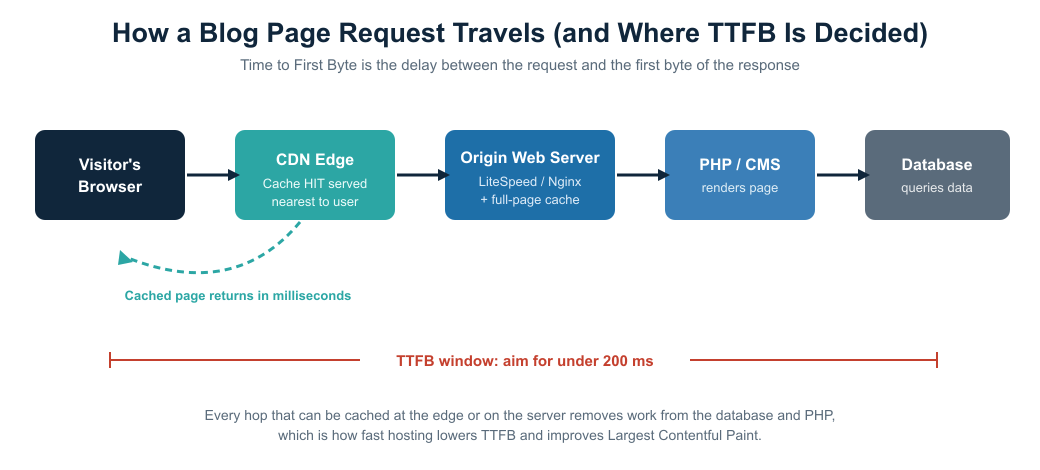
Figure 1. Where Time to First Byte is determined, and how caching at the edge and on the server reduces work for PHP and the database.
Types of Blog Hosting and Platforms (Free vs Paid vs Cloud)
Shared vs Managed vs Cloud Hosting
The three hosting models most bloggers weigh up are shared, managed, and cloud, each offering a different balance between cost and performance. Shared hosting is the most affordable entry point, allowing you to host several sites on a single server with pooled resources. On a modern stack with LiteSpeed caching and a CDN, it is more than fast enough for a new or moderately busy blog, and plans start as low as $2.24 per month. The trade-off is that you share capacity with neighbours, so a very busy site elsewhere on the machine can, in principle, affect yours, though isolation technology like CloudLinux largely mitigates this.
Managed hosting, typically managed WordPress, adds a layer of expert care on top of solid infrastructure. The provider handles caching, updates, security, and tuning, and the server is optimized for a single platform. You pay more than for basic shared hosting, but you buy back time and gain consistent speed. Cloud hosting sits at the flexible end, running your site across a distributed pool of resources you can scale up or down at will. Its pay-as-you-go model gives you complete control over cost and capacity, which is ideal for blogs with unpredictable or growing traffic. The trade-off is that it rewards a little more technical comfort in exchange for its power.
Blog Publishing Platforms Compared
On the platform side, the first fork is WordPress.org versus WordPress.com. WordPress.org is the self-hosted, open-source software: you own everything, install any plugin or theme, and choose your own host, which is why it powers such a large share of the web. WordPress.com is a hosted commercial service built on the same software; it’s easier to start but more restricted on lower tiers. Most professional bloggers who want full control choose WordPress.org paired with quality hosting.
Beyond WordPress, three names come up repeatedly. Ghost is the publisher’s favourite, with native newsletters, memberships, and monetization, and it is fast out of the box because it avoids plugin bloat. Webflow offers pixel-perfect visual design on a modern Jamstack architecture with a global CDN, making it a strong pick when design leads and blogging is secondary. Medium gives you instant access to a built-in audience with zero setup, but you trade away domain authority, lead generation, and true ownership of your content. For developers and teams, a headless CMS such as Sanity, Contentful, or Strapi, paired with a static site generator and a Jamstack front-end (Next.js, Astro, or Nuxt), delivers the security and speed of static files with a modern editing experience, at the cost of additional engineering effort.
When to Use Each Type
The right choice comes down to three questions. Traffic sets your floor: a modest blog runs happily on shared or managed hosting, while a large publication needs cloud or dedicated resources. Monetization strategy raises the stakes because a blog that earns from ads, affiliates, or memberships cannot afford downtime or slow pages, which pushes you toward managed, VPS, or cloud hosting with a strong uptime guarantee. Technical skill level decides how much you want to manage yourself: if you would rather write than configure servers, managed hosting or a SaaS platform earns its keep, whereas VPS and cloud reward those comfortable under the hood. The comparison table below distils these trade-offs into a single view.
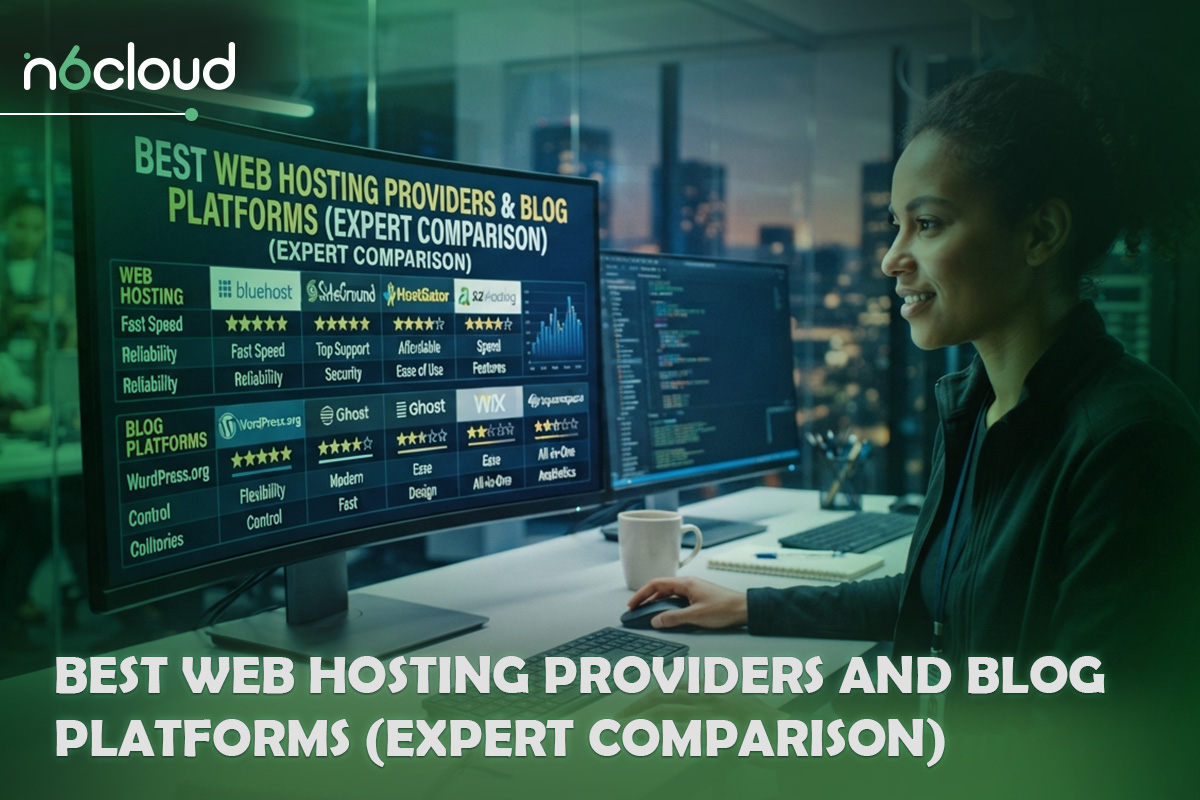
Best Web Hosting Providers and Blog Platforms (Expert Comparison)
Best Hosting for Bloggers in 2026
Among managed WordPress hosts, a handful consistently top independent speed tests. Kinsta has posted TTFB figures near 158 milliseconds; WP Engine delivers edge-cached responses in the high 300s with a strong uptime record; and edge-first providers like Rocket.net build their entire model around serving cached pages from locations close to the reader. These are premium services, and their prices reflect the hands-off convenience and tuning they provide.
For cloud hosting, the appeal is elastic capacity and precise cost control. This is where N6 Cloud’s Cloud Servers fit: with pay-as-you-go hourly billing starting at around $0.0053 per hour, and built-in load balancers and private networks for scaling a growing publication. Because you pay only for what you use, cloud hosting suits bloggers whose traffic is seasonal or climbing, letting you add power for a viral moment and release it afterwards.
At the budget end, fast shared hosting has closed much of the gap with pricier tiers thanks to LiteSpeed and bundled CDNs. Hostinger, for example, scores well in 2026 benchmarks, with sub-400-millisecond load times on LiteSpeed servers, and SiteGround performs strongly on Google Cloud infrastructure. N6 Cloud’s Lightning shared plans use the same LiteSpeed engine, pair it with RAID 10 SAS SSD SAN storage rated up to 24 times faster than traditional local disks, and include Cloudflare CDN integration, free daily backups, and free website migration. For a Canadian blogger who wants speed on a tight budget, that combination is hard to beat, and you can start with a plan and simply upgrade later without downtime.
Best Blog Platforms
Choosing a platform is a decision between CMS-based flexibility and SaaS simplicity. A self-hosted CMS like WordPress or Ghost gives you ownership, unlimited customization, and full control over technical SEO, which is why it remains the professional default. A SaaS platform like Medium or WordPress.com removes almost all setup and maintenance, but limits how far you can optimize and, in some cases, whose domain your work lives on. The honest summary is that flexibility and simplicity pull in opposite directions, and the right answer depends on whether you value control or convenience more. For most bloggers building a long-term asset, a self-hosted CMS on quality hosting is the more durable choice, because it keeps your audience, your data, and your search equity firmly in your own hands.
Real Use-Case Scenarios
A beginner blog with limited traffic and budget is best served by shared or WordPress hosting. The priority is a low entry cost, one-click setup, and enough speed to pass Core Web Vitals, all of which a modern LiteSpeed shared plan delivers. There is no need to over-provision on day one when you can scale up as you grow.
A monetized niche blog earning from ads and affiliates has a different priority: reliability. Here, managed WordPress or a VPS makes sense because guaranteed CPU and memory keep the site stable when a post takes off, and ad scripts add weight to each page. The uptime guarantee matters directly to revenue, since every minute offline is lost income.
A high-traffic publication with hundreds of thousands of monthly visits needs cloud or dedicated hosting. At this scale, you want the ability to absorb spikes without slowing down, which means dedicated resources, load balancers, and the option to add servers to a private network on demand. Cloud hosting’s elasticity is a particularly good match for publications whose traffic swings with the news cycle. The decision guide below maps these scenarios to hosting types at a glance.
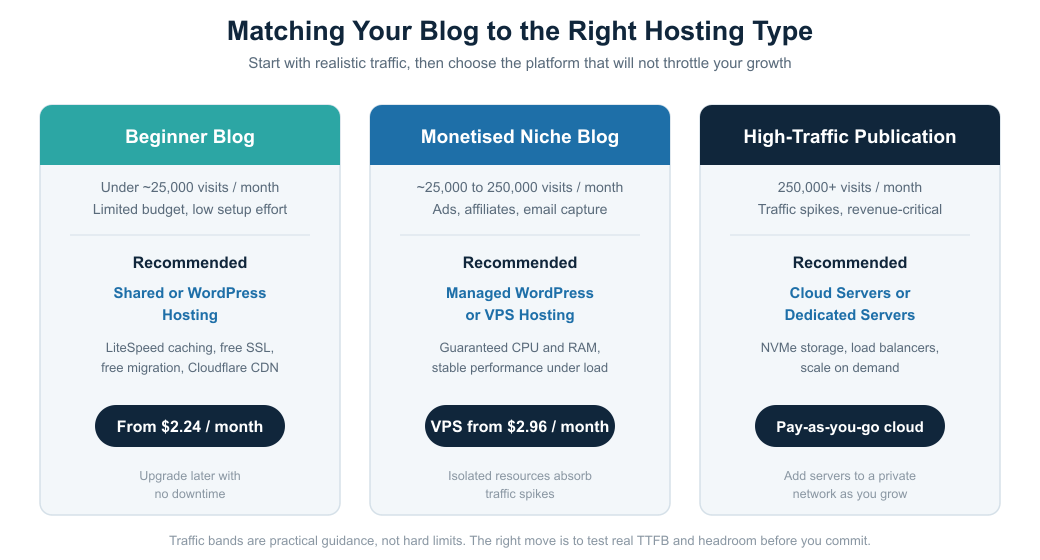
Figure 2. A quick decision guide matching common blogger profiles to the right hosting type and starting price.
How to Choose the Best Hosting for Your Blog (Decision Framework)
Key Selection Criteria
Four criteria should carry most of the weight in your decision. Performance comes first, judged by real numbers rather than marketing: look for a TTFB under 200 milliseconds and an LCP under 2.5 seconds on a live test. Uptime guarantees come next, and a credible host will back a figure like 99.9% with an SLA that pays service credits when it falls short. Security features protect both your revenue and your rankings, so look for free SSL, an active firewall, malware scanning, and automatic backups as standard. Scalability is the fourth, because the host that suits you today should let you grow without a painful migration later, ideally with instant, no-downtime upgrades.
Step-by-Step Decision Process
- Define your traffic expectations. Estimate current and near-future monthly visits realistically, and note whether your traffic is steady or spiky, since spikes favour cloud hosting.
- Choose a hosting type. Match that traffic profile to shared, managed, VPS, or cloud hosting using Table 1 and the decision guide in Figure 2 as your starting point.
- Evaluate providers. Compare shortlisted hosts on performance, uptime SLA, security, support quality, and data-centre location, weighing data sovereignty if your audience is regional.
- Test performance. Before you commit for the long term, run a real TTFB and Core Web Vitals test on the actual plan, using tools like PageSpeed Insights or WebPageTest, and rely on a money-back guarantee to make that trial risk-free.

Advanced Optimization for Blog Hosting (SEO and Speed)
Performance Optimisation
Once your hosting is in place, a few high-leverage steps will help you extract the most from it. CDN setup is the first: enabling a content delivery network, such as the Cloudflare integration included with N6 Cloud plans, pushes your pages to edge locations worldwide and cuts latency for distant readers. A layered caching strategy is the second, combining full-page caching at the web server with object caching for the database so that most requests never touch PHP at all. Image optimization is the third and often the most impactful for LCP, since images are frequently the largest element on a blog page; serving them in modern formats like WebP, sizing them correctly, and lazy-loading below-the-fold images can dramatically improve load times.
Technical SEO Optimization
The deeper wins come from tuning the stack itself. Server response optimization means keeping TTFB low through fast storage, an efficient web server, and enough guaranteed resources that the server never queues under load. Database tuning keeps queries fast and lean, which matters for content-heavy WordPress sites where an overloaded database is a common hidden cause of slow pages; regular cleanup and object caching both help. Edge caching ties it together by serving fully cached pages from the CDN edge, so that for most visitors the origin server is barely involved and Time to First Byte drops to a fraction of what it would otherwise be. Together, these techniques turn good hosting into consistently excellent Core Web Vitals, which is exactly the technical foundation strong content needs to rank.
Make Your Next Move
The fastest way to know whether hosting is holding your blog back is to test a better one. N6 Cloud combines Canadian data centres, LiteSpeed speed, top-tier security, and 24/7/365 expert support, backed by a 99.9% uptime SLA and a 30-day money-back guarantee. To get started on a fast, affordable plan, buy Web Hosting and let the team migrate your site for free. If you are scaling a high-traffic publication and want elastic, pay-as-you-go power, buy a Cloud Server instead. Not sure which fits? Contact N6 Cloud for a free consultation or a performance audit, and we will help you match your blog to the right infrastructure.