

Server hardware refers to the physical computing components specifically engineered to process requests, store data, and deliver services to multiple users over a network with high reliability and consistency. Unlike general-purpose computers, server hardware is designed to operate continuously, handle parallel workloads, and maintain predictable performance under sustained demand.
At its core, server hardware is the foundation of modern digital infrastructure. Every website request, database query, virtual machine, or business application ultimately relies on a physical server executing instructions, accessing memory, and moving data across storage and networks. While cloud platforms often abstract this reality, the underlying hardware still determines how efficiently, securely, and reliably those services operate.
What makes server hardware distinct is not raw power alone, but engineering discipline. Servers are built to tolerate component failures, minimize downtime, and support maintenance without service interruption. This is achieved through purpose-built processors, error-correcting memory, enterprise-grade storage, redundant power supplies, and specialized management interfaces. Together, these elements form a system optimized for stability rather than short bursts of performance.
In enterprise and professional environments, server hardware is expected to run 24 hours a day, seven days a week, often for years at a time. It must handle simultaneous users, background processes, and peak traffic without degrading performance or causing data corruption. This is why server platforms prioritize predictable throughput, thermal management, and long-term reliability over the consumer-focused design goals of desktop computers.
Understanding server hardware is essential for making informed infrastructure decisions. Whether the goal is hosting applications, running virtual machines, managing databases, or storing critical business data, the capabilities and limitations of the underlying hardware directly impact performance, scalability, and total cost of ownership. In the sections that follow, we will examine how server hardware differs from desktop systems, explore its core components, and explain how to select the right configuration for real-world enterprise workloads.
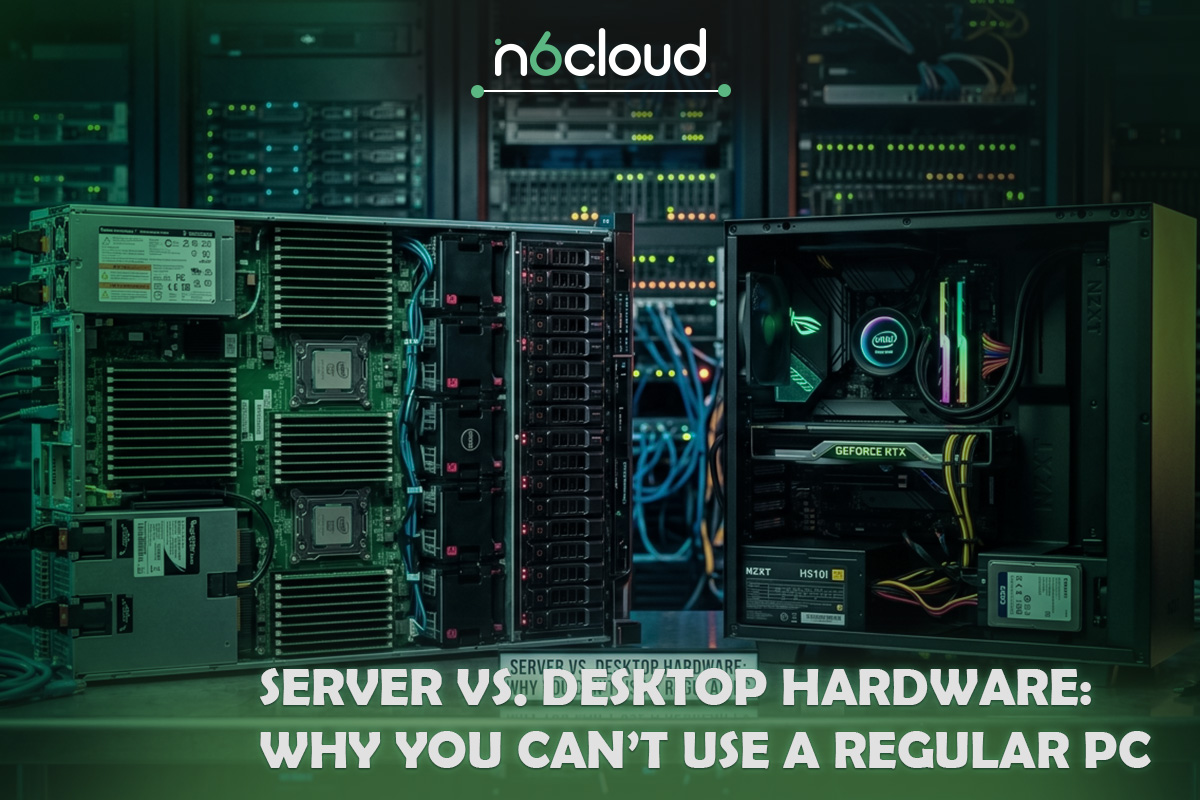
Server vs. Desktop Hardware: Why You Can’t Use a Regular PC
At first glance, a modern desktop computer may appear powerful enough to replace a server. High clock speeds, fast consumer SSDs, and large amounts of memory can make a workstation feel comparable to entry-level server systems. However, this comparison breaks down quickly when real-world workloads and operational expectations are taken into account. Server hardware and desktop hardware are designed with fundamentally different goals, and those differences become critical in production environments.
Desktop hardware is optimized for interactive, short-duration tasks. It is built to respond quickly to user input, launch applications, and handle fluctuating workloads throughout the day. Even high-end consumer systems assume regular idle periods, controlled environments, and a user who can intervene when something goes wrong. Components are selected for performance per dollar and user experience, not for sustained operation under constant load.
Server hardware, by contrast, is engineered for continuous operation. A server is expected to run at high utilization for extended periods while servicing many users simultaneously. This places constant stress on processors, memory, storage, and power delivery systems. Server-grade components are validated for these duty cycles, meaning they are tested to operate reliably under heat, load, and vibration conditions that would significantly shorten the lifespan of consumer hardware.
Reliability is the most important dividing line between servers and desktops. Consumer systems assume that occasional errors are acceptable or will be resolved by a reboot. In a server environment, even a single undetected memory error can corrupt databases, crash virtual machines, or silently damage critical data. This is why servers rely on features such as error-correcting memory, enterprise chipsets, and firmware designed to detect and isolate faults before they escalate into outages.
Scalability also separates server hardware from desktop systems. Servers are designed to scale vertically and horizontally, supporting larger memory capacities, multiple processors, higher I/O throughput, and sustained network traffic. Desktop platforms are typically limited in the number of memory channels, PCIe lanes, and expansion capabilities, creating bottlenecks as workloads grow. What works for a single user does not translate well to dozens or hundreds of concurrent users.
Another key distinction is serviceability. Servers are built to be maintained while running. Hot-swappable drives, redundant power supplies, and remote management interfaces allow administrators to replace components, apply updates, and diagnose issues without physical access or downtime. Desktop systems generally require shutdowns for maintenance and lack the depth of monitoring needed in professional environments.
While it may be tempting to repurpose a powerful PC as a server, doing so introduces hidden risks. Increased failure rates, lack of redundancy, limited monitoring, and unpredictable behaviour under load often lead to higher operational costs over time. In business-critical scenarios, the apparent savings of consumer hardware are quickly outweighed by downtime, data loss, and maintenance challenges. Server hardware exists precisely to eliminate these uncertainties and provide a stable foundation for services that businesses depend on every day.
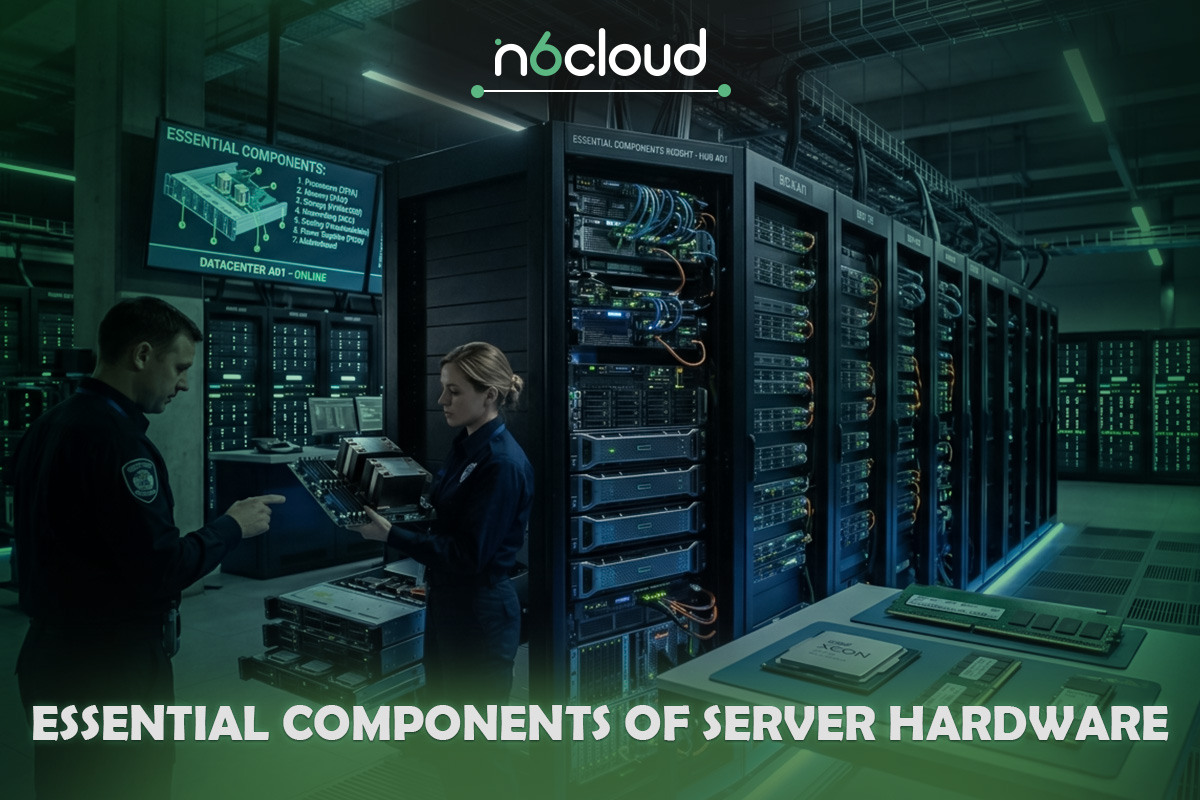
Essential Components of Server Hardware
Server hardware is not a single device but a carefully balanced system in which each component is designed to operate continuously under load without becoming a point of failure. Unlike consumer systems, where components are often selected independently, server platforms are engineered as cohesive ecosystems. The processor, memory, storage, and power subsystems must complement one another to deliver consistent performance, stability, and long-term reliability.
Understanding these core components is essential for evaluating any server platform, whether it is deployed on-premises, in a colocation facility, or in a dedicated hosting environment.
Central Processing Unit (CPU) – The Brain of the Server
The processor is the heart of any server, responsible for executing instructions, managing workloads, and coordinating data movement across the system. In server environments, CPU design priorities differ significantly from those of consumer processors. Rather than focusing solely on high clock speeds, server CPUs are optimized for parallel processing, sustained workloads, and predictable performance under constant demand.
Enterprise server processors typically offer high core counts and extensive multi-threading capabilities, allowing a single system to handle many tasks simultaneously. This is especially important in environments where multiple applications, virtual machines, or services must run concurrently without interfering with one another. The ability to distribute workloads across many cores reduces contention and improves overall system responsiveness.
Industry-standard server platforms are built around processors such as Intel Xeon and AMD EPYC, which are specifically designed for data center use. These processors support large memory capacities, multiple memory channels, and significantly more PCIe lanes than consumer CPUs. This expanded I/O capability allows servers to connect high-speed storage, network adapters, and RAID controllers without creating bottlenecks.
Another critical advantage of server CPUs lies in platform stability. Enterprise processors are validated with server-grade chipsets and firmware that prioritize consistency over rapid feature changes. This ensures predictable behaviour across operating system updates, virtualization platforms, and long deployment lifecycles. In practical terms, it means fewer unexpected performance anomalies and a lower risk of incompatibility with enterprise software stacks.
Thermal management also plays a major role in server CPU design. Servers often operate in dense rack environments where airflow and cooling efficiency are tightly controlled. Server processors are engineered to sustain performance within these constraints, avoiding aggressive thermal throttling that can occur in consumer systems under prolonged load.
Choosing the right CPU for a server is not about selecting the fastest model available, but about matching core count, memory bandwidth, and I/O capacity to the workload. Web services, databases, and virtualized environments all place different demands on the processor, and a well-chosen server CPU provides the foundation for scalable, reliable infrastructure.
Server Memory (RAM) – Stability Through ECC
Memory plays a far more critical role in servers than most people realize. While processors execute instructions and storage retains data, memory is where active workloads live. Databases cache records in RAM, virtualization platforms allocate memory to virtual machines, and operating systems rely on memory to manage processes efficiently. When memory becomes unstable or corrupted, the entire system is at risk.
In consumer environments, occasional memory errors may go unnoticed or simply result in a system crash that can be resolved with a reboot. In a server environment, however, even a single undetected memory error can corrupt a database, damage a virtual disk, or introduce subtle data inconsistencies that remain hidden for months. This is why enterprise systems rely on Error-Correcting Code (ECC) memory rather than standard consumer-grade RAM.
ECC memory is designed to detect and correct single-bit errors automatically and identify multi-bit errors before they cause catastrophic failure. Bit-flips can occur due to electrical interference, cosmic radiation, thermal fluctuations, or simply the natural aging of components. While rare at the individual level, these errors become statistically significant in systems that operate continuously and have large memory capacities. Servers are often equipped with dozens or even hundreds of gigabytes of RAM, increasing the probability that such errors will occur over time.
The value of ECC memory is not just in error correction but in maintaining system integrity under sustained workloads. When a server runs 24/7, hosting applications for many users, memory stability becomes foundational. Silent corruption in memory can cascade into corrupted storage writes, failed transactions, or unpredictable application behaviour. ECC acts as a safeguard, ensuring that transient hardware-level faults do not escalate into business-level problems.
Server platforms also support significantly larger memory capacities and more memory channels than desktop systems. This expanded architecture improves memory bandwidth and allows multiple processors or cores to access memory simultaneously without contention. In virtualized environments, where each virtual machine consumes allocated memory, capacity planning becomes critical. Insufficient RAM forces systems to rely on disk swapping, dramatically increasing latency and degrading performance.
Another often-overlooked advantage of server memory platforms is validation and compatibility testing. Enterprise motherboards and chipsets are designed specifically to work with registered or buffered ECC modules, which improve signal integrity in high-density configurations. Consumer platforms, by contrast, are rarely validated for large-scale memory deployments or constant utilization.
In practice, memory is often the first bottleneck in production environments. A server with an adequate CPU but insufficient RAM will struggle to maintain throughput under load. Applications become slower, response times increase, and virtualization density suffers. For this reason, infrastructure planning often begins with memory requirements rather than processor selection alone.
In enterprise server hardware, ECC memory is not an optional upgrade or a premium feature. It is a fundamental requirement for maintaining reliability, protecting data integrity, and ensuring long-term stability in environments where downtime and corruption are unacceptable.
Storage Solutions – Balancing Capacity, Performance, and Endurance
If the processor is the brain of a server and memory is its active workspace, storage is its long-term memory. Every application, database, file system, and virtual machine ultimately depends on storage performance and reliability. In enterprise environments, storage is not simply a matter of capacity; it is a strategic decision that directly affects latency, throughput, resilience, and long-term operational costs.
Modern server infrastructure typically relies on three primary storage technologies: traditional hard disk drives (HDD), solid-state drives (SSD), and NVMe-based storage. Each has a role depending on the workload profile.
Hard disk drives remain relevant in environments where capacity is the primary requirement. They provide cost-effective storage for backups, archives, and large file repositories. However, mechanical disks introduce higher latency and lower input/output operations per second (IOPS) compared to solid-state alternatives. In workloads that require frequent random reads and writes, such as databases or heavily accessed applications, HDD-based systems can quickly become performance bottlenecks.
Solid-state drives eliminate mechanical components and dramatically reduce latency. Standard enterprise SSDs provide consistent performance for mixed workloads and are suitable for application hosting, virtualization, and moderate database activity. They offer a balance between speed and capacity while maintaining better endurance ratings than consumer-grade drives.
NVMe storage represents the highest tier of performance in modern server hardware. Unlike SATA or SAS drives, NVMe devices connect directly via PCIe lanes, significantly reducing protocol overhead and enabling extremely low latency and high throughput. For workloads that depend on rapid data access—such as high-traffic web applications, transactional databases, or virtualization clusters—NVMe can dramatically improve responsiveness and system scalability.
However, raw performance is only part of the equation. Enterprise storage must also be evaluated for endurance and reliability. Consumer SSDs are not designed for sustained write-heavy workloads common in server environments. Enterprise drives are rated with metrics such as Drive Writes Per Day (DWPD) and Mean Time Between Failures (MTBF), which reflect their ability to handle continuous operation over extended periods.
To further enhance reliability, servers rely on RAID (Redundant Array of Independent Disks) configurations. RAID is not merely about combining disks for capacity; it is about designing storage systems that tolerate failure without data loss.
RAID 0 prioritizes performance by striping data across multiple disks but provides no redundancy. RAID 1 mirrors data across drives, offering redundancy at the cost of usable capacity. RAID 5 balances redundancy and storage efficiency by distributing parity information across disks, while RAID 10 combines mirroring and striping for both performance and resilience. In enterprise environments, RAID 10 is often favoured for performance-critical applications, while RAID 5 may be suitable for balanced capacity and redundancy scenarios.
Hardware RAID controllers further enhance reliability by managing parity calculations and disk management independently of the main CPU. This reduces overhead and improves consistency under load. In mission-critical deployments, RAID arrays are often combined with hot-swappable drive bays, allowing failed disks to be replaced without shutting down the server.
Storage architecture ultimately determines how quickly applications respond, how safely data is preserved, and how gracefully systems recover from hardware failures. When planning server hardware, organizations must evaluate not only how much data they need to store, but how that data will be accessed, how frequently it will change, and how much downtime they can tolerate in the event of a disk failure.
A well-designed storage subsystem ensures consistent performance under load, manageable rebuild times, and protected data integrity. In enterprise infrastructure, storage is never an afterthought. It is a defining factor in overall system reliability and scalability.
Power Supplies (PSU) – Designing for Zero Downtime
Power delivery is one of the least visible yet most critical layers of server hardware. While processors, memory, and storage often receive the most attention, none of them can function reliably without a stable, redundant power supply. In enterprise environments, a power failure is not merely an inconvenience; it can cause data corruption, service outages, and cascading infrastructure issues.
Unlike desktop systems, which typically rely on a single power supply unit, enterprise servers are designed with redundancy in mind. Most production-grade systems use dual power supply units in an N+1 configuration. This means that the server can continue operating even if one power module fails. The remaining PSU automatically carries the load without interrupting service.
Redundant power supplies serve two essential purposes. First, they protect against hardware failures within the PSU. Over time, components such as capacitors degrade due to heat and electrical stress. In consumer systems, a failing PSU often results in sudden shutdowns or system instability. In server environments, redundancy ensures that such failures do not translate into downtime.
Second, dual PSUs enable independent power feeds. In data center deployments, servers are typically connected to separate electrical circuits or power distribution units. This reduces the risk of a single upstream failure affecting the entire system. In facilities designed with higher data center tiering standards, redundant power paths are part of the overall infrastructure architecture to support uptime guarantees.
Hot-swappable capability is another defining feature of server power systems. A hot-swappable PSU can be removed and replaced while the server remains operational. This is essential for maintenance efficiency. Instead of scheduling downtime to replace a faulty power module, administrators can perform the replacement immediately, minimizing operational risk and maintaining service continuity.
Beyond redundancy, enterprise PSUs are built for sustained load and thermal efficiency. Servers operating in rack environments often share tightly controlled airflow systems. Power supplies must maintain stable voltage output even under continuous high utilization and elevated ambient temperatures. High-efficiency ratings also contribute to lower Total Cost of Ownership (TCO) by reducing wasted energy and heat generation over the server’s lifecycle.
Power stability directly impacts the lifespan of other components as well. Fluctuations in voltage or inconsistent power delivery can shorten the life of processors, memory modules, and storage devices. In this sense, the PSU is not just a backup mechanism but a foundational reliability layer protecting the entire system.
In mission-critical environments, selecting servers with redundant, hot-swappable power supplies is not an optional enhancement. It is a standard design requirement. Ensuring continuous operation in the face of component failure is what differentiates enterprise infrastructure from consumer-grade systems, and power redundancy is one of the clearest examples of this philosophy in action.
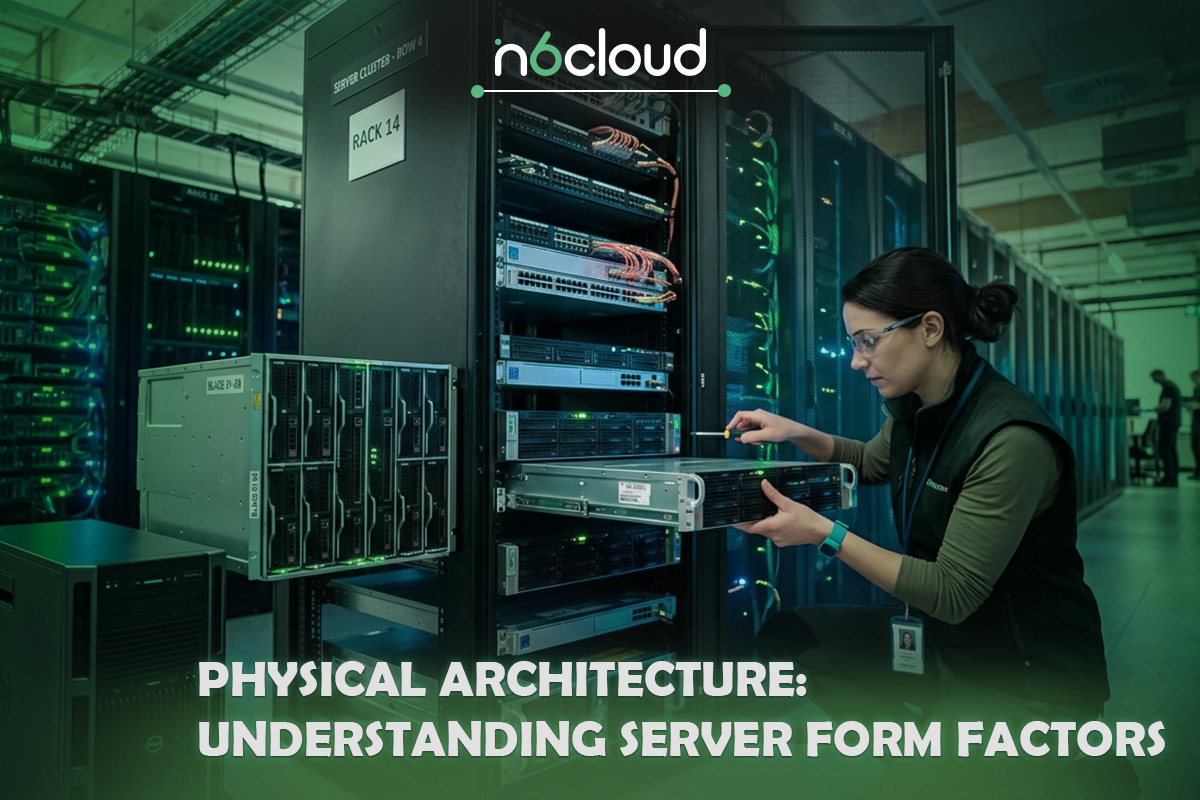
Physical Architecture: Understanding Server Form Factors
While processors, memory, and storage define performance, the server’s physical architecture determines how efficiently that performance can be deployed, cooled, scaled, and maintained. Form factor is not simply about shape or size; it influences airflow dynamics, power distribution, expansion flexibility, and long-term infrastructure planning. Choosing the wrong physical architecture can limit scalability even if the internal components are powerful.
Enterprise servers are typically deployed in one of three formats: tower, rack-mount, or blade systems. Each serves a distinct operational purpose.
Tower Servers
Tower servers resemble traditional desktop systems in appearance, but internally they use enterprise-grade components such as ECC memory, server-class processors, and hardware RAID controllers. They are often deployed in small business environments or branch offices where a dedicated rack cabinet is not available.
Their primary advantage is simplicity. They require minimal infrastructure planning and can operate independently in standard office environments. However, tower servers do not scale efficiently. As soon as multiple systems are required, space utilization becomes inefficient, and cable management grows complex. Thermal consistency is also harder to control outside structured rack environments. For growing businesses or hosting deployments, tower systems are typically transitional rather than long-term infrastructure solutions.
Rack-Mount Servers
Rack-mounted servers represent the industry standard for professional data centers and hosting environments. These systems are designed to fit into standardized racks and are measured in rack units (U), such as 1U or 2U. This standardization enables predictable density, controlled airflow, and structured expansion.
Rack architecture enables organizations to scale methodically. Additional servers can be deployed vertically within the same rack, maintaining organized power distribution and network routing. Cooling systems in rack environments are engineered to support sustained workloads, which improves thermal stability and hardware longevity.
Because of their balance between density, manageability, and scalability, rack servers are the dominant architecture for web hosting, virtualization clusters, database servers, and enterprise applications. In professional hosting environments, including Canadian dedicated hosting facilities, rack-mounted infrastructure provides the structured foundation required for consistent performance and uptime.
Blade Servers
Blade systems push density further by consolidating multiple slim server modules into a shared chassis. Power supplies, networking interfaces, and cooling resources are centralized within the enclosure, reducing cabling complexity and improving space efficiency.
Blade architectures are primarily deployed in large enterprise data centers where maximizing compute density per rack is critical. However, this modular design introduces greater architectural complexity and higher initial investment. Blade systems are best suited for environments with large-scale, uniform workloads and centralized infrastructure planning.

Hardware for Specialized Workloads: Virtualization and Modern Infrastructure
Modern server infrastructure rarely runs a single application per machine. Instead, organizations consolidate workloads using virtualization platforms such as VMware or Proxmox. When virtualization is introduced, hardware selection priorities shift significantly.
In virtualized environments, memory capacity often becomes the first constraint. Each virtual machine consumes dedicated RAM, and overcommitting memory can lead to swapping, which dramatically increases storage latency and degrades overall performance. For this reason, virtualization hosts are typically configured with higher memory densities than single-purpose application servers. CPU core count also becomes critical, as virtual machines must share processing resources without creating contention during peak usage.
Storage architecture plays an equally important role. In a virtualized setup, dozens of virtual disks may reside on the same physical storage array. If latency spikes or IOPS are insufficient, all virtual machines are affected simultaneously. NVMe storage significantly reduces this risk by delivering consistent low-latency performance under concurrent access. RAID 10 is often preferred in these scenarios due to its balance of speed and redundancy.
Network throughput also becomes more visible in virtualized infrastructure. When multiple VMs share a single physical 1G uplink, bandwidth planning must account for aggregate traffic rather than individual workloads. Even with lightweight applications, simultaneous traffic bursts can saturate network capacity if not properly designed.
It is also important to distinguish virtualization workloads from GPU-accelerated workloads such as AI model training or advanced rendering. While GPU servers are critical in certain industries, most enterprise web, database, and hosting workloads do not require GPU acceleration. Instead, they benefit more from balanced CPU performance, sufficient ECC memory, and high-quality storage.
In short, virtualization changes hardware planning from single-application optimization to shared-resource optimization. The goal is not to maximize a single metric, but to ensure that CPU cores, RAM, storage throughput, and network capacity scale together predictably.

How to Choose Server Hardware: A Practical Buying Guide
Selecting server hardware is not about choosing the most powerful components available. It is about aligning infrastructure with workload demands, growth projections, and operational priorities. A well-designed server balances CPU capability, memory capacity, storage performance, and network throughput without creating bottlenecks that increase long-term costs. The goal is predictable scalability, not short-term performance spikes.
When evaluating server hardware, decision-makers should first define the primary workload. Different applications stress different components, and understanding this distinction prevents overinvestment in one area while neglecting another.
Use Case 1: Web Hosting and Application Servers
Web hosting environments prioritize memory availability, storage responsiveness, and network stability. Modern web applications rely heavily on in-memory caching, background processing, and concurrent user sessions. Insufficient RAM quickly becomes a bottleneck, particularly when hosting multiple sites or containers on the same system.
Processors with balanced core counts, such as Intel Xeon Silver or Gold series, provide sufficient parallelism for handling simultaneous HTTP requests. Storage choice also influences user experience. SSD or NVMe storage reduces latency for dynamic applications, ensuring faster page loads and smoother performance during traffic spikes.
Network planning must account for aggregate throughput. Even with a 1G uplink, proper traffic distribution and workload balancing ensure consistent performance under peak demand. For organizations seeking reliable infrastructure tailored for hosting environments, investing in enterprise-grade dedicated server solutions is often more effective than adapting consumer hardware to production workloads.
Use Case 2: Database Servers
Database workloads place intense demands on both CPU and storage subsystems. Transaction-heavy systems rely on consistent IOPS and low latency to maintain performance during concurrent read and write operations. In this context, NVMe storage significantly improves query responsiveness and reduces lock contention.
Processor selection should emphasize core efficiency and sustained throughput rather than peak clock speed. Memory capacity is equally critical, as databases frequently cache large datasets in RAM to minimize disk access. RAID 10 is commonly preferred for database deployments because it provides both redundancy and performance stability during rebuild operations.
Under-provisioning storage performance in database environments can result in cascading latency that affects application layers above it. For mission-critical systems, hardware reliability directly correlates with business continuity.
Use Case 3: File Storage and Backup Systems
File servers and backup repositories prioritize capacity and redundancy over raw processing power. In these deployments, high-capacity HDD arrays combined with RAID 5 or RAID 10 configurations offer cost-effective storage while maintaining protection against drive failure.
While CPU demands are typically lower, sufficient memory ensures smooth caching and file indexing. Storage planning should also consider rebuild times. As drive capacities increase, RAID rebuild durations extend, which temporarily reduces redundancy. Designing arrays with this in mind prevents extended vulnerability windows.
For businesses centralizing file storage or archival data, balancing capacity with failure tolerance is more important than maximizing compute density.

Planning Beyond Today: Scalability and Total Cost of Ownership
Hardware decisions should reflect not only current requirements but also projected growth. Expanding memory capacity, increasing storage pools, or upgrading processors later may require downtime or platform replacement if initial planning was too restrictive. Selecting hardware with headroom reduces long-term Total Cost of Ownership by minimizing disruptive migrations.
Power efficiency, cooling requirements, and component reliability also influence lifecycle costs. Enterprise-grade systems are engineered for predictable operation over several years, typically remaining cost-effective for three to five years before performance-per-watt improvements justify refresh cycles.
For organizations seeking infrastructure that aligns with professional hosting standards, exploring Canadian dedicated hosting built on validated server hardware can eliminate uncertainty. Rather than assembling components individually, pre-configured enterprise platforms provide tested compatibility, hardware RAID support, ECC memory stability, and predictable performance characteristics.
Server hardware is not merely a capital expense. It is the physical foundation upon which applications, services, and business operations depend. Selecting the right configuration ensures the infrastructure supports growth rather than limits it.
Conclusion: Building Infrastructure That Supports Long-Term Growth
Server hardware is more than a collection of components assembled inside a chassis. It is the structural foundation of digital operations, determining how reliably applications run, how securely data is stored, and how efficiently workloads scale over time. From ECC memory protecting against silent data corruption to RAID-backed storage ensuring resilience, every hardware decision contributes to stability and performance.
The difference between consumer-grade systems and enterprise server hardware becomes most apparent under sustained load. Businesses do not operate in short bursts; they depend on infrastructure that performs consistently around the clock. High-core-count processors, validated chipsets, hardware RAID, redundant power supplies, and structured rack deployments exist to eliminate unpredictability and reduce operational risk.
Choosing the right configuration begins with understanding workload priorities. Web hosting environments demand balanced memory and network throughput. Database systems rely on low-latency storage and sustained CPU efficiency. File storage solutions require thoughtful capacity planning and redundancy strategies. There is no universal “best” server; there is only the right server for a specific workload.
Equally important is planning for growth. Infrastructure should provide headroom for scaling without forcing disruptive migrations every year. Factoring in Total Cost of Ownership, energy efficiency, and lifecycle planning ensures that today’s investment remains viable for years to come.
For organizations that prefer validated, professionally deployed infrastructure rather than assembling hardware independently, N6 Cloud offers enterprise-grade dedicated server solutions and reliable Canadian dedicated hosting built on Intel Xeon processors, ECC memory, and hardware RAID. These systems are designed to provide predictable performance, scalability, and long-term operational stability within structured data center environments.
Ultimately, server hardware is not about specifications on paper. It is about building a resilient foundation that allows your business to operate confidently, scale strategically, and maintain uptime in an increasingly digital world.