Most people arrive at this question in the same place. You are on a hosting company’s pricing page; two products sit next to each other, one says WordPress Hosting and costs a few dollars a month, the other says Managed WordPress Hosting and costs several times as much, and the feature lists underneath look suspiciously similar.
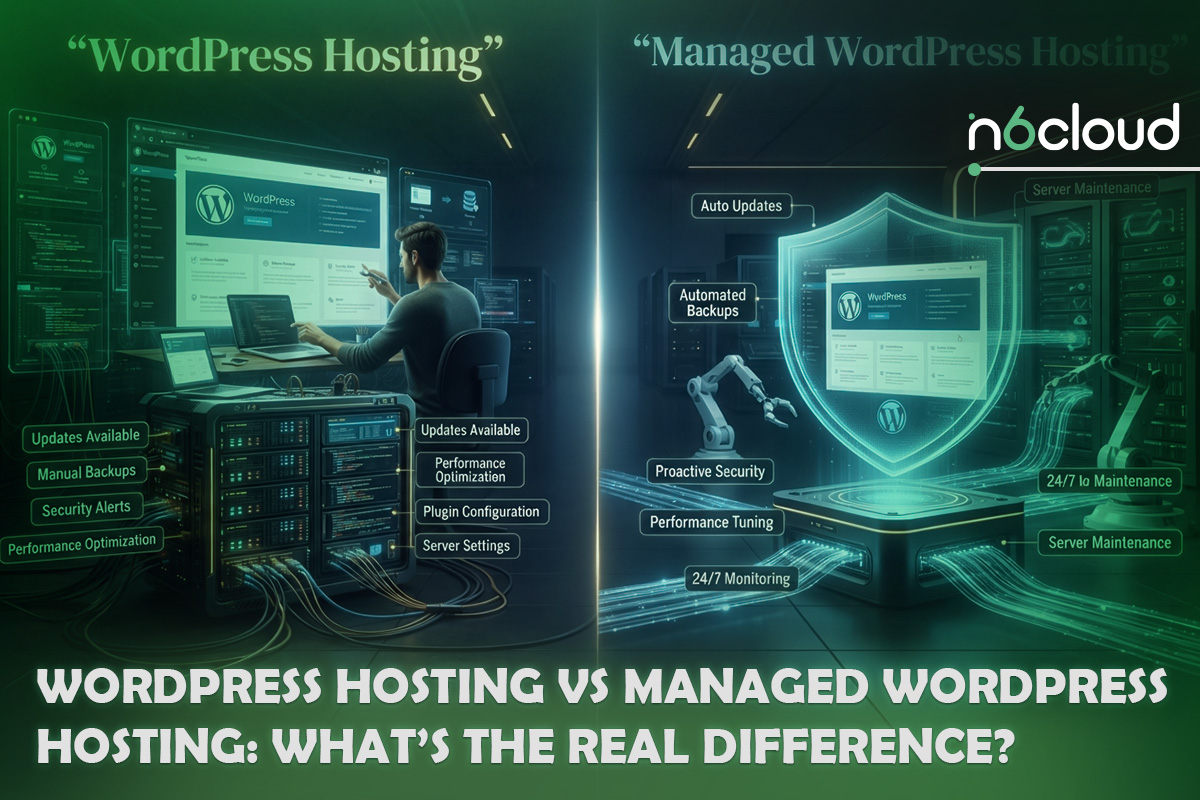
The usual explanation is that one is unmanaged and the other is managed. That framing is wrong. At almost every provider, including N6 Cloud, the plan labelled WordPress hosting already gives you a one-click WordPress installer, automatically applies core security updates, issues your SSL certificate, and runs server-level caching you never configured. It is not unmanaged. It is partly managed. The real question is narrower and more useful: which maintenance tasks move from your desk to the provider’s desk at each price point, and which ones never move at all?
WordPress Hosting vs Managed WordPress Hosting: What’s the Difference?
 What Is WordPress Hosting?
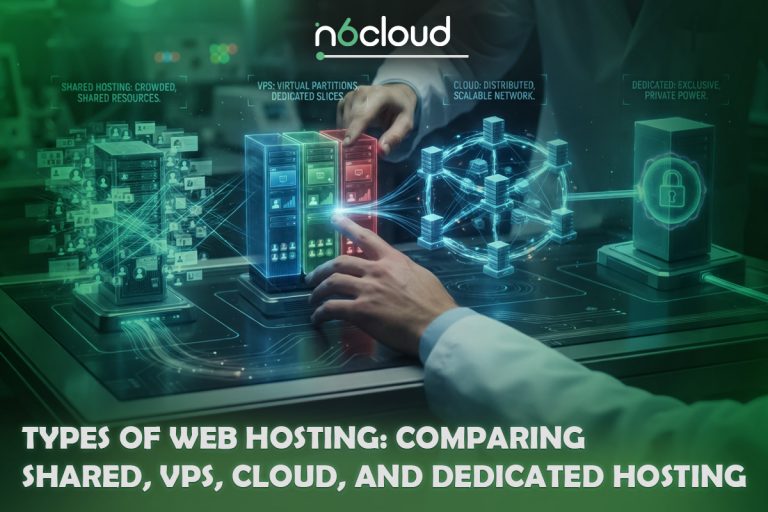
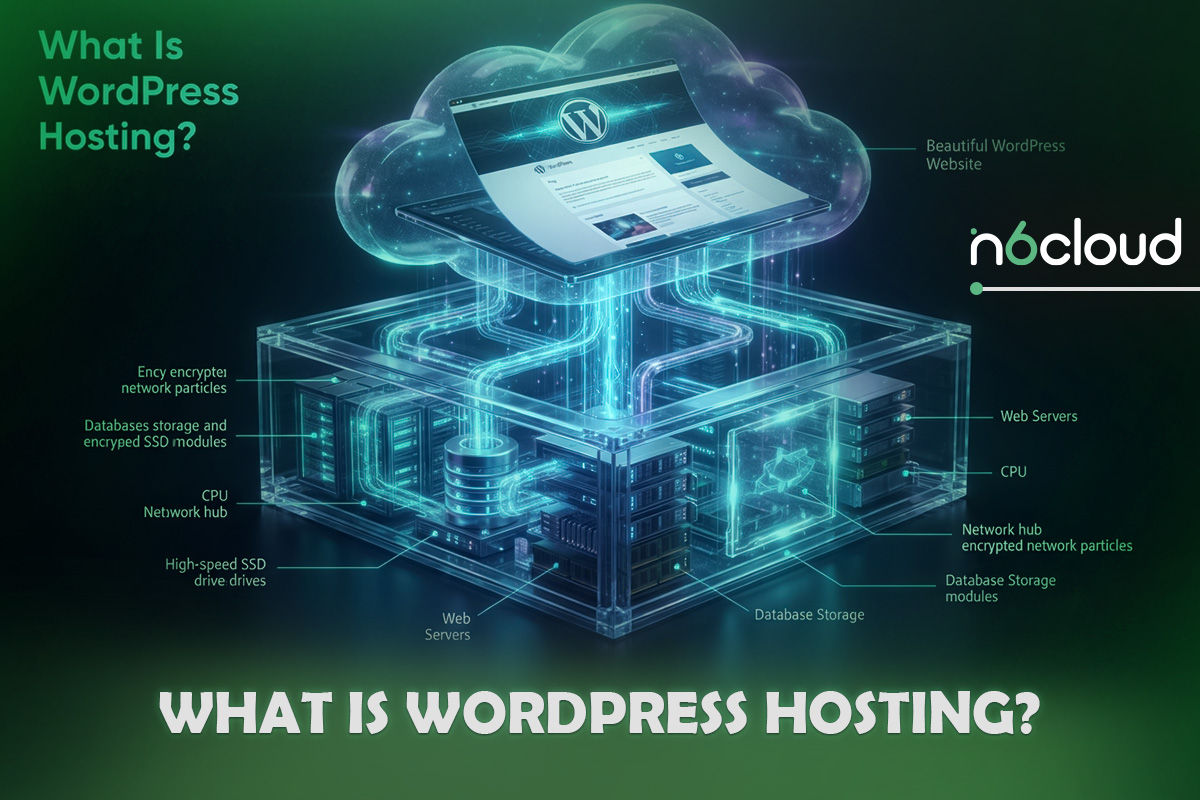
WordPress hosting is a hosting plan configured for the WordPress CMS, and the infrastructure underneath is usually shared hosting, meaning one physical server runs many accounts, each usually isolated on a modern stack with its own share of CPU, memory and processes. What makes it WordPress hosting is the layer on top: a one-click installer, a PHP version and extension set WordPress expects, a web server tuned for the WordPress request pattern, and often a server-level cache that stores finished HTML so repeat visitors never touch PHP. Most plans add cPanel, free SSL, daily backups and email accounts. What stays with you is the WordPress installation itself: you choose the plugins and themes, decide when to update them, and decide what to do at two in the morning when the site is down.
 What Is Managed WordPress Hosting?
Managed WordPress Hosting moves a defined set of those application-level tasks to the provider. The exact set varies, which is the most important thing to understand about the category, but the common core is automated core and plugin updates, automated backups with documented retention and self-serve restore, WordPress-aware security, a caching stack the host configures and maintains, a staging environment, and support staffed by people who know WordPress rather than servers in general. The infrastructure is usually optimized for the WordPress request path, with a full-page cache, a persistent object cache such as Redis, a current PHP version with OPcache, and resources expressed in memory and PHP capacity rather than just disk space.
What Does “Managed” Actually Mean?
Here is the part most comparisons skip: WordPress already manages a good deal of itself. Since WordPress 5.6, new installations have automatic updates enabled for both minor and major core releases by default, which is why the official documentation states that “by default, automatic updates of WordPress are enabled on most sites.” Plugin and theme auto-updates arrived in WordPress 5.5 and are, per the core announcement, “disabled by default,” but you can switch them on yourself at no cost.
So what is being sold? Execution, meaning the provider performs work you would otherwise perform. Infrastructure you cannot buy separately at that price, meaning the caching stack, object cache, CDN and monitoring. And recovery, which people undervalue until they need it: a tested restore point, a staging copy to reproduce the problem on, and a support desk that will look at your WordPress installation rather than telling you the server is fine.
A fourth category never moves at any price. Nobody manages your content, your design decisions, your choice of plugins or your custom code, so managed hosting shifts the operational burden rather than the authorship. It is also worth noting that “managed” isn’t standardized: one provider’s managed plan includes plugin updates with staging validation and rollback; another’s means core updates and a nightly backup; and both use the same word on the pricing page.
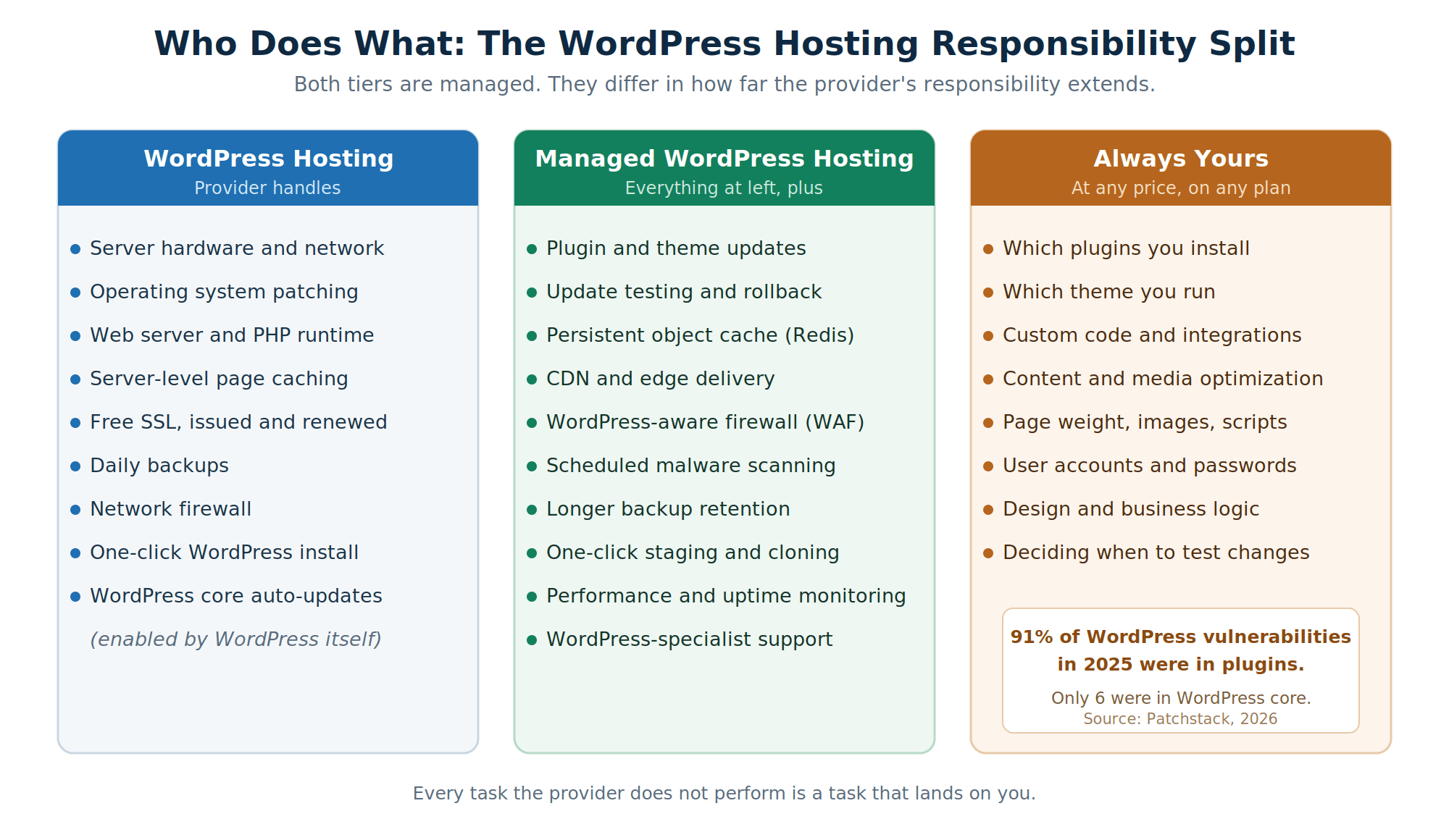 Figure 1: Both tiers are managed. What separates them is how far the provider’s responsibility extends, and which tasks never move at all.
WordPress Hosting vs Managed WordPress Hosting at a Glance
The Real Differences Between WordPress Hosting and Managed WordPress Hosting
Performance and Server-Level Optimization
Hosting performance mostly comes down to how many layers a request passes through before something has to think. Standard WordPress hosting typically gives you one, a server-level full-page cache; managed hosting gives you three, adding a persistent object cache and, at most providers, a CDN. The object cache is the one people misunderstand, because WordPress has one built in, but as the core documentation puts it, “by default, the object cache is non-persistent,” so the data “resides in memory only and only for the duration of the request.” Redis makes it persistent, which is transformative for a store or membership site and close to irrelevant for a cached brochure site. Judge all of it by time to first byte: Google’s guidance on web.dev puts a good TTFB at 0.8 seconds or less, and Lighthouse fails its server response audit above 600 milliseconds, now reported within its Document request latency insight. A slow LCP alongside a fast TTFB usually points to the page itself, meaning unoptimized images, render-blocking CSS or heavy JavaScript, rather than a hosting problem.
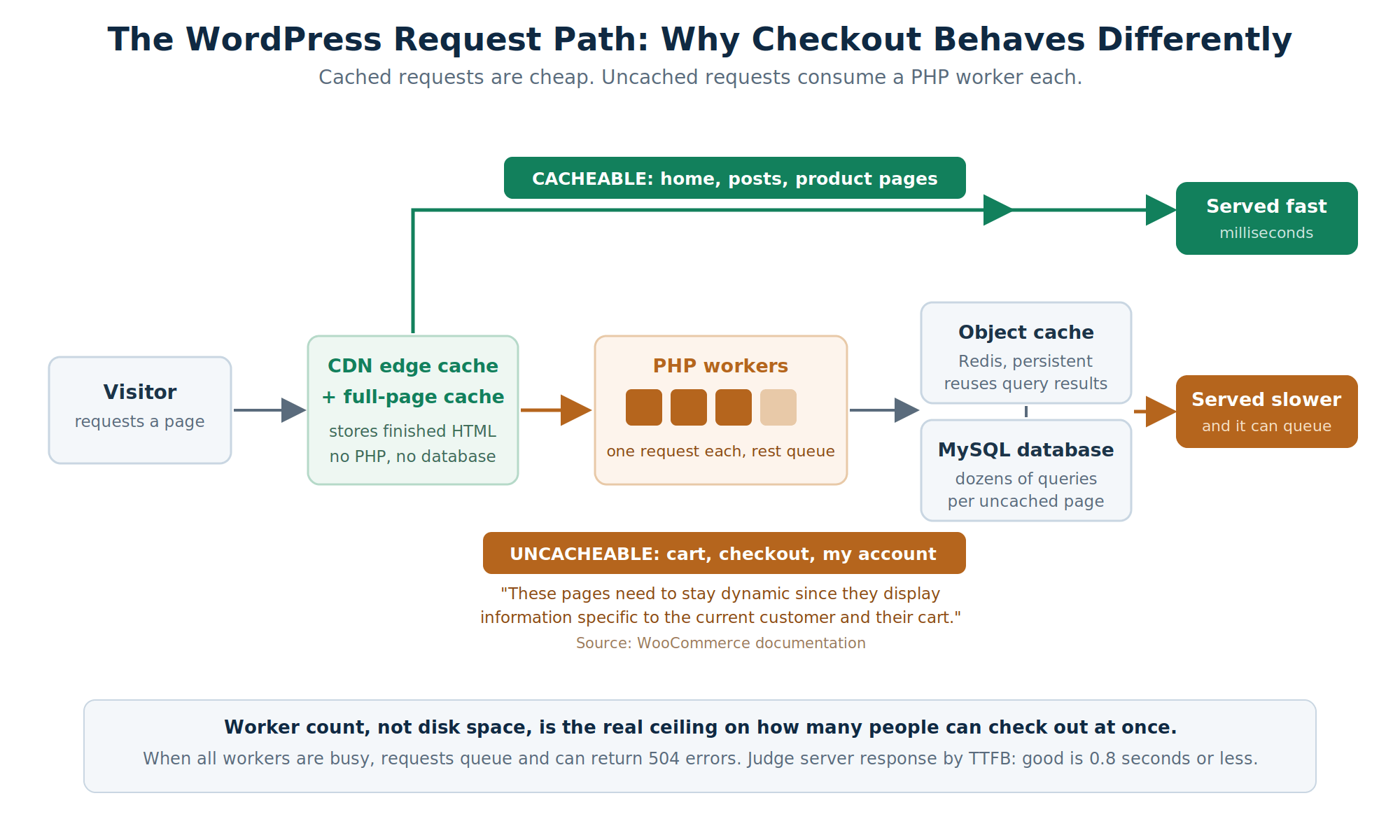 Figure 2: Cached requests never reach PHP. Cart, checkout and account pages cannot be cached, so each one occupies a PHP worker for the length of the request.
Security and Malware Protection
Both tiers provide server security: a network firewall, patched packages, account isolation, and free SSL. Managed hosting focuses its security on WordPress, usually meaning a web application firewall with WordPress-aware rules, scheduled malware scanning, file-change monitoring, and sometimes patching known plugin vulnerabilities before the author ships a fix. A web application firewall, which OWASP defines as “an application firewall for HTTP applications,” can sit in either of two places. At the edge, it filters traffic before it reaches your server, so malicious requests never consume your PHP capacity, while a server-level scanner such as Imunify360 inspects files on the machine itself and catches what an edge filter cannot see.
Now the part that cuts against the standard sales pitch. Patchstack’s State of WordPress Security in 2026, covering 2025, recorded 11,334 new vulnerabilities in the WordPress ecosystem, of which 91 percent were in plugins and 9 percent in themes, while core accounted for six. Wordfence’s independent 2024 report found 8,223 vulnerabilities, with 96 percent in plugins and five in core. Two databases, one conclusion: your exposure is determined overwhelmingly by what you install, not by which hosting tier you bought. A cheap WordPress plan is therefore not inherently insecure, and the managed features that actually reduce risk target plugins, which matters because Patchstack also found 46 percent of vulnerabilities had no developer fix at public disclosure.
 Updates and Maintenance
WordPress handles its own core updates competently. What it does not do is verify your site still works afterwards, and the official documentation on background updates and plugin auto-updates describes no compatibility check, no staging validation and no automatic rollback. On managed hosting, the provider takes some or all of that on, so the meaningful question is not whether updates are automated but what happens when an update breaks the site. Some hosts run the update on a staging copy and compare key pages before promoting it; others apply it and keep a backup from a few hours earlier. Both get described with the same phrase, so ask which one you are buying.
Backups and Disaster Recovery
Almost every plan at either tier includes backups now, so the bullet point tells you little, and four details tell you everything. Frequency determines how much work you lose, since daily backups mean up to 24 hours of lost orders. Retention determines whether you can recover from a problem you did not notice immediately, because malware is often found weeks later and a seven-day window is useless against a three-week-old compromise. Granularity determines collateral damage, since restoring a whole site to recover one page also reverses every order since that snapshot, and location determines whether the backup survives the event at all. The fifth detail is the one people discover at the worst moment: whether you can run the restore yourself, or must open a ticket and wait.
Technical Support
General hosting support answers questions about the server, and it will tell you correctly and unhelpfully that the server is healthy when your problem is a plugin conflict. WordPress-specific support crosses that boundary, reads a fatal error in your PHP log, and names the plugin that caused it. That is a different skill set, and it costs more to staff, which is much of why managed plans cost more. Every host still has a support boundary, and none will debug your custom theme, so find out where the line sits before you need to cross it, and treat response-time claims skeptically unless a published service level agreement defines what is measured.
Server Access and Flexibility
This is where the assumption that managed means more breaks down. Standard WordPress hosting on a cPanel-style stack usually gives you SFTP, phpMyAdmin, PHP version and directive control, cron jobs, and on many plans SSH. Managed hosting varies wildly: WP Engine documents an SSH gateway giving you WP-CLI, the MySQL command line, bash and Composer, while stating that “you cannot use SSH Gateway access to perform any actions that require root or sudo access,” whereas Namecheap’s EasyWP FAQ states plainly that “there is no SSH, cPanel, FTP, and PHP access provided with our EasyWP product,” offering SFTP instead, which is a real downgrade from a standard cPanel plan. That matters because SSH is how you reach WP-CLI, which the official handbook calls “the Command Line Interface for WordPress, used to do administrative and development tasks programmatically.”
Then there are plugin restrictions, the clearest evidence that managed hosting is as much a constraint as a service. WP Engine’s disallowed plugins page publishes a scan list of 71 file and folder names, alongside the common plugin names they correspond to, and Presslabs publishes a different one.
Two observations matter more than the table. First, the lists disagree: WP Engine blocks WP SlimStat, and Presslabs does not; Presslabs blocks WP-Optimize, All-in-One WP Migration, and WP Engine does not. So checking your plugin list against a provider’s list before migrating is not optional. Second, a correction: it is widely repeated that managed hosts ban security plugins such as Wordfence and Sucuri, and against these two published lists that is false, since neither name appears on either list. Sucuri turns up on WP Engine’s page only as a favourable reference to a research partner.
Scalability and Resource Management
Scalability on WordPress comes down to one question: what happens to requests the cache cannot serve? Cached requests are cheap, which is why a well-cached content site can survive the front page of a news aggregator on inexpensive hosting, while uncached requests are expensive and PHP workers handle them. As Kinsta’s documentation explains, and Kinsta now calls them PHP threads rather than workers, they “determine how many simultaneous uncached requests your site can handle at any given time,” and requests beyond that limit queue until “the queue starts to push out older requests which could result in 504 errors.” That explains most of managed WordPress pricing, since plans are priced in steps as worker capacity and memory are allocated in steps, and it shows why disk space is a poor proxy for whether a plan will hold up. One trade-off runs the other way, and almost no comparison mentions it: managed plans are frequently metered on monthly visits, with WP Engine billing 2 US dollars per 1,000 extra visitors and Kinsta 0.50, so a post that draws 100,000 extra visits on a 30-dollar plan generates roughly 200 dollars in overage.
Cost and Total Cost of Ownership
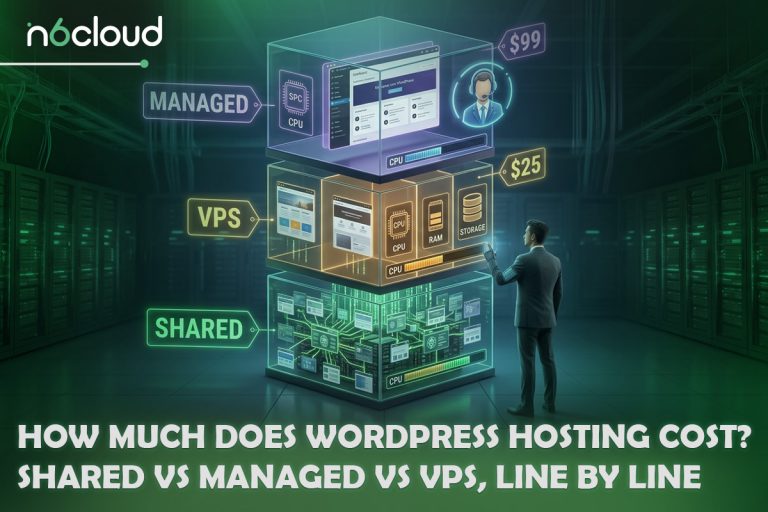
The published price gap is real but almost always misrepresented, because comparisons put one product’s promotional price beside the other’s standard price. Checked on providers’ own pages in August 2026, standard WordPress hosting advertises entry prices under 4 US dollars a month, while managed hosting advertises roughly 20 to 35 on annual billing: Pressable at 20.83, Flywheel at 25, WP Engine at 30 and Kinsta at 30. Two caveats belong here in fairness, because the article is about to criticize exactly this kind of comparison. WP Engine’s 30 is first-year pricing for new customers, and several cheap introductory rates require a long prepayment, with DreamHost’s and Hostinger’s promotional terms both running 48 months. Now look at renewal. SiteGround’s 2.99 becomes 17.99, Hostinger’s 2.99 becomes 10.99, and DreamHost’s 1.99 becomes 7.99, so the real ongoing gap is closer to two to four times, not ten. N6 Cloud’s own numbers follow the same pattern, with WordPress Hosting at 2.24 introductory and 6.74 regular against 9.74 for the entry managed tier.
The hosting fee is one input, and the interesting arithmetic sits around it, because running an unmanaged site properly costs recurring time and often recurring subscriptions for the backup, security and staging tools a managed plan bundles. ZipRecruiter’s August 2026 figure for the average US WordPress developer wage is 40.65 dollars an hour, and the marketplace Codeable publishes freelance rates of 80 to 120. If maintenance takes two hours a month and your time is worth 50 dollars an hour, that is 100 dollars of effort behind a plan costing 8; if it takes 20 minutes, the calculation reverses and managed hosting is money spent on a problem you do not have. One caveat, offered because the alternative is inventing a number: no credible independent study measures how long WordPress maintenance takes per site per month, and what exists is what vendors budget commercially, such as the one to two hours Codeable allocates in its care plans.
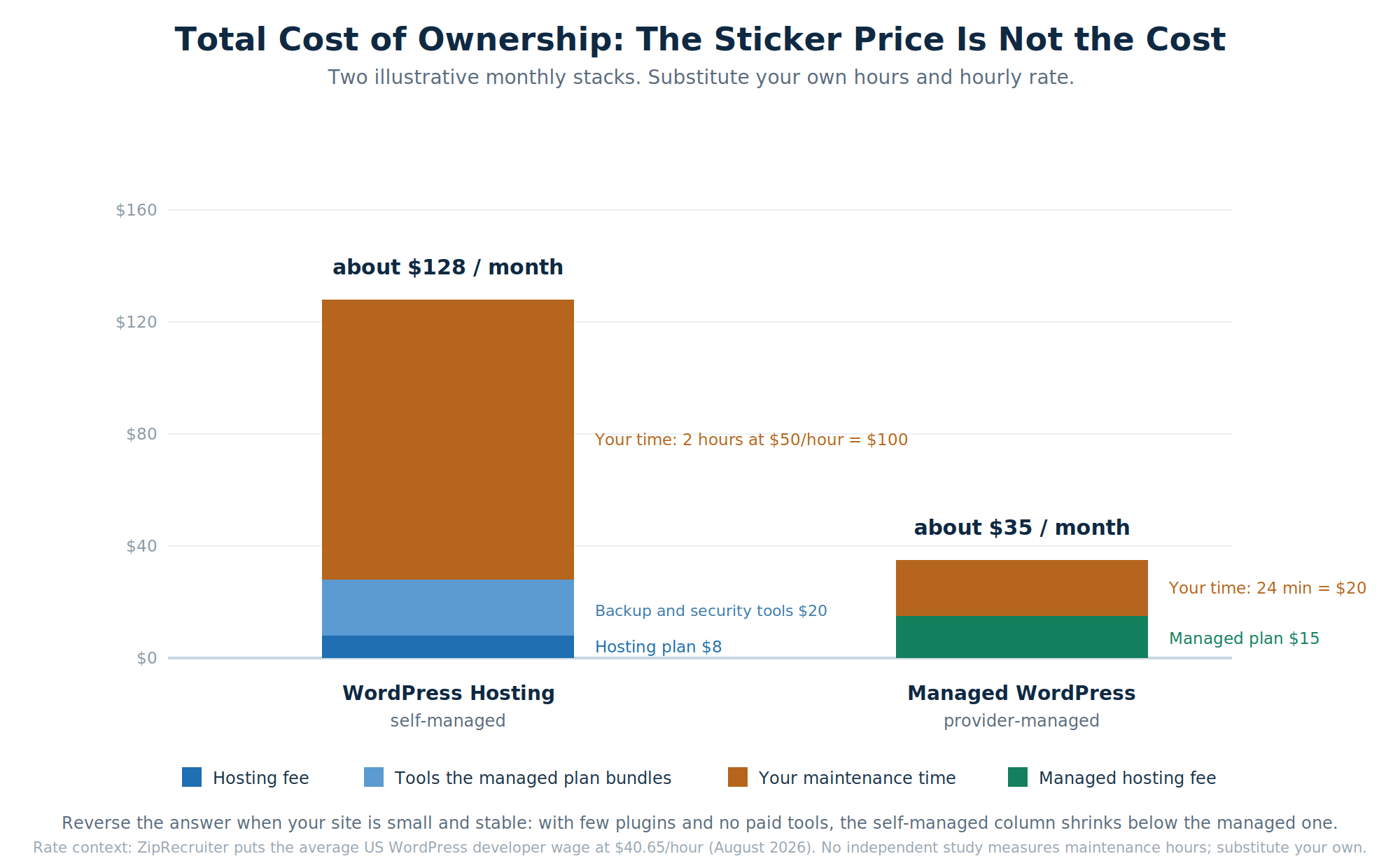 Figure 3: An illustrative monthly comparison. The result flips when your site is small, stable and lightly plugged in, which is exactly the point.
Which Hosting Option Is Right for Your Website?
When Should You Choose WordPress Hosting?
Standard WordPress hosting is the correct choice more often than most hosting blogs admit. It suits personal blogs, portfolios, brochure sites, community sites and documentation sites, and any project where content is largely static, the plugin count is modest and traffic is predictable. It also suits a technical audience, which surprises people: developers and agencies often prefer it because it offers more freedom, not less. If you need a plugin a managed platform disallows, a particular PHP configuration, an unusual cron schedule, or the ability to run something alongside WordPress, an open cPanel-style plan will accommodate you where a curated platform will not.
When Should You Choose Managed WordPress Hosting?
Managed hosting earns its price when the site makes money, when downtime has a cost you can name, or when nobody on the team wants to own server-adjacent work. Business sites that generate leads are the clear case, since the site is a revenue channel and the marketing team should not be deciding whether to apply a plugin update. Agencies running many client sites often move for the operational tooling rather than the speed, because staging, cloning and centralized updates across a portfolio save hours weekly. And if the honest answer to “who applies the plugin updates and checks the site afterwards” is “nobody, reliably,” then paying somebody to do it is cheaper than the incident it prevents.
Is Managed WordPress Hosting Better for WooCommerce?
For most stores, yes, and the reason is mechanical rather than promotional, which is why many hosts package a WooCommerce-specific plan, such as WooCommerce Hosting, rather than pointing stores to a general one. WooCommerce’s own server recommendations call for PHP 8.3 or greater, MySQL 8.0 or MariaDB 10.6 or greater, HTTPS, and a WordPress memory limit of 256 MB or greater, compared with WordPress core’s default attempt of 40 MB for a single site, as documented in the wp-config reference. That 6.4 times gap shows why a general-purpose plan can technically run a store while being sized for something else.
Caching compounds it. WooCommerce’s caching documentation instructs you to exclude Cart, Checkout and My Account from page caching because “these pages need to stay dynamic since they display information specific to the current customer and their cart.” So the chain runs: checkout cannot be page-cached; therefore every checkout request runs PHP; therefore concurrent checkouts consume PHP workers one for one; therefore worker count is the real ceiling on how many people can buy from you at once. That is why stores fail at checkout under load rather than on the homepage. The honest exception: a small store with a few orders a week is under none of this pressure.
 Is Managed WordPress Hosting Better for High-Traffic Websites?
Usually, with a qualification that depends on whether the traffic is cacheable. A content site serving anonymous readers is close to the ideal caching scenario, since nearly every request can be answered from a full-page cache or a CDN edge, so it handles large volumes on modest infrastructure and the managed upgrade buys monitoring and support rather than raw capacity. Logged-in, personalized, or transactional traffic is a different workload, because members, shoppers, and users hitting filtered archives all generate uncached requests. There, the managed advantages are direct: more PHP capacity, more memory, a persistent object cache that cuts query load, and monitoring that alerts somebody before your visitors notice. If you outgrow managed WordPress plans entirely, the next step is usually VPS Hosting or a cloud server, which trades convenience back for control.
Is Managed WordPress Hosting Worth the Extra Cost?
It is worth it when the value of the time and risk it removes exceeds the price difference. Take the real monthly difference, which after renewal pricing runs from about 3 dollars at some hosts to 25 at others, add what you would otherwise spend on backup, security and staging tools, then set that against your maintenance hours multiplied by what your time is worth. For a revenue-generating business site or a store, that arithmetic favours managed hosting and the margin is not close; for a stable personal site maintained by somebody who does not mind the work, it does not. Ask a second question alongside the first, though: does managed hosting solve the problem you actually have? If your site is slow because of a 4 MB hero image or a page builder loading twelve stylesheets, no hosting tier fixes that, so measure TTFB first.
 How to Choose the Right WordPress Hosting Provider
Whichever tier you land on, the provider matters more than the label, because labels aren’t standardized. The five checks below separate a plan that will hold up from a feature list that only reads as though it will.
Evaluate Performance
Ask what the server resources actually are, in memory and PHP capacity rather than only disk space, since disk is the least predictive number on the page. Ask which web server the plan runs on, because LiteSpeed, Nginx and Apache handle concurrency differently, and ask what caching is included and at which layers. Then verify rather than trust, by testing a site already hosted there against the 0.8 second TTFB threshold. Treat any uptime figure without a published service level agreement as marketing, and note that a 99 percent guarantee permits over seven hours of downtime a month.
Evaluate Security
Ask whether there is a web application firewall and where it sits, at the edge or on the server. Ask whether malware scanning is scheduled or on request, and what happens when something is found, because detection without remediation is half a service. Given that 91 percent of WordPress vulnerabilities are in plugins, ask specifically what the host does about plugin vulnerabilities: automated updating, virtual patching, or nothing at all.
Evaluate Backup and Restore Policies
Ask four questions and accept no vague answers: how often are backups taken, how long are they kept, can you restore them yourself without a support ticket, and are they stored somewhere other than the server they protect? Ask whether files and the database can be restored separately, because a full rollback to fix one mistake undoes everything else since. Then test a restore on staging while nothing is wrong.
Evaluate Technical Support
Ask whether support is staffed by people with WordPress expertise or general server knowledge, and where their boundary sits. Ask about actual availability, since 24/7 sometimes means overnight ticket coverage and live chat only in business hours. Ask what response time is committed in writing rather than advertised, and whether migration is included, who performs it and whether there is downtime.
Check Managed Hosting Restrictions
This is the step buyers skip and regret. Ask for the disallowed plugin list in writing and check your current plugins against it before committing, and ask whether you get SSH and WP-CLI, whether you can change PHP directives or run custom cron jobs, and what overages cost. Then ask the exit question, which almost nobody asks going in: if you leave, can you export a complete portable backup, and does anything depend on proprietary configuration that will not travel with you?
 WordPress Hosting and Managed WordPress Hosting at N6 Cloud
N6 Cloud runs both tiers from Canadian data centres, which matters for latency if your audience is Canadian and for data residency if your sector requires it. Three technical differences separate the two product lines, and each visibly affects how a site behaves.
The web server. Every managed WordPress plan runs on our Lightning stack with LiteSpeed, while the first two tiers of WordPress plans run Apache with Nginx, and LiteSpeed starts with Lightning Premium. LiteSpeed handles concurrent connections more efficiently and pairs with the LSCWP plugin for server-level page caching, which shows up as a lower TTFB and steadier behaviour when several visitors arrive at once, rather than as a different number on a single-visitor speed test.
The management toolkit. Managed plans include WP Toolkit Deluxe; the WordPress plans use Softaculous. Softaculous installs WordPress well and does it in one click, while WP Toolkit Deluxe is built around the lifecycle rather than the install: cloning, staging, smart updates that check a copy before applying changes to production, and bulk management across several sites from one screen. If you run more than one site, you’ll feel that difference every week.
Object caching. Redis is available on the managed plans, not the WordPress plans, which matters enormously for stores, membership sites and anything with logged-in users, because those requests cannot be served from a page cache. For a mostly cached content site, it changes very little.
WordPress Hosting starts at 2.24 a month introductory and 6.74 regular, with cPanel, free SSL, daily backups with easy restore, free migration, a 99.9 percent uptime commitment and a 30-day money-back guarantee on every plan. Managed WordPress Hosting starts at 9.74 with 2 GB of memory and scales to 26.99 with 16 GB, adding automatic smart updates for core files and plugins, automated daily backups, malware scanning with isolation technologies, and one-click staging and cloning. Prices are current at the time of writing.
The Short Version
WordPress Hosting and Managed WordPress Hosting are not managed and unmanaged versions of the same thing. Both are managed, but they differ in how far the management extends, so every task the provider doesn’t perform falls to you. Choose standard WordPress hosting when you have the skills, the time, or the need for freedom, and choose managed when the site earns enough that someone else should handle the maintenance.