
You have a project that needs to go live. Maybe it is a thesis application with a Postgres database behind it, a portfolio that has outgrown a free static host, or a first paying client who wants their site somewhere you control. Shared hosting has stopped fitting, so you start reading about virtual private servers, and within ten minutes you hit a fork in the road that almost nobody explains properly: managed or unmanaged.
The pricing pages make this look like a simple upsell. It is not. Choosing between managed and unmanaged VPS hosting is a decision about which resource you have more of, time or money, and how much risk your project can absorb. Choose well, and you save real money or build skills that show up on your resume. Choose badly and you either pay for work you would have enjoyed doing yourself, or spend three weekends chasing a firewall rule while a deadline closes in.
This guide is for readers who know roughly what a VPS is and want a structured way to decide. We will draw a clear line between the two models, clear up the most common misconception about unmanaged plans, and walk through a three-step framework built around a total cost of ownership calculation that most comparison articles skip. N6cloud sells both approaches on its VPS hosting plans, so the examples use real configurations, but the framework works wherever you buy.

What Are Managed and Unmanaged VPS Hosting, and Why Does the Difference Matter?
A virtual private server slices a physical machine into isolated virtual machines, each with guaranteed CPU cores, memory, storage and its own operating system. Unlike shared hosting, where hundreds of accounts share one operating system and one pool of resources, a VPS gives you root access and a dedicated slice of the hardware. That root access raises the managed versus unmanaged question: once you can change anything on the server, somebody has to keep it healthy.
Managed VPS vs Unmanaged VPS: Where the Line Is Actually Drawn
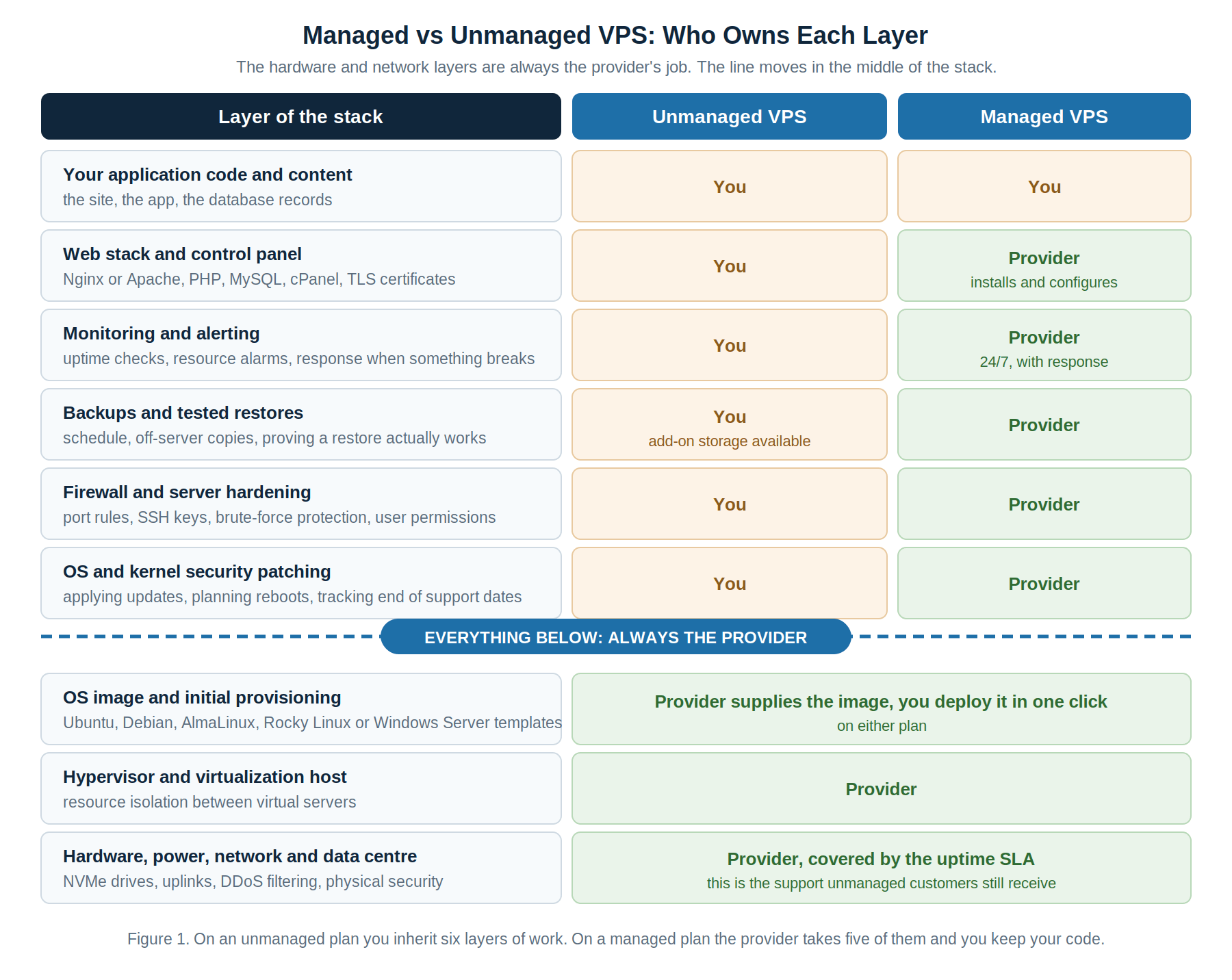
The distinction is not about hardware. Both models run on the same servers, in the same data centre, with the same NVMe drives and network. What differs is the division of labour above the hypervisor. On an unmanaged plan, the provider hands you a running virtual machine with a clean operating system image and a root password, and everything above that is yours. On a managed plan, the provider keeps the operating system and software stack, and you keep your application.
Being specific matters, because vague marketing language is where buyers get burned. A managed service typically covers control panel installation, regular operating system and package updates, security patching, a firewall baseline, automated backups, and 24/7 monitoring with a defined response. An unmanaged VPS covers none of those. The table shows the split as most reputable providers, including N6 Cloud, define it.
Patching deserves particular attention, because it is the task new server owners most reliably underestimate. There were 48,185 CVEs published in 2025, roughly 20 percent more than the year before, or about 132 newly disclosed vulnerabilities a day. Only a small fraction will ever touch your server, but the ones that do arrive without warning. A long-term support release such as Ubuntu 26.04 LTS gives five years of standard security maintenance, and Ubuntu Pro extends that to ten, but neither installs the updates for you. The OWASP Vulnerability Management Guide sets out the detection, triage and remediation cycle. On a managed plan, the provider handles that cycle. On an unmanaged plan, you are responsible for keeping the calendar entry.
Why This Decision Matters More Than It Looks: Cost, Risk and Time Trade-offs
The visible cost difference is small, often a few dollars against a few tens of dollars a month. The invisible difference is much larger, and it appears in three places. The first is your calendar. Setting up an unmanaged server properly, meaning SSH keys, a firewall, automatic security updates, a backup job with a verified restore, TLS certificates and basic monitoring, takes most people four to eight hours. Ongoing care runs one to two hours a month, more when a major version upgrade lands.
The second is risk. Uptime Institute’s 2026 outage analysis found 57 percent of organizations reporting a recent major outage put the cost above $100,000, and one in five above $1 million. Those are enterprise figures, and a portfolio site carries nothing like that exposure, but the shape holds at every scale: outages cost more than people expect, and the leading driver of human error in outages is failure to follow an established procedure. A server with no procedure behind it is waiting for that statistic.
The third is opportunity. Time on server administration is time not spent on what you were building. For a student, that trade can be worth making, because sysadmin skills have independent value. For a freelancer with a client deadline, the same hours are pure loss. The mistake is not picking one model over the other; it is picking without doing the arithmetic.
Common Misconceptions About Unmanaged Meaning No Support at All
The most persistent myth about unmanaged VPS hosting is that you are entirely on your own. You are not. Unmanaged describes the software layer only. The provider still runs the physical hardware, power and cooling, network uplinks, DDoS filtering and the hypervisor, and that work stays covered by the uptime guarantee. If your server will not boot, the host node has a fault, there is a routing problem between the data centre and your visitors, or you need a rescue console, you open a ticket and a real engineer works on it.
What the provider will not do is log into your operating system to fix your Nginx configuration, remove malware, or restore a database you never backed up. The boundary is clear: infrastructure problems belong to the provider; software problems belong to you. A second misconception runs the other way: that managed means you can ignore security. It does not. Your code, WordPress plugins, database credentials and user accounts remain yours on any plan. Managed hosting hardens the floor you stand on; it does not audit what you build on it.
How to Actually Decide: A Practical Framework, Including the Hidden Cost Most People Miss
Three steps, in order. Skipping the second one is the reason so many people end up on the wrong plan.
Step 1: Take an Accurate Inventory of Your Skill and Your Available Time
Answer these in writing rather than in your head, because written answers are less flattering and more useful. Have you configured a firewall from the command line, not through a hosting panel? Have you set up SSH key authentication and disabled password login? Have you scheduled automated backups off the server, then restored from one to confirm it works? Can you read a system log to find out why a service stopped? Have you ever patched a server in response to a specific published vulnerability?
Four or more yes answers and unmanaged will feel comfortable, with a modest ongoing time cost. One or two, and it is still reasonable for a project that can tolerate being broken, but budget the first month generously. No across the board, with a deadline or a paying client attached, and the answer is managed. No credit is awarded for learning server administration on something that matters to somebody else.
Time is the other half of the inventory, and it is seasonal. A student in the middle of exams has close to zero spare hours, no matter how capable. Ask what happens to your server during your busiest fortnight of the term, because that is when the security advisory will land.
Step 2: Calculate the Real Total Cost of Ownership, Not Just the Sticker Price
This is the step almost every comparison article leaves out, and it is where the decision usually resolves itself. The real monthly cost of a server is not the plan price. It is the plan price, plus the value of the hours you spend on it, plus the expected cost of downtime:
Real monthly cost = plan price + (hours per month x what your hour is worth) + (annual downtime risk / 12)
annual downtime risk = expected incidents per year x hours to recover x cost of an hour offline
Run it twice and compare the totals, not the prices. Take a student running a portfolio and a thesis application on a 1 vCPU, 2 GB VPS at $6.15 a month. Value your hour at British Columbia’s minimum wage, $18.25 as of 1 June 2026, roughly what the part-time shift you skipped would have paid. At two hours a month, and no real cost to being offline for an afternoon, unmanaged costs about $42.65. That looks expensive beside the sticker price, but the $36.50 is not wasted. It buys firewall, backup and patching experience that transfers to a job interview. Unmanaged wins.
Now take a freelancer hosting a client site on a 2 vCPU, 4 GB VPS at $13.35 a month, billing at $45 an hour, spending two and a half hours a month on server work, and facing perhaps one six-hour incident a year costing $500 in credits and goodwill. Unmanaged really costs about $167 a month. A managed plan that removes most of those hours and most of that risk wins at any fee under roughly $120, and real fees sit far below that. The sticker price said unmanaged was cheaper by a few dollars. The arithmetic says it costs ten times as much.
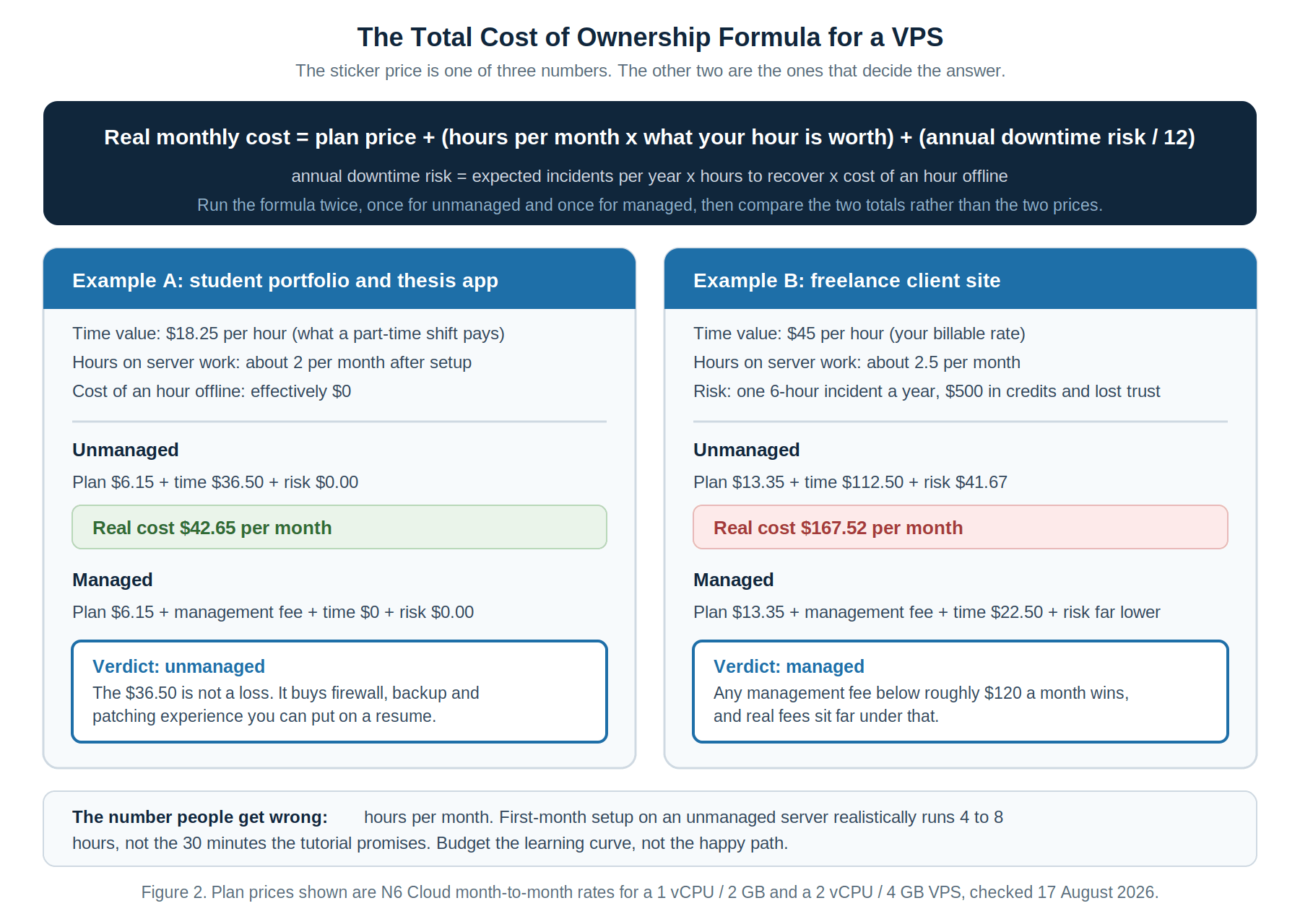
The number people get wrong is hours per month. Tutorials show the happy path, where a working stack comes up in twenty minutes. A real first month includes reading documentation, breaking something and fixing it. Budget from experience rather than optimism.
Step 3: Match the Option to Your Project Type
The framework produces different answers for different projects, and most people are running more than one.
A concrete example beats the rule. A computer science student deploys a thesis project on a $6 unmanaged VPS in September, planning to spend an hour on setup. By November it still has password SSH login enabled, no firewall beyond the defaults, no backups, and an operating system untouched since installation. Nothing has gone wrong yet, which is the dangerous part. The fix costs a Saturday. The alternative, discovered the week before submission, costs the project. Unmanaged was right for the learning. The missing piece was a realistic estimate of the hours.

Why Trust N6 Cloud for Your VPS Hosting?
N6 Cloud is a Canadian hosting company based in British Columbia, run by a team with more than 20 years of experience in web hosting and domain services. Its VPS hosting range spans ten configurations, from 1 vCPU with 1 GB of RAM and 20 GB of NVMe storage at $2.96 a month on annual billing, up to 16 vCPU with 32 GB of RAM. Every plan includes a dedicated IPv4 address, generous bandwidth, and a one-click choice of Ubuntu, Debian, AlmaLinux, Rocky Linux, CentOS, or Windows Server images.
What matters here is that both models run on the same infrastructure. The standard VPS is unmanaged with full root access, the right starting point for students and developers who want to learn. The optional managed service adds a cPanel Solo licence with full installation and configuration, regular updates and patching, a basic security setup, and 24/7 monitoring with rapid response. So the decision you make today is not permanent. Start unmanaged while learning, add management when a project becomes someone else’s problem too, and move to a Dedicated Server when sustained load justifies it, without changing providers.
The infrastructure behind both is identical: NVMe storage, enterprise Intel processors, a 99.9 percent uptime guarantee, and a Western Canada data centre, giving low latency for Canadian visitors and data residency for organizations that need it. Support runs 24/7/365 by phone, live chat and ticket, backed by a 30-day money-back guarantee and free migration. Prices change, so confirm current figures on the product page before you commit.
Conclusion
There is no universally better option here, which is why any article claiming managed VPS hosting always wins is selling rather than advising. Unmanaged is right when your time is cheap, your skills are growing, and the project can survive being broken for an afternoon. Managed is right when your time has a price tag, when someone else depends on the site staying up, or when the hours you would spend patching are hours the project cannot spare.
Do the three steps in order. Write down what you can already do, run the cost of ownership numbers for both models using your own hourly value, and match the answer to the project rather than your ambitions. Then remember the decision is reversible. Start unmanaged while the stakes are low, and move to managed the day the project stops being only yours. The skills you build keep their value either way.