Shared hosting remains the most cost-effective way to put a website online, and for millions of businesses, it has been the right choice for years. The trade-off is architectural: your site lives on a physical server alongside dozens or hundreds of other accounts, sharing the same kernel, the same file system, and often the same IP address. That shared foundation is what keeps the price near two dollars a month, and it is also the source of a distinct security model that a virtual private server or a dedicated box lacks. Understanding that model, rather than reciting a generic checklist, is what separates a hardened account from an easy target.
This guide is written for technical users, developers, system administrators, and SEO specialists who already run production sites and want the real risk picture, not beginner reassurance. It covers how the multi-tenant environment works, where the exposure lies, and the best security practices for shared hosting users that measurably reduce it. Each control is presented as what it is, why it matters, and how to implement it on a modern cPanel account. Where the advice applies to any website, regardless of hosting tier, we keep it tight and point readers to our broader companion guide, How to Secure a Website in 2026, so this article can stay focused on what is specific to shared hosting.
Understanding Shared Hosting Security: What It Is and Why It Matters
What Shared Hosting Is and How the Multi-Tenant Model Works
Shared hosting places many customer accounts on a single server and allocates its resources among them. Each account gets a slice of CPU, memory, and disk, a home directory, a set of databases, and the software stack needed to serve a website, typically a web server, PHP, and a database engine. The economics are simple: one well-provisioned machine can host a large number of low-traffic sites, and spreading the hardware and administration cost across all of them is what produces the low monthly price.
The important consequence for security is that the boundary between accounts is enforced in software, not in hardware. On a virtual private server, virtualization gives each tenant its own operating system instance. On shared hosting, everyone runs on top of the same operating system kernel, so the isolation between your account and your neighbour’s depends on how well the host has configured user separation, file system controls, and resource limits. When that separation is done properly, a problem in one account stays in that account. When it is weak or absent, one compromised site can become a foothold against everyone else on the box.
Is Shared Hosting Secure? Reality vs Myths
The honest answer is that shared hosting can be secure, and on a competently managed platform it usually is, but the security profile is different from a dedicated environment, and it is worth being precise about the difference. The persistent myth is that shared hosting is inherently unsafe because “anyone on the server can read your files.” On a modern platform with proper tenant isolation, that is simply not true, and we will show exactly what prevents it. The opposite myth, that the host takes care of everything so you can ignore security, is equally wrong. The provider secures the server; you remain responsible for your application, passwords, file permissions, and updates.
The realistic view sits between the two. A good host provides a hardened, isolated foundation with a network firewall, a web application firewall, malware scanning, and per-account isolation. What you build on top of that foundation, such as a WordPress install with a dozen plugins, a set of FTP credentials, and a database user, is yours to secure. Most shared hosting compromises are not failures of the server. They are outdated plugins, reused passwords, and files left writable to the world. That is good news, because it means the exposure that matters most is the exposure you directly control.
The Real Limitations of Shared Hosting Security
Being transparent about the limitations is part of choosing the right tier. First, you do not get root access, so you cannot install a custom kernel module, run your own intrusion detection tuning, or apply server-wide firewall rules of your own design. You inherit the host’s configuration. Second, you share an IP address with other sites, which means your email deliverability reputation and, in rare cases, your exposure to IP-level blocklisting can be affected by a badly behaved neighbour. Third, resource abuse by another account, a traffic spike, or a runaway process can affect performance even if it doesn’t breach your data, although platforms that enforce per-account resource limits handle this well.
None of these limitations makes shared hosting the wrong choice for a brochure site, a blog, a small store, or a startup looking to keep costs down. They simply define the ceiling. When your site’s value, traffic, or compliance obligations exceed that ceiling, the correct response is to move to an environment with stronger isolation rather than fight the constraints of the shared model. We cover exactly when that moment arrives later in this guide.
 Common Shared Hosting Security Risks (and Why They Matter)
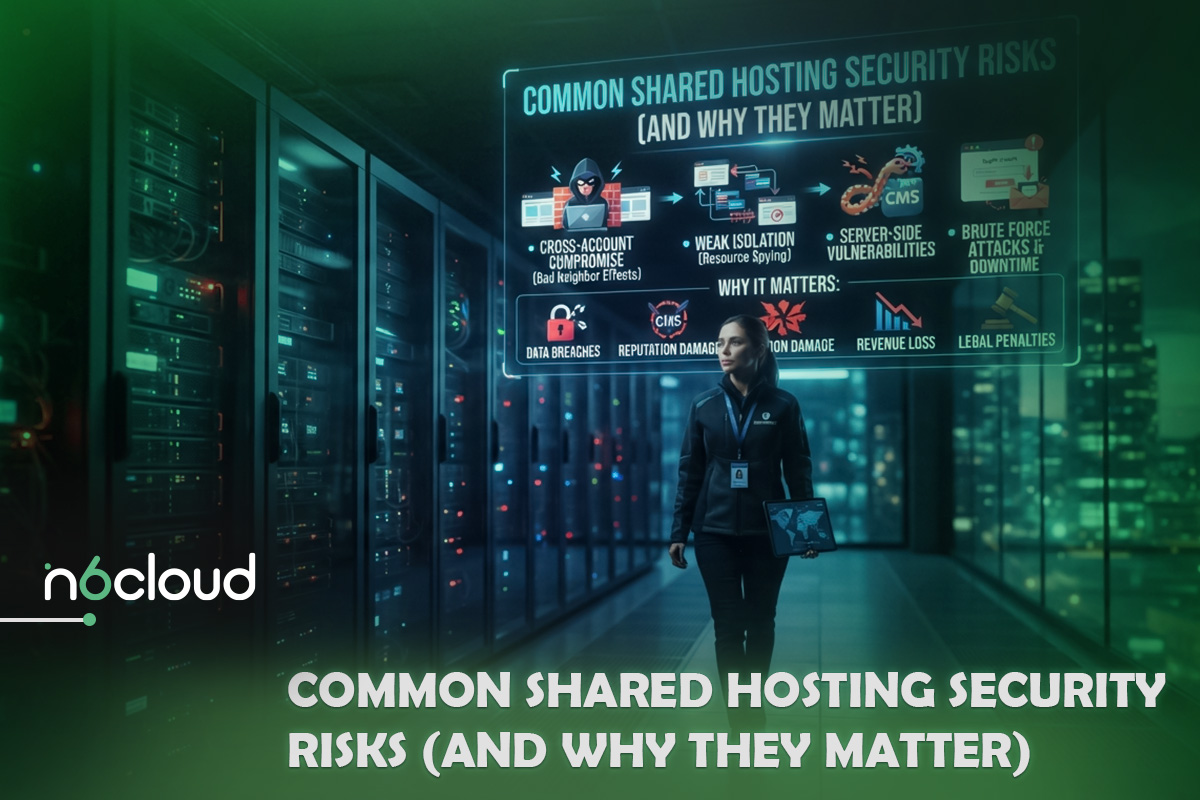
Before hardening anything, it helps to name the threats specific to this environment. The following risks actually drive shared hosting security incidents, illustrated by the scenarios that produce them.
Cross-Account Vulnerabilities on a Shared Server
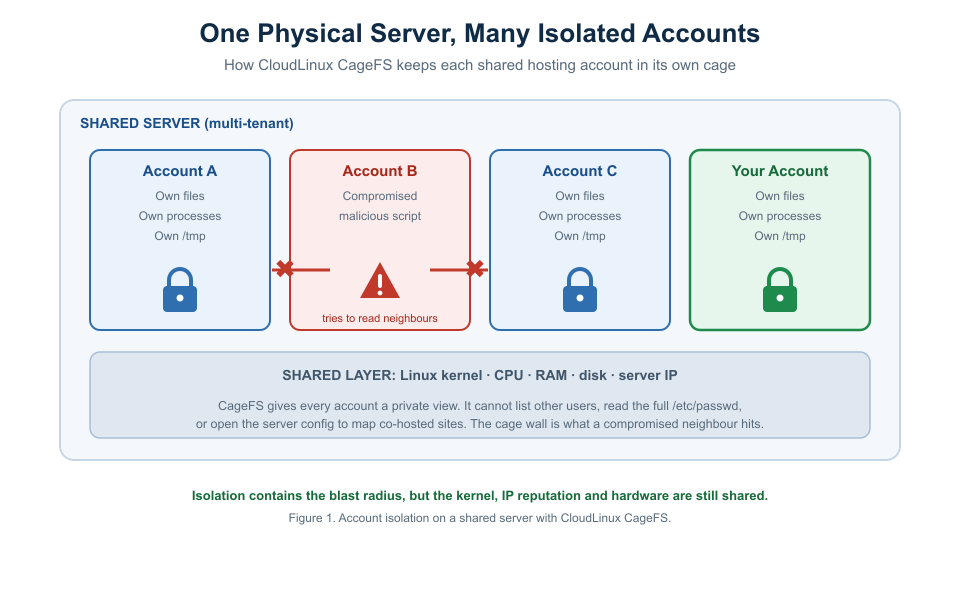
The risk unique to shared hosting is the compromised neighbour. Imagine an account on your server running an abandoned e-commerce plugin with a known file read vulnerability. On a poorly isolated server, an attacker who exploits that one site can read the server’s Apache configuration to list every domain hosted on the machine, read the full /etc/passwd to enumerate every username, and in the worst cases, traverse into other users’ home directories through world-readable files or a shared temporary directory. Your site did nothing wrong, yet it is now within reach.
This is precisely the vector CloudLinux CageFS is designed to close, and it’s why isolation belongs at the top of any serious shared hosting security discussion. CageFS locks each account inside its own virtualized view of the file system. From inside that cage, an account cannot see other users, read the full/etc/passwd file, or access the server configuration that maps co-hosted domains. A compromised script hits the wall of its own cage rather than its neighbours’ data, which is why per-account isolation turns a server-wide breach into a single-site incident.
Weak Authentication and Brute-Force Attacks
Automated bots continuously probe hosting accounts and content management logins for weak or reused credentials. A brute-force attack doesn’t need to be clever; it just needs to be patient, trying thousands of username-and-password combinations against your cPanel login, your WordPress admin, or an exposed FTP service until one works. Credential stuffing further increases the odds by replaying username-password pairs leaked from unrelated breaches, which is why password reuse is so dangerous. A single reused password from a forgotten forum account can hand over control of your hosting panel.
 Outdated CMS, Plugins, and PHP Versions
The largest attack surface on most shared hosting accounts is not the server; it is the application stack the owner installed and then stopped maintaining. The scale is documented, not anecdotal. In the first half of 2025, security researchers catalogued roughly 6,700 new vulnerabilities across the WordPress ecosystem, and about 89 percent of them originated in plugins rather than in WordPress core. Around 41 percent were classed as realistically exploitable, and a striking 57.6 percent required no authentication at all, meaning an anonymous bot can attempt them without ever logging in. An outdated plugin is therefore not a theoretical weakness; it is an advertised entry point that automated scanners find within hours.
A running PHP version matters just as much. End-of-life PHP releases stop receiving security patches, so a site left on an unsupported version accumulates unfixed vulnerabilities at the language level, beneath the application. Keeping the core, plugins, themes, and the PHP runtime up to date is the highest-return security habit available to a shared hosting user, which is why it earns a full section below.
Malware Injection and Phishing Scripts
When an application vulnerability or a stolen credential lets an attacker write to your files, the payload is usually one of two things. The first is injected malware: obfuscated PHP code dropped onto your site that serves spam, redirects visitors to malicious destinations, mines cryptocurrency, or quietly adds the attacker’s own admin account for later use. The second is a phishing kit, a set of pages disguised as a bank or webmail login uploaded into a corner of your hosting account and used to harvest other people’s credentials. Both damage you twice, once through the compromise itself and again through the reputational and blocklisting fallout when browsers and search engines flag your domain as dangerous.
Misconfigured File Permissions (the chmod 777 Trap)
File permissions decide who on the server can read, write, or execute a given file, and on a shared server “who” includes processes that are not yours. The classic mistake is setting a folder or file to 777 to make an upload or to get a stubborn plugin working. That value grants read, write, and execute to every user on the system. On a shared box, a compromised neighbour’s process, or a malicious script running under the web server, can then overwrite your files, plant a backdoor, or read data it should never touch. A permission set for convenience becomes a doorway. The fix is a small, well-understood set of correct values, covered in the practices section.
 Best Security Practices for Shared Hosting Users (Step by Step)
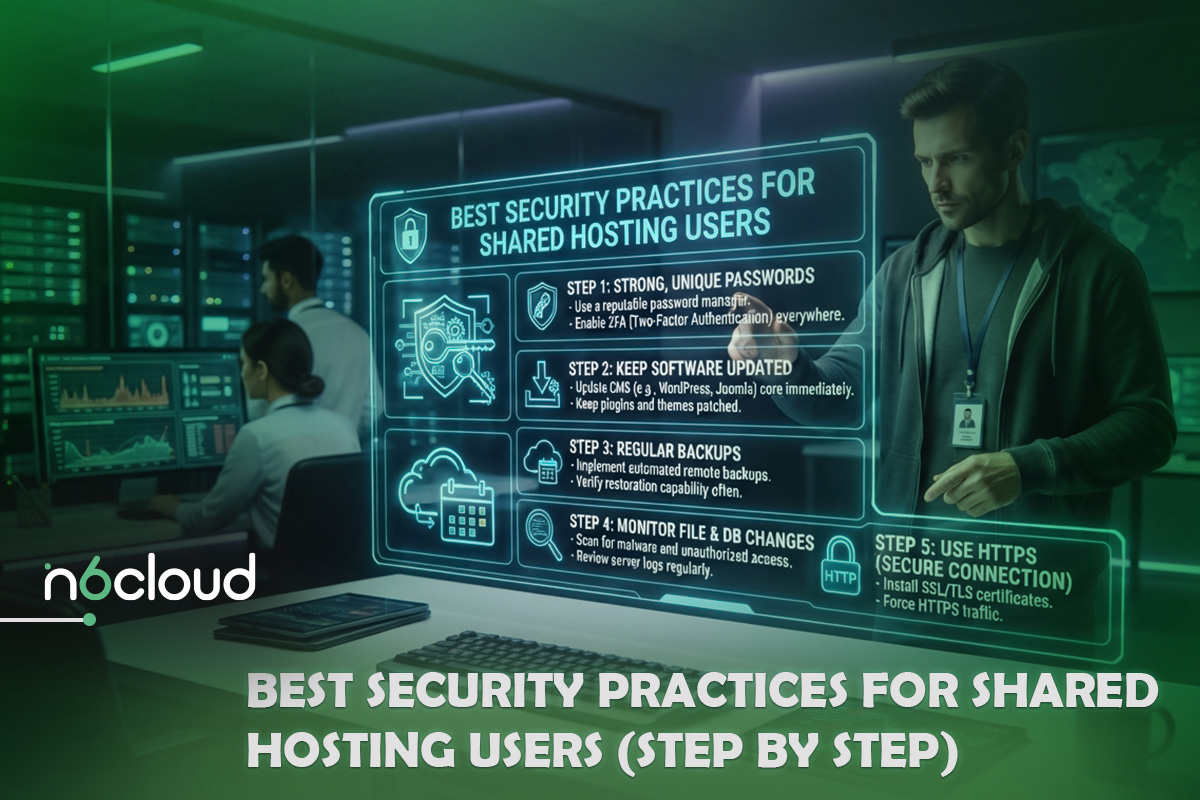
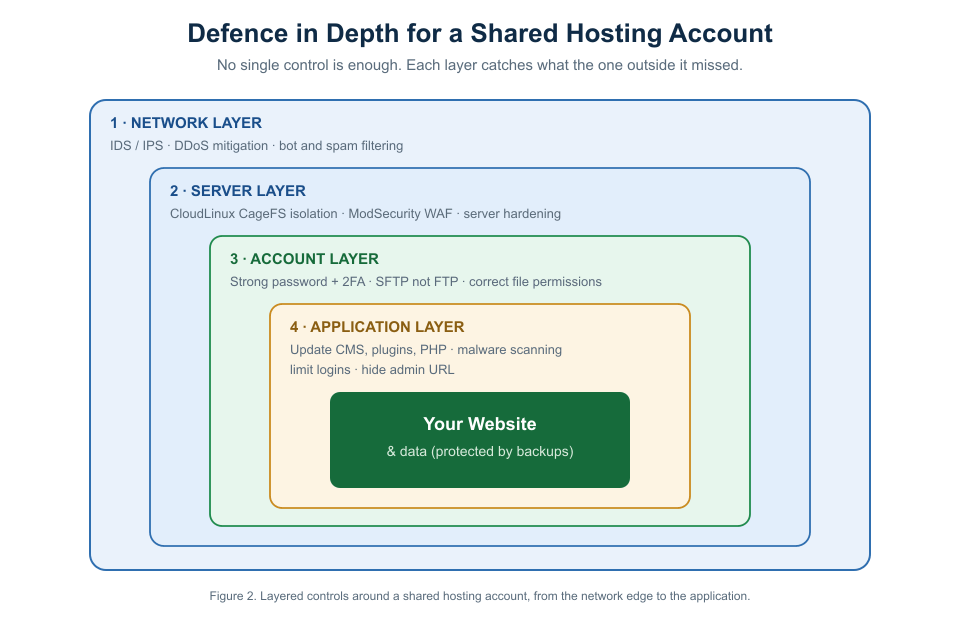
These controls harden a default account. Each is layered, so anything that slips past one control meets the next. The diagram below shows how the layers stack, from the network edge down to your application, before we work through each control in the what, why, and how format.
Use Strong Passwords and Enable Two-Factor Authentication
What it is. A strong, unique password on every access point, cPanel, your CMS admin, database tools, and email, paired with two-factor authentication (2FA) that requires a second, time-based code at login.
Why it matters. Passwords are the most targeted control on a shared account because brute-force attacks and credential stuffing are cheap and fully automated. Two-factor authentication is the single most effective defence against account takeover, because a stolen or guessed password alone no longer grants entry.
How to implement. Use a password manager to generate passwords of at least sixteen random characters and never reuse them across services. In cPanel, open the Two-Factor Authentication tool, scan the QR code with an authenticator app, and store the backup codes offline. Enable 2FA on your WordPress or other CMS admin accounts as well, since those logins are attacked independently of the control panel. Remove old FTP and email accounts you no longer use, because every dormant credential is an unguarded door.
Keep Your CMS, Plugins, Themes, and PHP Updated
What it is. A disciplined update routine covering your content management system core, every plugin and theme, and the PHP version the account runs on.
Why it matters. With roughly 89 percent of WordPress ecosystem vulnerabilities residing in plugins and more than half of them exploitable without authentication, an unpatched extension is the most likely way a shared site is breached. Updates are overwhelmingly security fixes, and the window between a vulnerability being disclosed and bots weaponizing it is measured in hours.
How to implement. Enable automatic updates for minor core releases and for trusted plugins, and review major updates on a staging copy before applying them in production. Audit your plugin list quarterly and delete anything unused or abandoned, since a deactivated plugin that remains in the directory can still be exploitable. In cPanel, set the account’s PHP version to a currently supported release and retest the site.
For a safe, repeatable update workflow, including staging and rollback, follow our companion article on how to update WordPress on hosting safely.
Set Correct File Permissions (chmod Best Practices)
What it is. Applying the least privilege permission value to every file and directory so that nothing is writable by users or processes that do not need it.
Why it matters. On a shared server, over-permissive files are directly exploitable by other processes on the machine. Correct permissions remove the write access malware injection depends on and protect configuration files that hold database credentials.
How to implement. Use the values below as your baseline, set through your control panel’s file manager or over SFTP. Never use 777 on anything in a public web directory. If an application appears to need it, the correct fix is almost always ownership or a 755 directory, not world write access.
Install and Enforce an SSL Certificate (HTTPS Everywhere)
What it is. A TLS certificate that encrypts traffic between visitors and your site, with every request redirected from HTTP to HTTPS.
Why it matters. Without SSL, login credentials, session cookies, and form data travel in clear text and can be read or altered by anyone positioned on the network path. HTTPS also protects session integrity and is a baseline expectation for browsers and search engines, which flag unencrypted sites.
How to implement. Most quality shared hosts provide free certificates and provision them automatically, so confirm the certificate is active for every domain and subdomain. Then enforce it: redirect all HTTP traffic to HTTPS, and add an HSTS header so browsers refuse to connect over plain HTTP. For a step-by-step on the WordPress side, see our guide on
how to get SSL for WordPress. Once HTTPS is enforced, check for mixed-content warnings and update any hard-coded internal links to use the secure scheme.
Use SFTP Instead of Plain FTP
What it is. Transferring files over SFTP or FTPS, which encrypt the connection, rather than legacy FTP, which does not.
Why it matters. Plain FTP sends your username and password across the network in clear text. Anyone able to observe the connection, whether on shared Wi-Fi or via an intermediate hop, can capture those credentials and gain full write access to your hosting account. The captured credentials are then used to inject malware directly into your files.
How to implement. Configure your file transfer client to use SFTP on port 22, or FTPS where SFTP is unavailable, and disable plain FTP entirely. Prefer key-based authentication over passwords where your host supports it, and create separate transfer accounts scoped to a single site rather than sharing one master credential.
Enable a Web Application Firewall (WAF)
What it is. A filter that inspects incoming web requests and blocks those matching known attack patterns, such as SQL injection, cross-site scripting, and malicious bot behaviour, before they reach your application.
Why it matters. With more than half of vulnerabilities in the WordPress ecosystem exploitable without authentication, a WAF is the layer that stops automated exploitation of a flaw you have not yet patched. It buys you time and absorbs the constant background noise of opportunistic attacks.
How to implement. Many shared platforms run a server-level WAF such as ModSecurity for you, so confirm it is active on your account. Add an application-level rule set as well, either a reputable security plugin or an edge WAF through a CDN, so that filtering happens both at the server and in front of it. Review the WAF’s blocked request log periodically to tune out false positives and to spot which attacks are being aimed at your site.
Run Regular Malware Scans
What it is. Automated scanning of your account’s files and database for injected code, backdoors, and known malicious signatures, with automatic quarantine or removal.
Why it matters. Even a well-maintained site can be compromised through a zero-day or a supply chain issue in a trusted plugin. Scanning lets you detect a breach quickly, rather than discovering it weeks later when your domain is blocklisted. Early detection sharply limits the damage.
How to implement. Use the malware scanner your host provides, and confirm it is set to scan on a schedule rather than only on demand. Platforms running Imunify360 detect and automatically remove malware and apply virtual patches to known CMS vulnerabilities, closing the gap between disclosure and your own update. Supplement server-side scanning with a CMS security plugin that monitors file integrity, and investigate any unexpected change to a core file immediately.
Build a Real Backup Strategy (Automated and Offsite)
What it is. Automated, regular backups of both files and databases, retained for a meaningful window, stored away from the live server, and, critically, tested by restoring them.
Why it matters. Backups are your recovery path when prevention fails, whether due to a compromise, a bad update, or human error. A backup you have never restored is a hope, not a plan, and a backup stored only on the same server can be encrypted or deleted in the same incident that took down the site.
How to implement. Confirm your host performs automated daily backups with one-click restore and a retention window of at least a couple of weeks; many quality shared plans include daily backups retained for up to 30 days. Keep an independent copy offsite as well, downloaded or pushed to separate storage, so you are not dependent on a single provider. Then schedule a periodic restore test, because the only proof a backup works is a successful restore.
Limit Login Attempts and Hide Your Admin URL
What it is. Throttling repeated failed logins, locking out offending addresses, and moving well-known admin endpoints away from their default locations.
Why it matters. Brute-force attacks rely on making unlimited guesses against a predictable login page. Rate limiting turns a fast automated attack into an ineffective one, and relocating the login reduces the volume of automated traffic that ever reaches it.
How to implement. Enable a login attempt limiter that locks out an IP after a small number of failures, either through a security plugin or your host’s brute force protection. Rename or restrict the default admin path, and protect it further with an .htaccess password prompt or an IP allowlist for administrators. Enforce 2FA on every administrative account so that even a correctly guessed password is blocked by the second factor.
 Shared Hosting Security Checklist (Daily, Weekly, Monthly)
A security posture is a routine, not a one-time project. Use this website security checklist as a recurring cadence. It is deliberately scannable so it can live beside your other operational runbooks and be delegated or automated where possible.