
High traffic is the goal every website owner works toward, yet it is also the moment when weak infrastructure is exposed. A campaign lands, a post spreads, a product launches, and suddenly the same site that felt quick with a few hundred daily visitors is crawling or returning error pages to the very audience it worked so hard to attract. The difference between a site that thrives under load and one that buckles is rarely the content. It is the hosting underneath, and specifically whether that hosting was built to scale and to stay available when demand is at its peak.
This guide is written for people who are past the beginner stage and need real answers about hosting at scale. It explains what actually defines a high-traffic website, the specific ways performance breaks under pressure, and the features that separate hosting that can absorb a surge from hosting that cannot. It then compares cloud, VPS, and dedicated hosting on the terms that matter at volume, and finishes with a practical framework that matches your traffic level to the right infrastructure. Throughout, it highlights where N6 Cloud fits and carefully describes what each of our products does and does not do, because accuracy matters more to you than a sales pitch.

High-Traffic Hosting Fundamentals
What Defines a High-Traffic Website
There is no single visitor count that determines whether a site is ordinary or high-traffic, because raw monthly visits tell only part of the story. A more useful measure is concurrency, meaning the number of people interacting with your site at the same moment, because that is what your server experiences directly. A site with a million visits spread evenly across a month may never exceed a few dozen concurrent users, while a site with far fewer monthly visits can see thousands of concurrent users during a product drop or a televised event. As a working guide, most hosting professionals consider a site high-traffic once it consistently serves 100,000 or more visits per month, or when it must support hundreds to thousands of concurrent users without slowing down.
Two other numbers matter as much as concurrency. The first is requests per second, since a single page view can trigger dozens of individual requests for images, scripts, stylesheets, and data. The second is how dynamic your content is, because a page assembled from a database on every visit requires far more server work than a cached page served from a ready-made file. A news homepage that updates constantly, a busy WooCommerce store with logged-in shoppers, and a membership platform with personalized dashboards all generate heavy dynamic load, which is why they reach the limits of entry-level hosting long before a mostly static brochure site of the same visitor count.
Performance Challenges at Scale
When traffic climbs, problems appear in a predictable order, and understanding that order helps you buy the right protection. The first symptom is usually a rising Time to First Byte, the delay before your server sends the opening byte of a response. Under light load, a well-configured server answers in well under 200 milliseconds, but as concurrent requests pile up, the processor and memory become contended, requests begin to queue, and that first byte arrives later and later. Because nothing renders in the browser until the response starts arriving, a slow Time to First Byte drags down Largest Contentful Paint and pushes the page out of the range Google rewards.
The next pressure point is almost always the database. Application servers can often be scaled by adding more, but they usually share a single database, and a flood of simultaneous queries is what most often brings a busy site to its knees. Connections saturate, queries wait behind one another, and response times climb sharply rather than gradually. This is why a site frequently does not slow down smoothly under load; instead, it performs acceptably right up to a threshold and then falls off a cliff. Once requests arrive faster than the server can complete them, the backlog grows without bound, memory fills, and the server begins to refuse connections or return 502 and 503 errors. That is the mechanism behind the crash you see during a traffic spike: not a single dramatic failure, but a queue that grows faster than it can drain until the system has nothing left to give.

Essential Features for High-Traffic Hosting
If the challenges above are predictable, so are the defences against them. High-traffic hosting is really a stack of features, each removing work or adding headroom at a different layer. The four that carry the most weight are the ability to scale and distribute load, a serious caching strategy, a content delivery network in front of it all, and a redundant platform with a credible uptime guarantee.
Scalability and Load Distribution
Scaling comes in two forms, and the distinction shapes every other decision in this guide. Vertical scaling means making one server more powerful by adding processor cores, memory, or faster storage. It is simple, requires no changes to your application, and is often a one-click operation, making it the natural first move for a growing site. Its ceiling is the size of a single machine, and this machine remains a single point of failure. Horizontal scaling means adding more servers and spreading traffic across them, which removes the single-machine ceiling and, done properly, removes the single point of failure as well. The cost is added complexity, because your application now has to run correctly across several nodes at once.
Horizontal scaling depends on a load balancer, a component that sits in front of your servers and distributes incoming requests across them so that no single node is overwhelmed. If one server fails or is taken down for maintenance, the balancer simply routes around it, which is how a horizontally scaled site can stay online through events that would take a single server offline. A closely related idea is auto scaling, where the platform adds or removes servers automatically as demand rises and falls. True auto scaling is powerful but not universal, and it is worth being precise about what a provider actually offers. At N6 Cloud, our Cloud Servers include a high-power load balancer that distributes concurrent requests across multiple instances on a private network, so you can scale out and add or remove nodes as your traffic changes. Our VPS plans, by contrast, scale vertically through one-click upgrades of CPU, RAM, and storage on a single node, which is a different and equally valid tool for a different job. Knowing which mechanism you are buying prevents an expensive mismatch later.
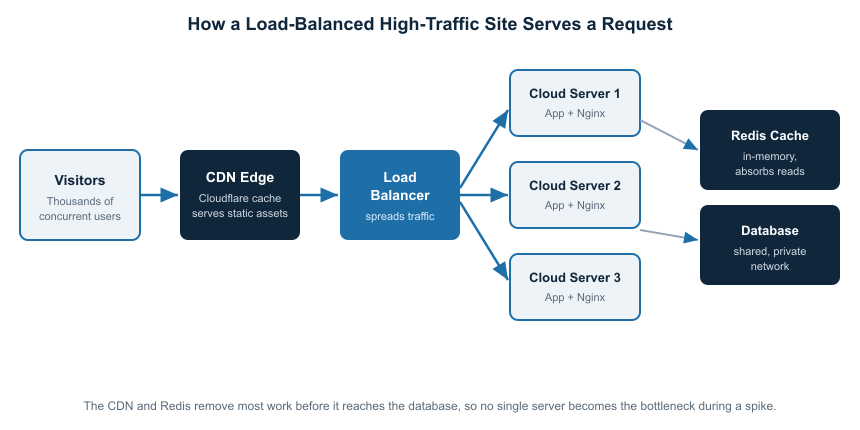
Figure 1. In a load-balanced setup, the CDN and an in-memory cache, such as Redis, handle most requests before they reach the database, and the balancer spreads the remaining load across multiple Cloud Servers so no single node becomes the bottleneck.
Caching Layers and the Content Delivery Network
Caching is the single most cost-effective way to handle high traffic, because every request served from a cache is one your application and database never have to process. A high-traffic stack usually layers several caches. Full-page caching at the web server stores complete rendered pages so repeat visitors are served a ready-made file. Object caching with an in-memory store such as Redis keeps the results of expensive database queries in RAM, which is where it delivers the largest gains for dynamic sites like WooCommerce and membership platforms. A reverse-proxy cache such as Varnish can sit in front of the application and serve cached responses at very high concurrency. Together, these layers can reduce the work of reaching your database by an order of magnitude, which is often the difference between a site that holds steady and one that collapses.
A content delivery network extends caching across the globe. Providers such as Cloudflare copy your static assets, and often full pages, to edge locations around the world, then serve each visitor from the nearest one. This reduces latency for distant users, entirely offloads a large share of traffic from your origin server, and absorbs sudden spikes at the edge before they ever reach your infrastructure. The web server software matters here too. Nginx and modern engines like LiteSpeed handle high concurrency far more efficiently than older configurations, which is why they are standard on performance-focused plans. N6 Cloud pairs NVMe storage with these modern engines and Cloudflare CDN integration, so the caching layers have fast hardware underneath.
Uptime, Redundancy, and the Cost of Downtime
At high traffic, availability is a revenue figure rather than a technical footnote. The reason a strong uptime guarantee matters becomes obvious once you translate the percentages into time. A 99.9% uptime guarantee, the standard that N6 Cloud backs with service credits across its platform, allows for roughly 8.8 hours of downtime per year. Moving up to 99.99% tightens that to about 52 minutes per year, and 99.999% to just over five minutes. For a store or a publisher earning money every hour, the gap between those tiers is measured directly in lost sales and lost trust. Redundancy is what turns a good uptime number into a reliable one, because a platform that can lose a server without taking your site offline is the only kind that upholds its guarantee during real failures. This is exactly what a load-balanced, multi-node setup provides, and it is why redundancy and scalability are two sides of the same design rather than separate features.
Best Hosting Types for High-Traffic Websites
Cloud vs VPS vs Dedicated Hosting
VPS hosting gives you a guaranteed slice of a physical server, with dedicated processor and memory allocations that are not shared with noisy neighbours. For high traffic, a well-tuned VPS is a strong and cost-effective choice within a defined range. Paired with disciplined caching, Redis, and a CDN, a single capable VPS can comfortably serve a steady flow of six-figure monthly traffic. It scales vertically, so you meet growth by upgrading to a larger plan, and its limits are the capacity of a single node and the fact that this node stands alone. This makes VPS ideal for sites with high but reasonably predictable traffic and owners who want control and value more than an elastic, multi-server architecture offers.
Cloud hosting is built for the cases a single server cannot cover. Because it runs across a distributed pool of resources with a load balancer in front, it scales horizontally, absorbs spikes by spreading them across nodes, and removes the single point of failure that limits a lone VPS. Its pay-as-you-go billing suits traffic that is seasonal, unpredictable, or climbing, because you can add capacity for a surge and release it afterward rather than paying year-round for peak headroom. N6 Cloud Servers sit here, with hourly billing, private networking, and the high-power load balancer that makes horizontal and vertical scaling practical. The trade-off is that a multi-node architecture rewards a little more technical comfort than a single server.
Dedicated hosting hands you an entire physical machine with no virtualization layer and no neighbours at all. It offers the maximum raw power and the most consistent performance for a very heavy, steady workload, and it is the right answer when a site is large enough to keep a full server busy or has strict isolation and compliance needs. Its constraints are cost and the fact that a single dedicated box, like a single VPS, does not by itself provide multi-server redundancy unless you build a cluster. For many high-traffic sites, a load-balanced cloud setup now delivers comparable power with far better elasticity, which is why dedicated hardware is increasingly reserved for the largest and most specialized workloads.
Comparison Overview
The table below summarizes how the three models compare on the factors that decide high-traffic performance. Treat the concurrency figures as practical guidance rather than hard limits, since caching quality and your site’s dynamism can move them substantially in either direction.
Table 1. Cloud, VPS, and dedicated hosting compared for high-traffic use.
Choosing the Right Hosting for Your Traffic Level
The cleanest way to choose is to work from your traffic profile rather than from a feature list, because the right infrastructure at 80,000 visits a month is not the right infrastructure at two million. The three bands below cover most real sites, and the following figure maps them to N6 Cloud products at a glance. As you read them, remember that a smoothly rising visitor count and a spiky one point to different answers, even at the same monthly total, because spikes reflect peak concurrency, which is what breaks servers.

Hosting by Traffic Size
Up to roughly 100,000 visits a month, with steady traffic. A single, well-tuned VPS is usually the sweet spot here. With guaranteed CPU and memory, full-page and Redis caching, and a CDN in front, one capable node handles this range comfortably and predictably, and one-click upgrades give you room to grow without re-architecting. If this describes your site and you want dependable performance at a low, fixed monthly cost, you can buy VPS hosting from N6 Cloud and scale the plan up as your audience grows. This is the range where a VPS is at its best, and pushing beyond it is less about the visitor count than about how spiky and how dynamic your traffic becomes.
Roughly 100,000 to one million visits a month, or any site with sharp spikes. Once traffic becomes large, uneven, or business-critical, a single node is no longer the right tool because you need both the ability to distribute the load and the resilience of multiple servers. This is where cloud hosting with a load balancer earns its place: it distributes concurrent requests across multiple instances, lets you scale for a surge, and release capacity afterward. N6 Cloud Servers are built for exactly this, so if your site is growing fast or its traffic swings with campaigns and seasons, the best cloud server setup is a load-balanced pair or trio of instances on a private network, billed by the hour so you pay for peak capacity only while you actually need it.
One million visits a month and beyond, or mission-critical uptime. At the top end, the priorities are raw capacity, redundancy, and guaranteed headroom. The usual answer is a balanced cluster of cloud servers sized for your peak, which maintains the elasticity and failover of the cloud model at scale; dedicated hardware when a workload is heavy enough and steady enough to justify a full machine; or a combination of the two. The defining requirement at this level is that no single component failure should take the site down, which only a redundant, multi-node design can deliver. N6 Cloud supports this with clustered Cloud Servers and, where the workload calls for it, dedicated servers, all within Canadian data centres.
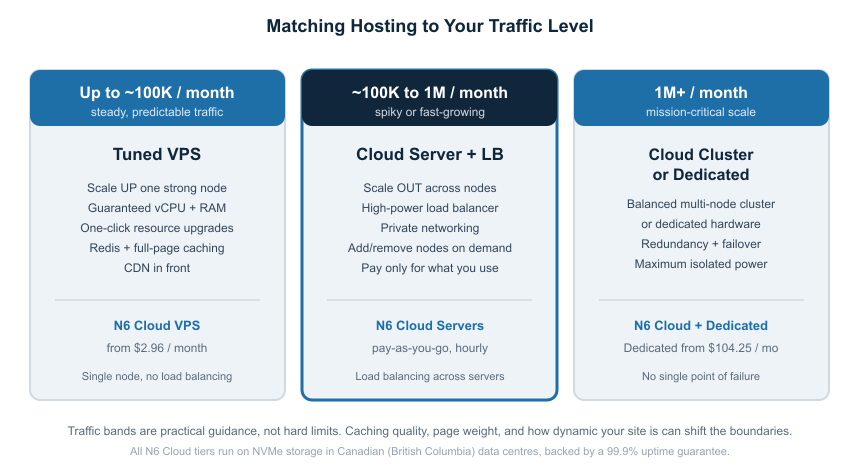
Figure 2. A quick guide matching common traffic levels to the right N6 Cloud infrastructure. The bands are practical guidance, not hard limits.
The Bottom Line
High-traffic hosting is not about buying the biggest server you can find. It is about matching your traffic profile to an architecture that scales the right way and stays available when it counts. For steady six-figure traffic, a tuned VPS with strong caching and a CDN is a reliable, economical home, and you can buy VPS hosting and simply upgrade the plan as you grow. For spiky, fast-growing, or mission-critical sites that need to spread load and survive a node failure, the best cloud server setup is a load-balanced, pay-as-you-go cluster that adds capacity only when you need it. N6 Cloud backs both with NVMe storage, Canadian data centres, a 99.9% uptime guarantee, 24/7/365 expert support, and free migration, so you can test the right tier for your traffic risk-free under our 30-day money-back guarantee. If you are not sure which fits, contact the N6 Cloud team for a free consultation, and we will help you match your traffic to the right infrastructure.