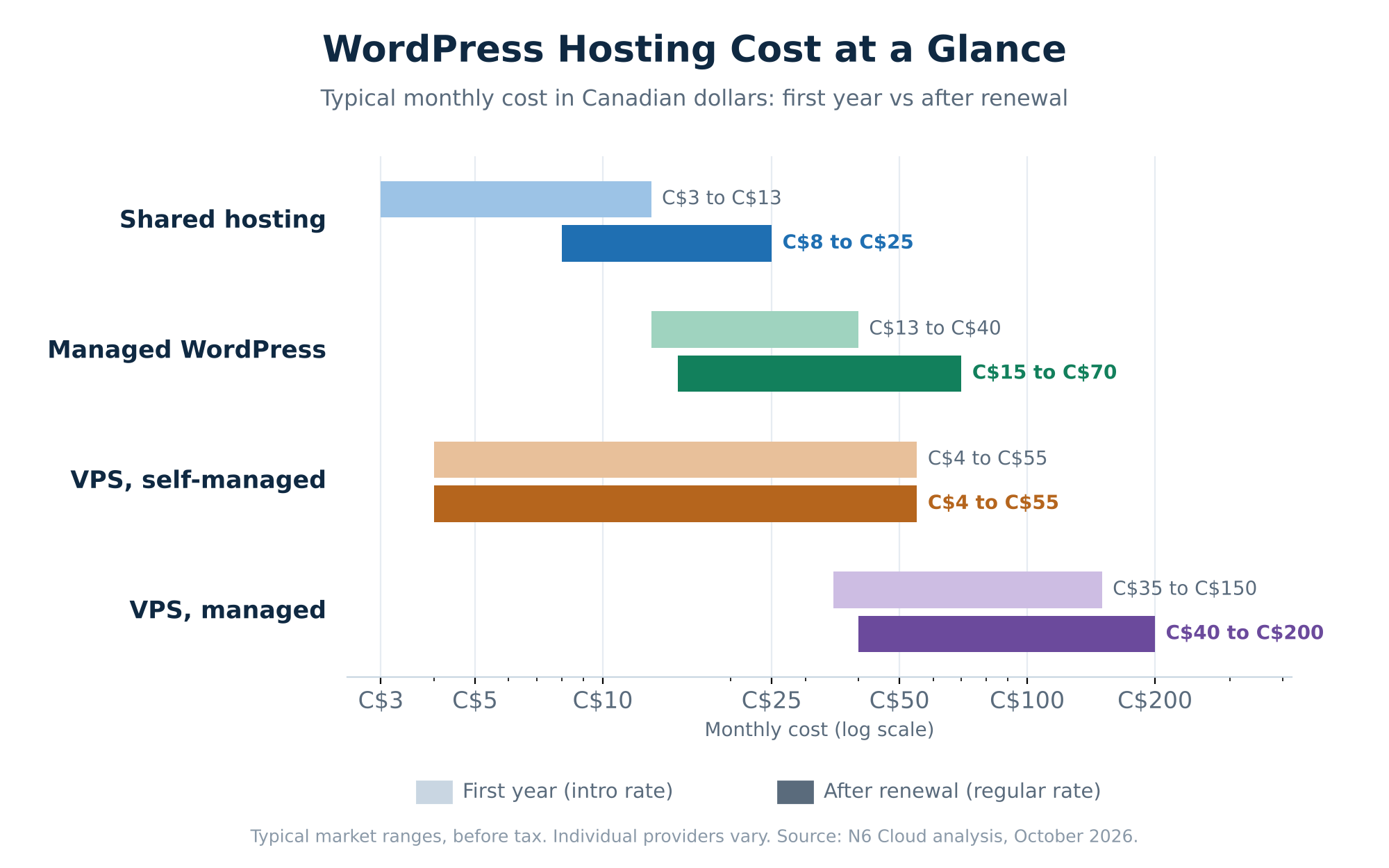
 Figure 1. Typical monthly WordPress hosting cost in Canadian dollars, first year vs. after renewal.
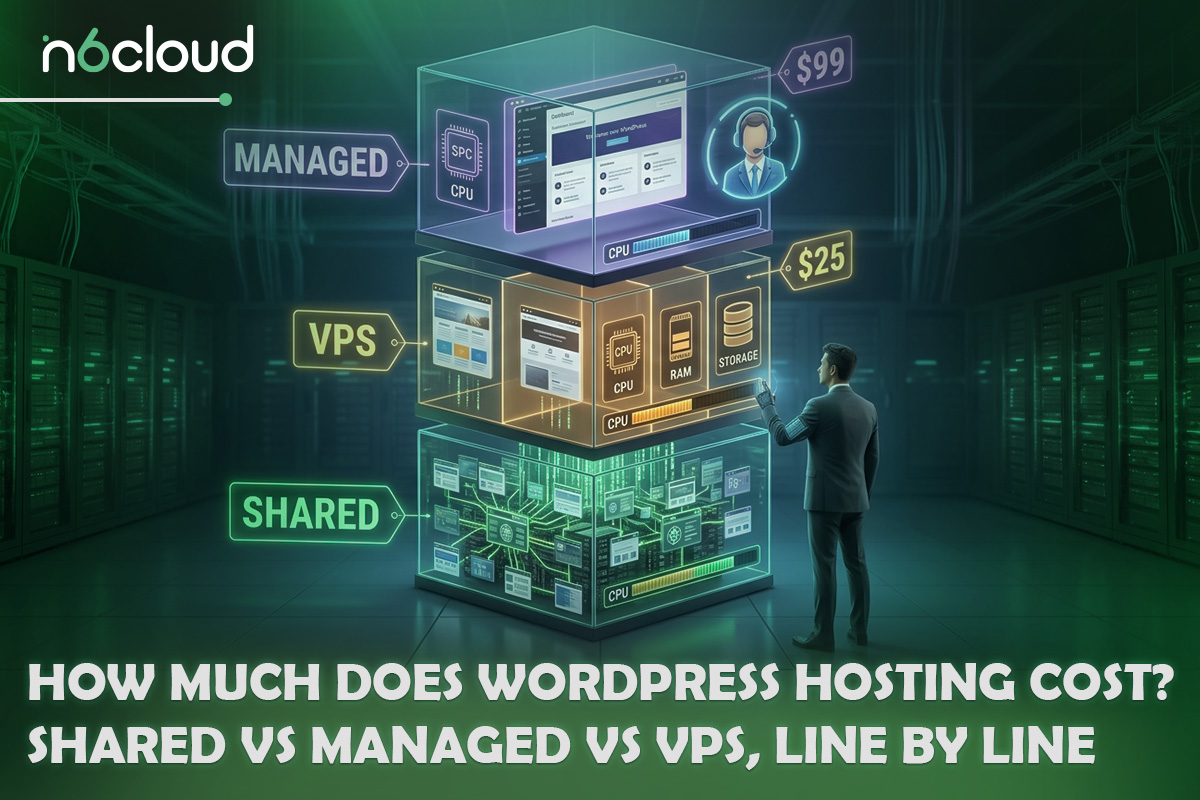
The three types differ in two ways: how many resources your site gets, and who does the maintenance. Those two factors explain almost every dollar of difference between the rows above.
Shared hosting is the cheapest because many websites share one server, and the provider divides that server’s processor, memory, and storage among them with fixed limits per account. An entry-level plan typically gives you one processor core, around 1 GB of memory and a cap on the number of files (often 500,000, called an inode limit). That is plenty for a portfolio, a class project or a new blog with a few thousand visitors a month. The provider keeps the server patched and running, while you keep WordPress, your theme and your plugins up to date. Shared plans also carry the largest intro discounts, which is why the gap between the first-year and after-renewal columns is widest on this row.
Managed WordPress hosting costs more because the provider handles routine work and server maintenance. On a typical managed plan, WordPress core and plugin updates are applied for you, backups run daily and can be restored in one click, malware scanning runs in the background, and a staging copy lets you test a new plugin or theme before it touches the live site. Managed plans usually run on faster web server software, such as LiteSpeed with built-in caching, and give each site more memory than an entry-level shared plan. You pay partly for those resources, and partly for the hours you no longer spend on maintenance. Intro discounts tend to be smaller here, so the renewal jump is small, but the billing term you choose changes the total a great deal, as the worked example later shows.
WordPress VPS hosting costs depend mostly on who runs the server. A virtual private server (VPS) reserves a fixed share of processor cores, memory and fast storage for your site alone, so a busy neighbour cannot slow it down, and you get full control over the software installed on it. With a self-managed (also called unmanaged) VPS, you pay only for those resources and do everything else yourself: install the operating system and control panel, apply security patches, configure the firewall, and fix problems when something breaks. With a managed VPS, the provider handles the operating system, control panel updates and security setup, and usually migrates your existing site for you. On identical hardware, the managed version often costs three to four times as much, which is why the time you would otherwise spend matters so much in the comparison.
What You Actually Pay For: The Line-by-Line Breakdown
The hosting plan is only one line on the bill. A realistic total cost of ownership adds the domain name, security, paid themes or plugins, and the hours you spend keeping the site running. Some are bundled into the plan, and one never appears on an invoice.
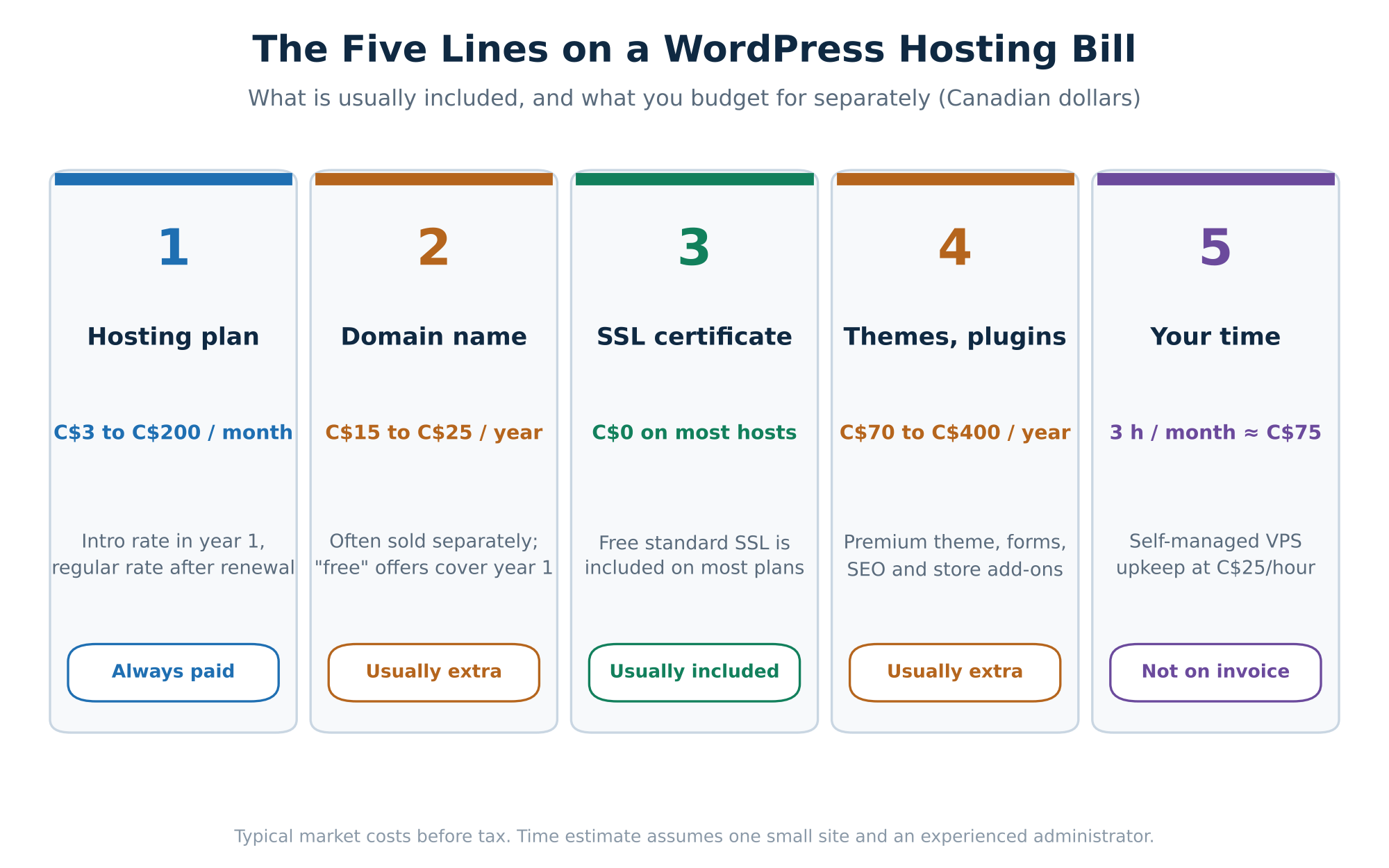 Figure 2. The five lines that make up the real cost of a WordPress site.
Domain, SSL, Plugins and Other Add-Ons: Included or Extra?
These extras are where the real WordPress website cost per year drifts away from the advertised rate. The table shows what is usually included in a hosting plan and what usually costs more, with typical market costs in Canadian dollars.
The assumptions are one site with moderate traffic, no major incidents that month, and an administrator who already knows basic Linux commands. A beginner could easily take two or three times longer. As a cross-check, a 2026 VPS-versus-managed test by ItSourceCode put routine VPS upkeep at one to two hours a month for an experienced administrator, so three hours is a cautious middle figure.
To turn hours into dollars, multiply them by your hourly rate. At C$25 an hour, three hours add C$75 a month to a self-managed VPS. On N6 Cloud’s plans, the managed and unmanaged VPS with the same specifications differ by C$27 a month, so the managed plan is the cheaper choice for anyone who would spend more than about one hour a month on upkeep. For a student learning server administration, those hours are part of the education; for a business owner, they are a real cost.
The 3-Year Cost Nobody Shows You: Intro vs Renewal Price
The fairest way to compare hosting is the total over three years, because that is long enough for the renewal price and the billing term to show their full effect. A plan that looks three times cheaper in its first month can end up only slightly cheaper by year three, and sometimes cost more.
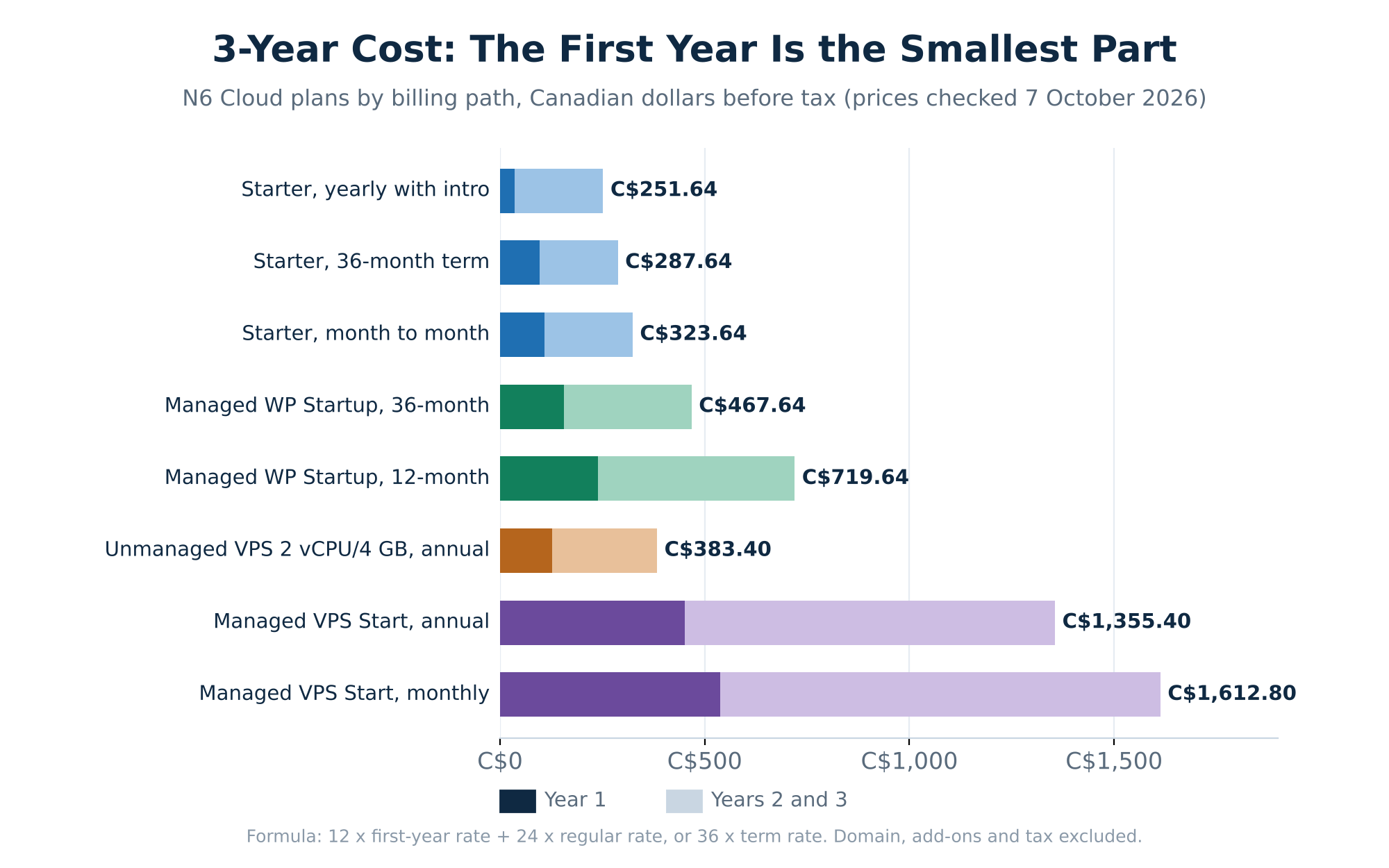 Figure 3. Three-year cost of each plan and billing path, in Canadian dollars, before tax.
How to Read a Hosting Price Table
Most shared plans advertise an introductory price that applies only to your first term. When that term ends, the plan renews at the regular price, which is often two to four times higher. The WordPress hosting renewal price is usually on the same page, in smaller type.
Start with the crossed-out price. The struck-through number next to the headline rate is usually the regular price, which is roughly what you will pay from year two onward, so treat it as the long-term cost. Next, look for the payment condition. A note such as “billed annually” or “12-month term” means the low monthly figure applies only if you pay the whole year upfront; paying monthly means you pay the regular rate from day one. Then check whether a promo code is required. Some intro rates apply only when you enter a code at checkout; without it, you are charged the regular price.
Finally, check the term selector. Many hosts show different monthly rates for 1-month, 12-month, and 36-month terms, and the headline figure may belong to any of them. You can’t compare a rate that requires a 36-month prepayment directly with a rate billed yearly.
Worked Example: 3 Years of Shared, Managed and VPS Hosting
Here is the formula, so you can run the same calculation for any provider. Use the first line for a plan with an introductory first year, and the second for a plan with one rate across the whole term.
3-year cost = (12 × first-year monthly rate) + (24 × regular monthly rate)
3-year cost = 36 × monthly rate for the chosen term
Take N6 Cloud’s Starter plan on yearly billing as an example. The first year costs 12 × C$2.99 = C$35.88. Years two and three renew at the regular C$8.99, so they cost 24 × C$8.99 = C$215.76. Added together, the three-year total is C$251.64. The assumptions are that the introductory rate covers the first 12 months only, term and annual rates stay the same at renewal, and tax, domain and add-ons are excluded. If a host does not publish its renewal rate, ask for it in writing before you buy.
Prices checked on the N6 Cloud plan and specification pages on 7 October 2026, in Canadian dollars, before tax.
The first lesson is that the first year says little about the total. Starter’s first year (C$35.88) is only 14% of its three-year cost, so comparing two hosts on their first-month rate compares the smallest part of the bill.
The second lesson is that the best billing term depends on the plan type. On shared hosting, the yearly path with the intro discount beats the 36-month prepayment by C$36, because the 36-month rate doesn’t include the first-year discount. On managed hosting, the opposite is true: the 36-month term saves C$252 over yearly billing on the same plan. Paying monthly is the most expensive path in both cases. On the managed VPS, yearly billing saves C$257.40 over three years compared with month-to-month, about 16%. Monthly billing suits a trial period or a one-semester course site; for a site you plan to keep, run the formula for each term and pick the lowest total. The VPS rows make the time argument concrete: the managed plan costs C$972 more over three years on the same hardware, far less than the C$2,700 that three hours a month for three years would cost at C$25 an hour.
Shared vs Managed vs VPS: Which One Is Worth the Money?
The lowest-rate plan is worth it only if it handles your traffic and you have the time to look after it. Two questions settle most cases: how many visitors you expect each month, and how much technical work you are willing to take on yourself.
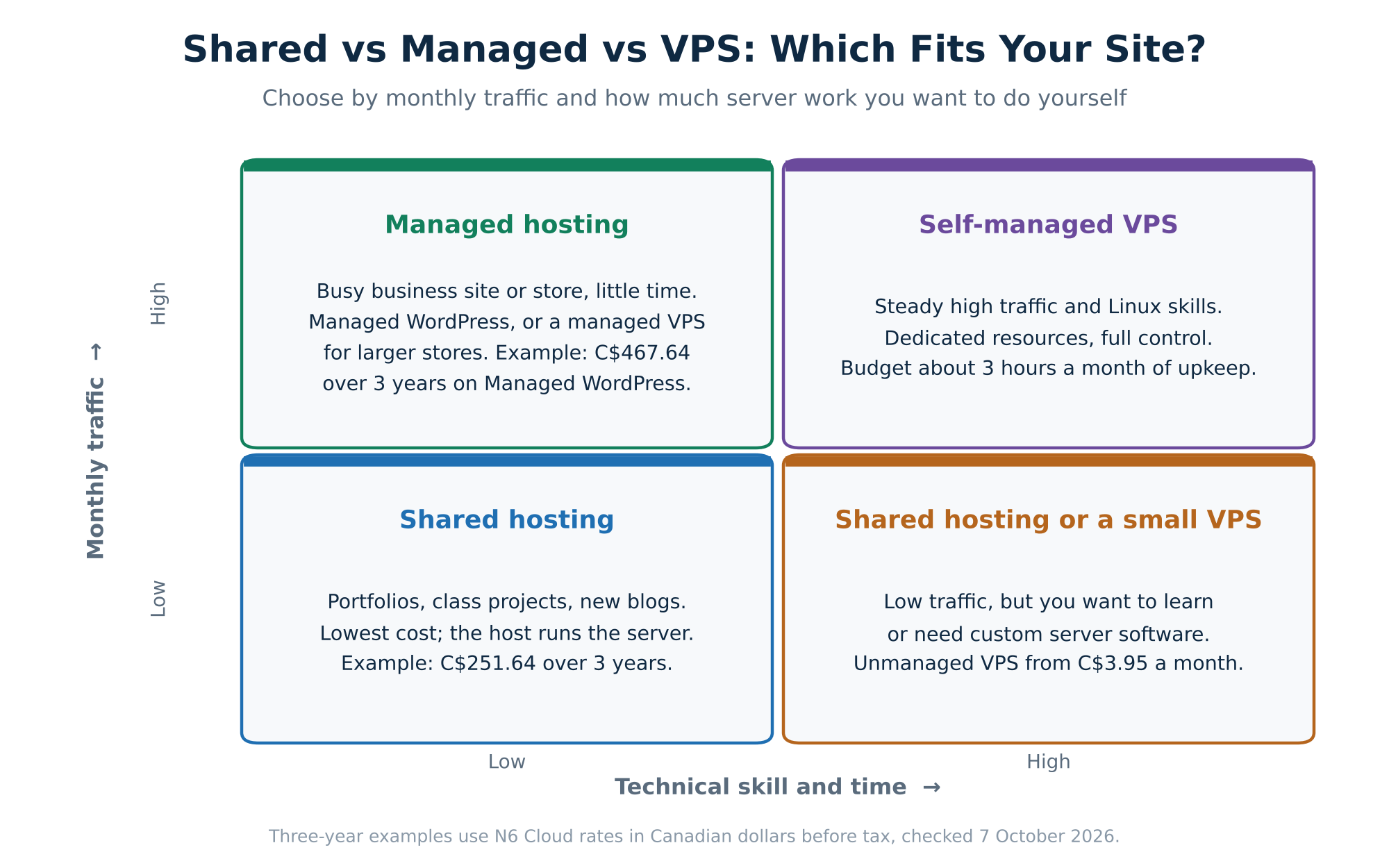 Figure 4. A quick decision guide based on traffic and technical skill.
Shared hosting is enough for most personal and small business sites with up to a few thousand visitors a month. For a portfolio, a course project, or a first blog, entry-level shared hosting gives you a control panel, email accounts, and a one-click WordPress installation for a few dollars a month. Signs you have outgrown it are specific: pages that slow down during busy times, error messages about resource limits, or a control panel showing you regularly hit your processor or memory cap.
Managed WordPress hosting pays for itself when the time it saves is worth more than the extra cost. In the worked example, the managed plan on a 36-month term costs C$216 more than the Starter plan on its least expensive path over three years, which works out to C$6 a month. If managed hosting saves you even one hour of updates, backup checks or troubleshooting each month, it has covered that difference at almost any hourly rate. It is also the safer choice for a business site where an hour of downtime means lost sales or enquiries, because tested backups and a staging copy make it far less likely that an update takes the site offline.
You need a VPS when your site needs guaranteed resources: a WooCommerce store with steady orders, a membership site with many logged-in users, or an agency hosting several client sites. Pages for logged-in users and shopping carts cannot be served from a cache, so every visit uses real processor time, and that is where shared limits start to bite. A VPS also lets you install custom software and change server settings that shared hosting keeps locked. If your site is outgrowing a shared environment, moving to VPS hosting gives it dedicated processor cores and memory. Choose managed if you do not want to run the server yourself, and self-managed if you have Linux skills and the hours estimated earlier.
Paying for Hosting in Canada: Currency, Sales Tax and Data Location
If you live in Canada, the amount charged to your card can differ from the figure on the pricing page for two reasons: currency and sales tax. Data centre location rarely changes the cost, but it does affect speed and where your data is stored, so it belongs in the same decision.
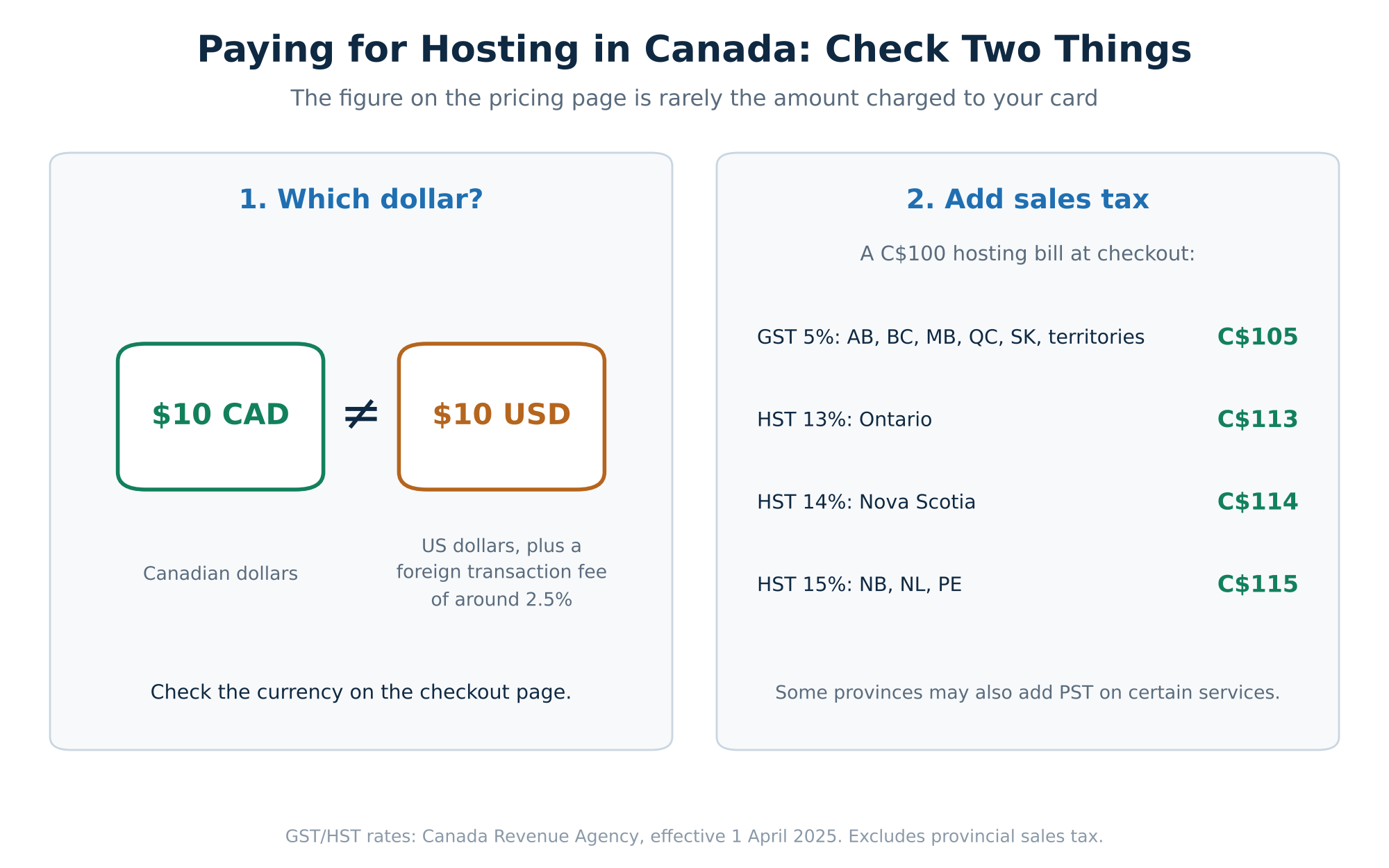 Figure 5. Check the currency and add sales tax before comparing two hosts.
Start with the currency. Many hosting pages show a plain dollar sign without indicating the currency. A plan listed at $10 in US dollars costs noticeably more than one listed at $10 in Canadian dollars (CAD), and your bank may add a foreign transaction fee of around 2.5% on a US-dollar charge. Before comparing two providers, check the currency on the checkout page, convert both offers into the same currency, and then compare their three-year totals rather than their monthly headline rates.
Next, add sales tax. Hosting prices are usually shown before tax, which is added at checkout based on your province or territory. According to the Canada Revenue Agency, GST is 5% in Alberta, British Columbia, Manitoba, Quebec, Saskatchewan and the three territories, while the harmonized sales tax (HST) is 13% in Ontario, 14% in Nova Scotia, and 15% in New Brunswick, Newfoundland and Labrador, and Prince Edward Island (rates effective 1 April 2025). On the C$251.64 Starter total, that is the difference between about C$264 in Alberta and about C$289 in New Brunswick. Some provinces also charge a separate provincial sales tax on certain services, so always check the final total on the last checkout screen.
Data centre location rarely changes the price by much, but it does change performance and where your data lives. A server close to your visitors shortens the time it takes for each page to reach them. For Canadian audiences, a Canadian data centre also keeps site files, databases and backups in the country, which matters to schools, clinics and businesses with data residency requirements.
How to Lower Your WordPress Hosting Cost Without Losing Performance
You can reduce your hosting bill without slowing your site by matching the plan to real traffic, testing before you commit, and not paying twice for the same feature. None of these steps cost anything to apply.
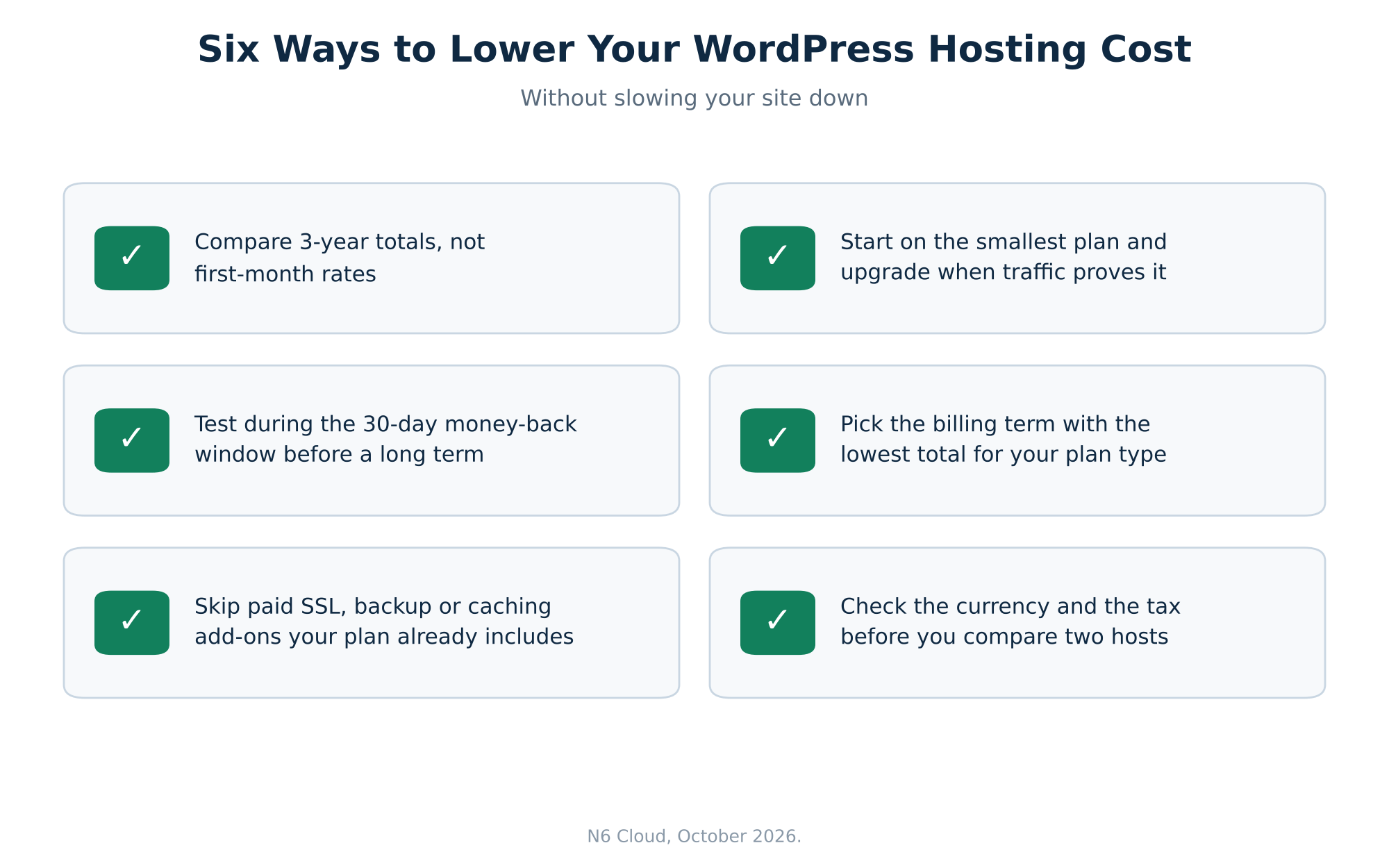 Figure 6. Six ways to lower your hosting bill without losing speed.
Start small and upgrade when traffic proves it. Most new sites get far less traffic in their first year than their owners expect, so start on the smallest plan that fits and monitor load times and resource usage in your control panel for a few months. Upgrade when the numbers show you need to, not in advance. A provider that offers shared, managed, and VPS options under one account lets you move up without changing hosts.
Lock in a longer term only after a trial period. A money-back guarantee works like a free trial if you use it intentionally: sign up, move a copy of your site, and test speed, uptime, and support response time during the guarantee window. If everything holds up, switch to the billing term with the lowest three-year total for your plan type. Domain registrations are often non-refundable, so register the domain once you have decided to stay.
Finally, avoid paying twice for features your plan already includes. Common examples include paying for an SSL certificate when your host provides a free one, a backup plugin subscription on a plan with automated daily backups, a caching plugin licence when the server already runs LiteSpeed caching, and a separate email service when your cPanel plan includes mailboxes. Dropping one C$80-a-year plugin you do not need saves more than a full first year of entry-level shared hosting.
 Why Trust N6 Cloud With Your Hosting Budget?
N6 Cloud is a Canadian hosting company with its data centre in Western Canada, and every N6 figure in this guide comes from its own published plan and specification pages. Showing the full three-year math, including the paths where a longer term costs more, is part of how we aim to earn your trust.
N6 Cloud offers separate plans for shared hosting, managed WordPress hosting, and VPS hosting, so a site can start small and scale as traffic grows without changing providers. Shared and WordPress plans include cPanel, the control panel used in most hosting tutorials, plus free SSL, email accounts, malware scanning, and 24/7 support. Website migration is free, and a 30-day money-back guarantee gives you time to test speed and support before choosing a longer term.
If you want your site’s data stored in Canada and predictable costs after year one, compare N6 Cloud’s Canadian WordPress hosting options against the three-year figures above. Run the same formula on any other host you are considering, and the lowest three-year total will be easy to spot.