
Most people do not start researching hosting plans out of curiosity. They start because something is wrong. The site takes a long, awkward moment to appear when a customer clicks a link. A red warning about resource usage turns up in the hosting panel, and nobody is quite sure what it means. Sales dip during the exact week a campaign is running, the worst possible time for a checkout page to stall. Underneath all of that sits one question that is surprisingly hard to answer from the outside: is the current plan too small, or is the money already being wasted on capacity the site never uses?
The comparison that follows is meant to settle that question with evidence rather than adjectives. N6 Cloud sells both shared and VPS hosting plans from a data centre in British Columbia, so this guide has no reason to push everyone up a tier. Plenty of websites belong exactly where they are. What matters is knowing which signals mean “your site has outgrown its plan” and which mean “your site is heavy and no amount of hardware will fix that”. Hosting comparisons are also full of confident numbers that fall apart when you check them, so everything here is tied to a source you can open: Google’s performance thresholds, CloudLinux’s documentation on resource limits, WooCommerce’s published requirements.
Which words mean what? The search results mix two vocabularies, so it is worth settling before we start. When a price list says “web hosting,” it almost always means shared hosting, so “web hosting vs VPS hosting” and “shared hosting vs VPS hosting” are the same comparison described in two different ways. The practical version of that comparison is a question of timing rather than preference. Nearly every site starts on shared hosting; a good number of them stay there for years, and a growing site eventually reaches the point where the plan, rather than the website, becomes the limit. The seven signs in section four and the three checks in section five exist to tell you when you have reached it.
 What Is Shared Hosting? (And Why Most Sites Start Here)
How Shared Hosting Actually Works
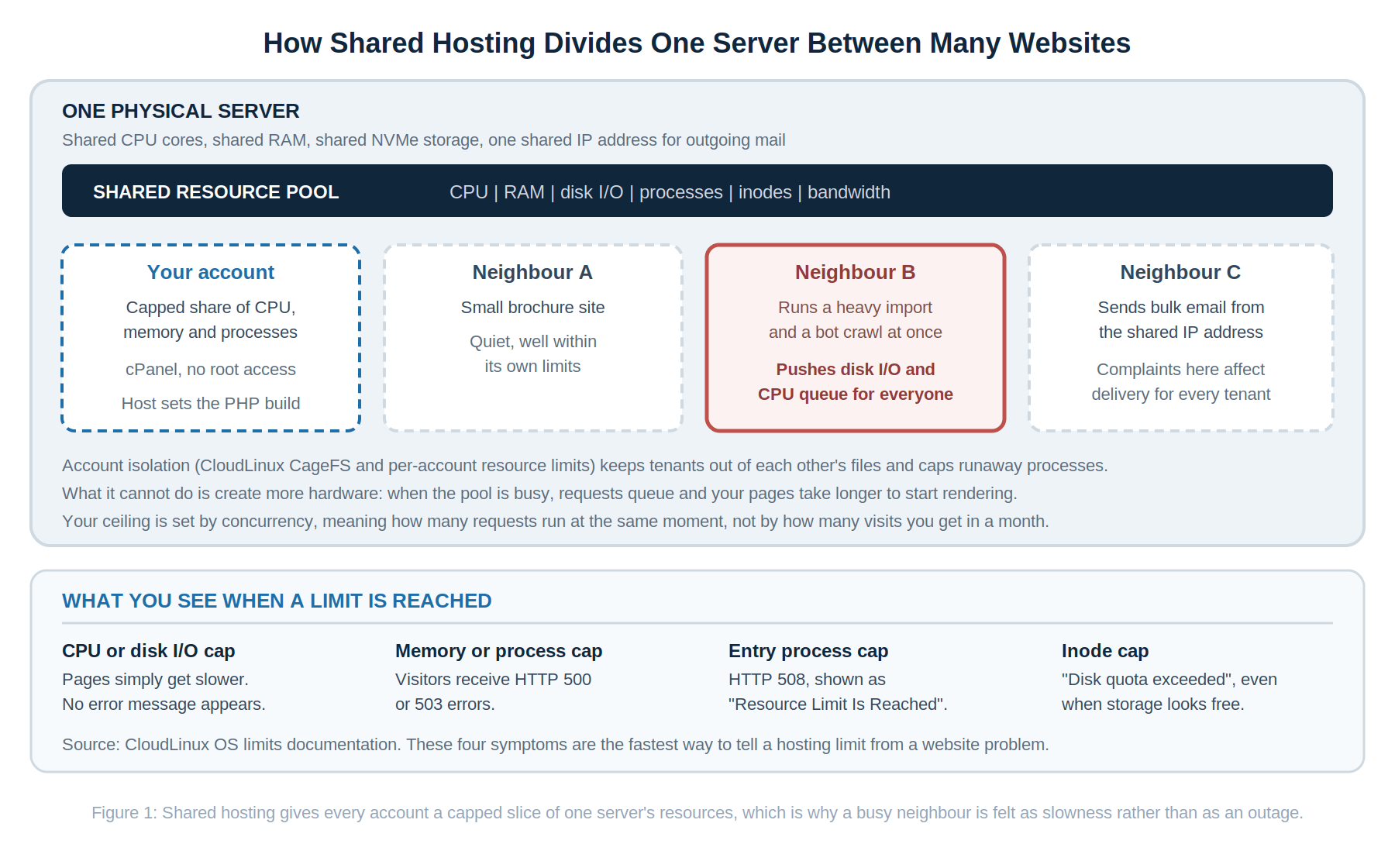
Shared hosting puts many customer accounts on a single physical server and lets them draw from one common pool of processing power, memory, disk speed and bandwidth. Think of an apartment building with a shared hot water tank. Everyone has their own locked unit and key, but the tank is communal, and in the morning, when several neighbours shower at once, the pressure drops for everybody. Providers manage that with per-account limits, so no tenant can drain the tank, and with account isolation, so nobody can wander into anyone else’s unit.
On a modern platform such as the one behind N6 Cloud’s shared hosting plans, that isolation comes from CloudLinux, which locks each account into its own virtualized view of the file system, and Imunify360, which watches for malware and blocks common attacks. You manage the site through cPanel while the provider handles the operating system, the web server, patching, and backups. That division of labour is exactly why shared hosting is the default starting point: it costs a few dollars a month, it needs no server administration knowledge, and the parts most likely to break are somebody else’s responsibility.
Who Shared Hosting Is Really Built For
Forget the vague claim that shared hosting is “for beginners”. Experience level matters very little. What matters is how much work your server has to do for each visitor. A ten-page site for a contracting business in Squamish, a student portfolio, a community club calendar, a consultant’s brochure site with a contact form, a blog that publishes twice a week and serves most readers from cache: all of these can run well on shared hosting for years, because a cached page is mostly a file being handed over and costs the server almost nothing.
The pattern is easiest to see in the exceptions. A WordPress blog serving 40,000 cached pageviews a month is a light workload. A store processing 4,000 uncached checkouts, each one running database writes, tax calculations, inventory updates and payment gateway calls, is a far heavier one, even though the traffic number is ten times smaller. This is why you should distrust any article that tells you shared hosting handles a specific number of monthly visits. The ceiling is set by how many requests need real work at the same moment, not by the monthly total.
The Real Limitations of Shared Hosting
The first limitation is the resource cap itself. Your account is allowed a defined slice of CPU, memory, disk activity and simultaneous processes, and when your site asks for more, the platform holds you at the line. The second is the neighbour effect: isolation stops a neighbour reading your files, but it cannot manufacture extra hardware, so when the machine is busy your requests wait their turn. The third catches people by surprise, because the server’s IP address is shared and outgoing email reputation is shared with it. Google states plainly that “the activity of any senders using a shared IP address affects the reputation of all senders for that shared IP address”, and recommends keeping spam complaint rates below 0.10 percent. If somebody else on the machine sends careless bulk mail, your invoices and password resets can land in spam through no fault of your own.
The fourth is customization. You use the PHP versions and extensions the host provides; you cannot install system-level software, and you cannot write your own firewall rules. For most sites, that is a fair trade. For a site that needs Redis, a queue worker, a Node service or an unusual PHP extension, it is a wall.
What Is VPS Hosting? (And What “Virtual Private” Actually Means)
 How a VPS Isolates Your Resources
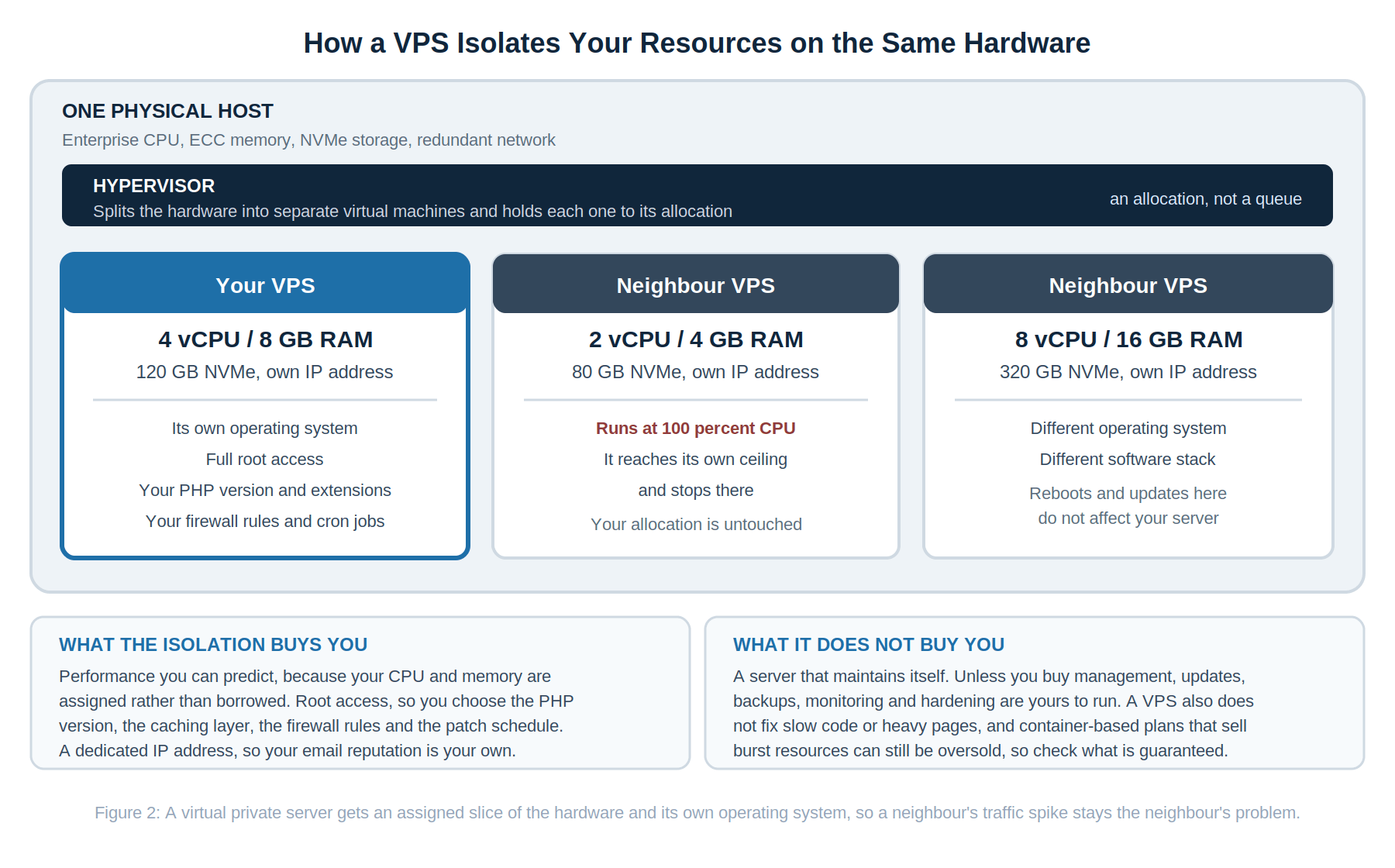
A virtual private server starts from the same physical machine and solves the problem differently. Instead of many accounts sharing one operating system and one resource pool, a hypervisor divides the hardware into separate virtual machines, each running its own operating system with its own assigned vCPU allocation, memory and NVMe storage. Back to the building analogy: rather than renting a unit on the communal hot water tank, you rent a unit with its own tank, sized and paid for by you. When the neighbours all shower at once, your water pressure doesn’t drop.
That single architectural difference produces every other benefit people associate with VPS Hosting. Performance becomes predictable, because your allocation is assigned rather than borrowed. Root access means you choose the PHP version and extensions, the caching layer, the database tuning, the cron schedule and the firewall rules. Your own IP address means other tenants can no longer damage your sending reputation, though a new address still needs warming up and deliverability still depends on your domain reputation and correct SPF, DKIM, and DMARC records. Because the virtual machine is defined in software, you can usually increase resources in place, subject to free capacity on the host machine, rather than rebuilding your site elsewhere. N6 Cloud’s VPS range runs from 1 vCPU with 1 GB of RAM up to 16 vCPU with 32 GB, with in-place upgrades between them and a choice of AlmaLinux, Rocky Linux, Ubuntu, Debian, CentOS or Windows Server.
One caveat belongs here, because most comparison articles skip it. Not all virtualization is equal. Hardware virtualization such as KVM gives each virtual machine its own kernel, while container platforms such as LXC share the host kernel with their neighbours. Neither approach guarantees capacity on its own, since processor time is commonly oversubscribed either way and “burst” allocations are only available when neighbours are idle. Before you buy from anyone, ask which resources are guaranteed rather than burstable, and on which platform.
Managed vs Unmanaged VPS: Which Applies to You?
This is where buyers get burned, so here is the plain version. On an unmanaged VPS, the provider handles the hardware, network, power, and virtualization platform; everything above that line is yours: operating system updates, security hardening, the web server, the database, backups, and monitoring. A managed VPS shifts much of that work to the provider, typically patching, monitoring of supported services, backup configuration and server-level troubleshooting. What managed almost never includes, at any provider, is your application. If a plugin conflict breaks your checkout, that remains your problem or your developer’s.
To answer the question for N6 Cloud specifically, since vague answers here cost people money: N6 Cloud VPS plans are unmanaged by default. Every plan includes full root access, a choice of operating system, one-click resource upgrades, and 24/7 platform support; you can add optional VPS Management Services if you would rather not run the server yourself, covering patching and monitoring and including a cPanel Solo licence with installation and configuration. Backups are also an add-on rather than a default, which is worth knowing before launch day rather than after it. If you are comfortable with a terminal, unmanaged is excellent value. If you are not, budget for management from the beginning or stay on a shared or managed WordPress plan, because an unpatched VPS is a worse outcome than a well-run shared account.
Who Actually Needs a VPS
Four profiles come up again and again. Online stores, once the catalogue grows and checkouts overlap, because payment and inventory operations cannot be cached away. Membership sites, course platforms and forums, where almost every page is logged in and generated fresh for each visitor. Content-heavy WordPress builds running page builders, search, related-post queries and several integrations at once, where a properly sized plan pays for itself, though our WordPress Hosting plans are tuned for that workload if you would rather not run a server. And applications with specific technical requirements: a particular PHP extension, a Node or Python runtime, Redis, a queue worker, a staging environment, or compliance rules that call for your own firewall policy.
 VPS Hosting vs Shared Hosting: Head-to-Head Comparison
Performance and Speed
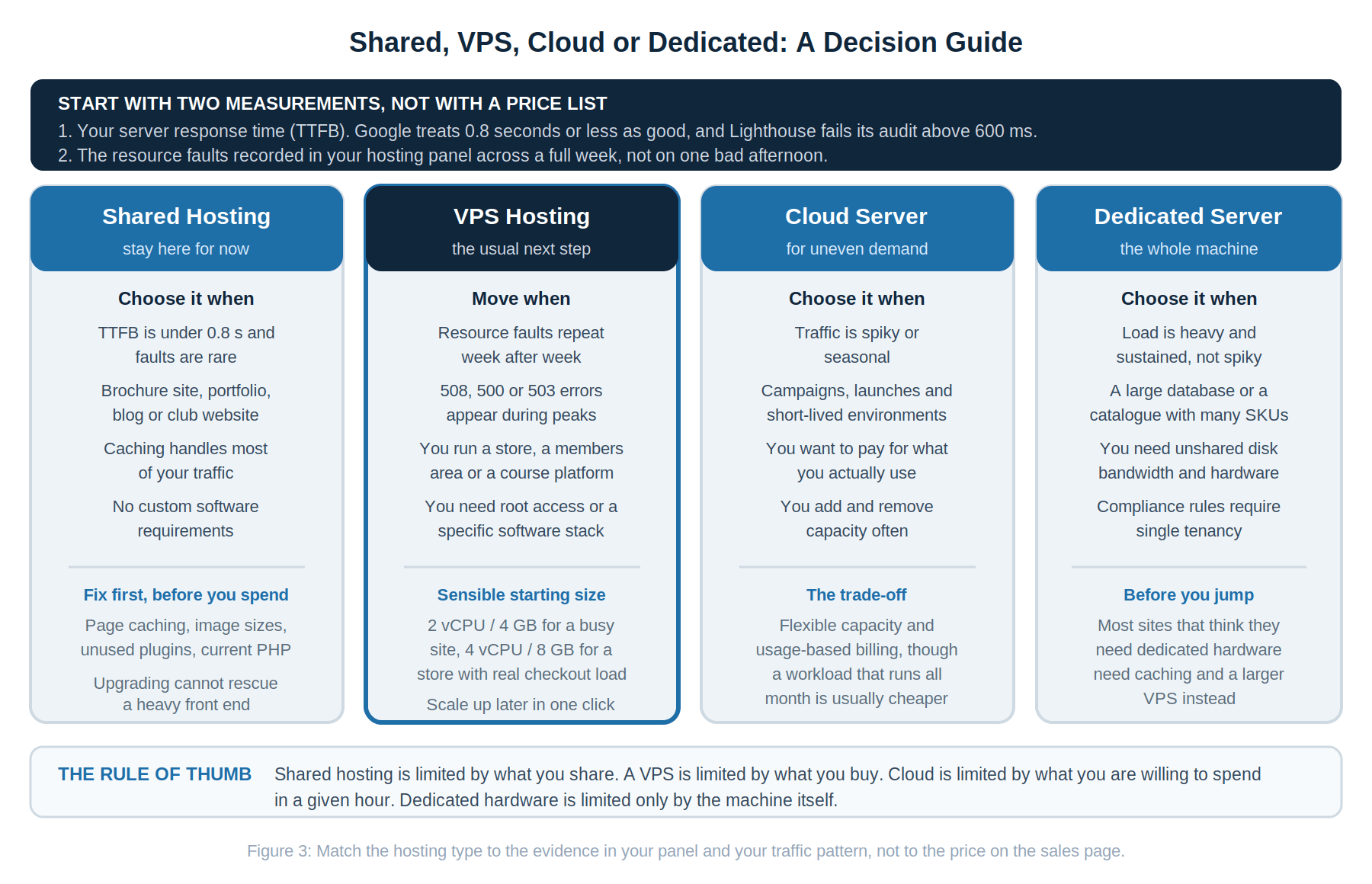
The useful measurement here is Time to First Byte, the delay between the browser asking for a page and the first byte of the answer arriving. It is the metric most sensitive to your hosting plan because it captures the work the server does before the browser can do anything. Google’s guidance is specific: a good TTFB is 0.8 seconds or less, and anything above 1.8 seconds is poor. Lighthouse fails its server response audit when the browser waits more than 600 milliseconds for the main document. If your TTFB sits comfortably under 0.8 seconds at your busiest hour, your hosting is not what is slowing your site down.
The mechanism behind a slow TTFB on shared hosting is usually queuing. PHP handles one request per worker process, so when every worker is busy, the next request waits in line, and a long enough line ends in timeouts. Hardware cannot shorten a queue caused by bloated code, which is why caching, image weight and plugin sprawl deserve attention first. When the code is already reasonable, and the queue still forms at peak, more assigned capacity is the only remaining answer, and that is what a VPS provides.
Security and Isolation
Shared hosting isn’t insecure, and articles implying that one hacked neighbour automatically compromises your site describe hosting from a decade ago. Modern platforms isolate accounts at the file system level and scan continuously for malware. What shared hosting cannot give you is control: no custom firewall rules, no say over when patches are applied, no intrusion detection of your choosing, and no way to separate your email reputation from the other tenants.
A VPS reverses that. The isolation boundary is the virtual machine itself, with its own kernel and network identity, and the security decisions become yours. That is an advantage for anyone handling payments, personal data or client information, and it is also a responsibility. An unmanaged server that nobody patches is less safe than a shared account maintained by a hosting team, so match the choice to who will actually do the work.
Pricing and Long-Term Value
Look at the gap in dollars rather than percentages. N6 Cloud shared plans start at USD $2.24 per month on the introductory rate, and VPS plans start at USD $2.96 per month on annual billing, with a 4 vCPU and 8 GB configuration at USD $15.34 per month on the same annual terms. Prices are current at the time of writing and worth confirming on the product pages. For context, Forbes Advisor Canada put typical market rates in December 2025 at roughly USD 2.49 to 4.99 a month for entry-level shared hosting and USD 15 to 100 a month for VPS, so most upgrades land somewhere between a few dollars and 40 dollars a month.
Now weigh that against what slowness costs. Portent’s analysis of more than 27,000 landing pages found B2C ecommerce conversion fell from 3.05 percent at a one-second load time to 1.12 percent at three seconds. Google’s Milliseconds Make Millions study, run with 55 and Deloitte across 37 European and American brands, measured a 0.1-second mobile improvement, producing an 8.4 percent lift in retail conversions. You do not need to accept those figures as universal to see the shape of the argument: if your site earns money, the monthly price difference between plans is usually smaller than the revenue lost to one bad afternoon of queued requests.
Sign four: your email deliverability is deteriorating without any change on your side. Password resets and order confirmations going to spam, while your sending habits haven’t changed, point to the shared IP address. A VPS with its own address puts that reputation back under your control.
Features and Software Needs Shared Hosting Cannot Support
Sign five: you have been told no. The clearest signal of all is a support ticket that ends with “that is not available on shared hosting”. A specific PHP version or extension your application requires; Redis or Memcached; a Node or Python runtime; a cron job that must run every minute; a queue worker; WP-CLI at scale; custom firewall rules; or a staging environment on the same server. None of these are unreasonable requests. They simply require root access, and shared hosting cannot provide it without breaking the model that makes it cheap.
Downtime That Arrives With Your Visitors
Sign six: outages that follow your traffic rather than the clock. Real downtime and resource throttling look identical from the outside, and telling them apart determines whether you change your plan or your provider. Put a free uptime monitor on the site, then compare its alert times against the fault timestamps in your resource usage graph. Outages clustered around your busiest hours, with matching faults, mean the site is not crashing at all; it is being held at its own limits, and a correctly sized plan removes that ceiling. Outages scattered at random hours with no matching faults point instead to the provider’s infrastructure, which is a different conversation entirely. Keep the arithmetic in view either way, because a 99.9 percent uptime commitment still allows roughly 43 minutes of downtime per month, so two brief interruptions are not automatically a breach of anything.
Resource-Heavy Applications That Cannot Be Cached
Sign seven: your site does real work for every single visitor. Caching is what makes shared hosting quick, and logged-in traffic is what defeats caching. A blog can serve the same cached page to 50,000 readers at almost no cost to the server. A store cannot do that because carts, checkout, and account pages are built fresh every time, each one running database writes, tax and shipping calculations, inventory updates, and a call to the payment gateway. Membership sites, course platforms, forums and booking systems all share that shape. If you are running one of them, the ceiling is a traffic level far below what a content site would need to reach, which is why a growing store on WooCommerce Hosting or a heavy build on WordPress Hosting tends to need VPS-level resources, while a blog on the same plan stays perfectly comfortable.
If you recognize one sign, investigate it. If you recognized three or more, your plan is the constraint, and moving to a VPS will produce a change your visitors can feel. Before you buy anything, though, run the three checks in the next section. They turn a sign you recognize into a number you can use with a hosting provider.
How to Confirm the Problem Is Really Your Hosting (Self-Diagnostic Checklist)
Plenty of people upgrade on a hunch, and some of them upgrade for nothing, because a slow theme moved to a faster server is still a slow theme. Three checks settle it. None of them cost anything; together, they take about twenty minutes, and every threshold below is published by Google or the platform vendor rather than invented by a hosting company, which means you can quote these numbers to any provider and expect a real answer. Run all three before you shop, write down the results, then run them again a week after any move so you can prove the change had a measurable effect.
Check Your TTFB With PageSpeed Insights or GTmetrix
Time to First Byte is the cleanest single signal of server health because it measures how long the server takes to begin answering before any of your images, fonts or scripts are involved. Run PageSpeed Insights or GTmetrix three times rather than once: overnight, at your busiest hour, and somewhere in the middle. What you are looking for is both the number and the spread. A TTFB that sits consistently above 600 milliseconds on a site whose caching and image weight are already sorted out points to server-side limits rather than your code, and a figure that is fine overnight but doubles at peak leads to the same conclusion, just with a timestamp attached. A TTFB comfortably under 0.8 seconds while the page still feels slow points the other way, at the page itself, and no amount of hardware will fix that.
Read Your Hosting Panel’s Resource Usage Reports
Your control panel already contains the evidence, and almost no one opens it. In cPanel, go to Resource Usage, switch from the summary to the detailed view, and set the range to the last thirty days. You are looking for faults, meaning the moments when your account was held at a limit, broken down by the limit reached. Write down three things: how often faults occur, which resource is responsible, and what time of day they cluster. A handful of processor faults in a month during campaign weeks is ordinary growth. Daily faults, or repeated entry process and memory faults, mean the plan has become the ceiling. Take a screenshot before you contact anyone, because a specific fault log gets a far more useful answer from a support desk than “my site feels slow” ever will.
Review Core Web Vitals in Google Search Console
The first two checks tell you what your server does in a test. This one tells you what real visitors actually experienced, which is the version Google uses. Open the Core Web Vitals report in Search Console, where the data comes from Chrome users in the field rather than from a lab, and look at Largest Contentful Paint first. Google’s published Core Web Vitals thresholds are 2.5 seconds or less for LCP, 200 milliseconds or less for INP and 0.1 or less for CLS, each measured at the 75th percentile. Slow server response directly inflates LCP, so an LCP stuck in the poor band on a site whose images and layout are already optimized leaves hosting as the remaining explanation. Because these metrics feed Google’s page experience signals, the hosting decision and the ranking decision are effectively the same, which our guide to Core Web Vitals optimization for WordPress covers in full.
 How to Decide: A Quick Framework for Choosing Between Shared and VPS
When Staying on Shared Hosting Is the Right Call
Being told to upgrade is not the same as needing to. A portfolio, a student project, a club calendar, a brochure site for a local business, or a blog that publishes twice a week and serves nearly everything from cache will very likely sit happily on shared hosting for years. The test is evidence rather than ambition. If your TTFB is comfortable at peak hours, your panel shows no repeated faults, and your Core Web Vitals sit in the green, an upgrade buys you headroom you are not using, and that money does more good spent on the site itself. Run the checklist again in six months, or sooner if your traffic pattern changes.
If You’re Just Starting Out
Stay on shared hosting and spend the difference on the site instead. A new site rarely generates enough concurrent work to trouble a modern shared plan, and the money goes further on page caching, correctly sized images, a current PHP version and fewer plugins. Set a baseline while everything is quiet by recording your TTFB and glancing at your resource usage graph once a month. That habit turns the upgrade decision into a measurement instead of a guess.
If You’re Scaling or Running an Online Store
Ecommerce changes the arithmetic because carts, checkouts and account pages cannot be served from cache. WooCommerce’s own server requirements call for a WordPress memory limit of 256 MB or greater and PHP 8.3 or newer, while WordPress by default attempts to allocate only 40 MB for a single site. A store therefore requires roughly six times the memory headroom of an ordinary install, and each simultaneous checkout holds a worker process while it communicates with the payment gateway. If your catalogue is growing, or two overlapping checkouts already feel slow, move to a store-optimized plan such as our WooCommerce Hosting, or a VPS starting at 2 vCPU and 4 GB, with 4 vCPU and 8 GB for steady checkout traffic.
If You Need Even More Power Than a VPS
Two paths open up beyond a standard VPS. A Cloud Server suits demand that fluctuates: seasonal peaks, launch weeks, marketing campaigns, and short-lived environments, billed based on what you use rather than a flat monthly rate. A Dedicated Server suits heavy, constant load, a large database, a catalogue with tens of thousands of items, or compliance requirements that call for single tenancy. Worth saying plainly: most sites that believe they need dedicated hardware actually need proper caching and a larger VPS, and that upgrade costs a fraction as much.
Why Trust N6 Cloud for Your VPS Hosting?
Hosting decisions are trust decisions, so here are checkable specifics rather than adjectives. N6 Cloud is a Canadian company based in British Columbia, with servers in a Western Canadian data centre, which matters for latency for Canadian visitors and for organizations that need to know where their data physically resides. The team behind it has more than 20 years of experience in web hosting and domain services. Support runs 24 hours a day, every day of the year, by phone, chat or ticket, and every plan carries a 99.9 percent uptime commitment and a 30-day money-back guarantee.
Every VPS Hosting plan includes full root access, NVMe storage, your choice of operating system, and in-place CPU, memory and storage upgrades that keep your data, configuration and applications intact, across ten sizes from 1 vCPU and 1 GB up to 16 vCPU and 32 GB, with management services and a cPanel licence available if you want a managed setup. Just as importantly, the range does not stop at VPS. Shared and WordPress plans sit below it with free migration included, and Cloud Servers and Dedicated Servers sit above it, so growth means resizing a plan rather than changing providers and migrating every site you run.
The Short Version
The VPS vs shared hosting question comes down to one line: shared hosting is limited by what you share, and a VPS is limited by what you buy. If your site is light, cached and behaving, stay where you are and put the money into the site itself. If your panel shows repeated faults, TTFB climbs at peak hours, 508 errors appear during your best campaigns, or you’re told a feature you need isn’t available, those are signals that a plan change is overdue, not optional. Take the two measurements in this guide, check them against the table in section four, and the decision usually makes itself.