

A client texts to say your website now reads “This account has been suspended”, and the quote you emailed this morning never left. A suspension is a lock, not a deletion: nothing on the server is gone. When a shared hosting account is suspended, the first job is finding which of a small set of causes you face, and step 1 below works even if your own email is locked.
What Does It Mean When Your Hosting Account Is Suspended?
A suspension means your host has locked your whole hosting account: your sites stop loading, and you can’t log in, but your files, databases, and mail stay on the server. Visitors see a page that says “This account has been suspended.” Unlike termination, the lock can be reversed.
What Stops, What Keeps Working, and What’s Kept
Many shared hosts use cPanel, the control panel for your sites, email, and files. cPanel’s documentation on suspended accounts lists what the lock covers. Table 1 sums it up. The email rows are the ones your customers notice first, so read those closely.
 Figure 1. What every visitor saw on N6 Cloud’s suspended test account: no reason, no date, and no direct way to reach the host.
The “Contact your hosting provider” link in Figure 1 emails the webmaster address at your own suspended domain. Tell regular customers yourself by phone or from a personal email address. Mail sent to you is held: under cPanel’s default, a message that still can’t be delivered about four days and eight hours after it was sent goes back to the sender with a failure notice. Treat that window as your first deadline, because inside it customers’ messages arrive late instead of never.
Suspension vs. Termination: Why the Difference Matters
Only one of the two can be undone: a lifted suspension brings the account back as it was. Hosting account termination removes the account and, in cPanel’s words, “permanently deletes all of its data from the server”, including the sites, the databases, and every mailbox. A host may keep backups of its own, but you can’t count on one once the account is gone.
Hosts usually terminate after a suspension that isn’t resolved, such as an unpaid invoice or uncleaned malware, though serious abuse can lead straight to termination. Each host sets the gap between the two, so ask support how long you have, and don’t assume it’s weeks. Until you know, treat every suspension as urgent, even a billing one you can fix quickly, and start the recovery steps below the same day. Your own copy of the account is what keeps a termination from costing you the site.
Why Is My Hosting Account Suspended? The Real Reasons
Hosts suspend a shared account for one of three reasons: it became a danger to others, it used more than its share of the server, or it violated the agreement. A person at the host or the host’s tools decide, not cPanel itself. Many hosting terms allow suspension without notice when an account is causing harm, so don’t count on a warning.
Malware, Hacked Files, and Spam Sent From Your Account
Hosts usually act fastest on an infected or hijacked account, because it puts visitors, other customers, and the server’s mail reputation at risk. The suspension is containment, not punishment. Typical cases are injected code in a plugin nobody has updated for years, a phishing page in a forgotten folder, or a hacked mailbox sending thousands of messages. Many hosts scan accounts and clean or quarantine single infected files automatically, so a whole-account suspension often means a bigger or recurring problem.
Spam has its own brake: cPanel can cap a domain’s hourly sending and block its outgoing mail for a while when too many of its messages fail. The first signs are a malware notice from your host, outgoing mail that suddenly stops, or a “This site may be hacked” label under your site in Google. If your site is verified in Search Console, Google’s free tool for site owners, Google also emails you about security problems. Anyone can check a domain with Google’s Safe Browsing site status tool.
Using More Than Your Share of the Server
A host usually suspends for resources when an account’s load keeps hurting the server for everyone, not after one busy afternoon. Each account has limits on processor time, memory, and simultaneous requests, and trouble starts when a runaway script, bots crawling uncached pages, or steady growth hits them all day. Hosting terms generally allow a suspension for that, and many offer an upgrade as the alternative. N6 Cloud’s comparison of VPS and shared hosting explains what happens when you exceed your limits.
You’ll usually see it coming in a resource warning email or a rising count of faults (moments the account hit a limit) on cPanel’s Resource Usage page. The pattern decides the fix. A one-off spike needs a repair, such as caching the page the bots hit or stopping the looping script. Steady growth needs more room: a larger Canadian shared hosting plan, or VPS hosting once the site has outgrown shared plans.
Unpaid Invoices and Other Breaches of the Terms of Service
The third group is the most predictable: an unpaid invoice, or activity the terms forbid. Typically, the renewal charge fails because the card expired, and the reminders go to an address nobody reads anymore. Once the invoice is overdue, the account can be suspended while the owner still thinks the bill was paid as usual. The first sign is a failed-payment email, if it reaches anyone.
Policy breaches take longer to sort out, because the host has to judge what happened and why. A hosting terms of service violation covers more than malware and spam: the acceptable use policy (the part of the terms that lists banned activity) usually forbids crypto mining, password-guessing tools, and illegal content. Many hosts try to work with a customer first but keep the right to act on a first offence, and you’ll usually hear about it first through an abuse complaint your host forwards.
What to Do If Your Account Is Already Suspended
Work through the five steps below in order, because changing files before you know the reason can destroy the evidence support needs. You can start without your locked cPanel login or business mailbox. If the cause is billing, steps 1 and 3 may be all you need.
- Reach out to your host and confirm the reason. The notice goes to the account’s contact address, which may be the locked mailbox or an outdated address. Most hosts have a separate client or billing area, with its own login (not your cPanel one), that holds invoices, tickets, and often copies of notices. Phone or live chat works too, where your host offers them. cPanel recommends that hosts record a reason for every suspension, so support can tell you the cause even if the notice doesn’t. Ask for it with the file paths, which show which domain or folder was involved (see the noisy neighbour section).
- Save what you can before changing anything. You can’t download files while the account is locked, so ask support whether a copy or a recent backup is available. Once access returns, download a full backup before any cleanup.
- Fix the root cause. For billing, pay the invoice in the client area; depending on the host, the account returns on payment or after a ticket. For malware, every site in the account needs cleaning, but you don’t have to do it yourself. Your host may offer cleanup, or you can hire a malware-cleanup service or ask the person who built the site. Then change every password, including cPanel, WordPress, FTP, and email. For spam, secure the abused mailbox or form; for resources, fix the script or upgrade.
- Ask for reactivation with evidence. Hosting account reactivation goes faster when your ticket says what you found, what you changed, and how you’ll prevent a repeat. A line such as “removed the old staging folder, updated 14 plugins, and reset all passwords” gives support what it needs.
- Check for and clear any Google warning. If the Safe Browsing tool above flags the site, or Google shows “This site may be hacked” under it, open the Security Issues report in Search Console (verify the site first if nobody has). Fix what it lists, then select Request Review. Google’s guide to the Security Issues report says most reviews take “several days or weeks” and that you shouldn’t resubmit while one is pending. That wait usually affects only Google’s warning, not your host’s reactivation. Sites that keep switching between clean and harmful can’t request a review for 30 days.
Could a Noisy Neighbour Get Your Account Suspended?
Almost never. A noisy neighbour, another busy account on your server, can slow shared disks and network. On hosts that run CloudLinux, a server operating system that holds each account to its own limits, another account’s load can’t push yours over them (CloudLinux’s documentation on account limits). Where the host also uses CageFS, a CloudLinux feature that gives each account a private view of the server’s files, another customer’s malware has no normal route into your folders.
The shared IP address is where a neighbour can reach you. Accounts on a server often share one IP address (see how one server hosts many sites for why), and a neighbour’s spam can land it on a blocklist such as Spamhaus. Those lists filter email, so a shared IP blacklist problem makes your mail harder to deliver but isn’t a reason to suspend you. Search isn’t affected either: Google’s John Mueller said in September 2020 that he knew of no ranking algorithm that uses shared IPs. Safe Browsing matches warnings to a site’s hostname and path, so a neighbour’s listing doesn’t carry over to yours.
The neighbour that can get you suspended lives inside your own account. A suspension covers the whole cPanel account, so any old install, staging folder, or weakly protected mailbox shares your main site’s fate. Picture a landscaping company’s site plus the owner’s garden-design side project on an addon domain (a second website in the same account). The side project’s plugin is two years out of date, injected code turns up in its folder, and both sites and every mailbox go offline.
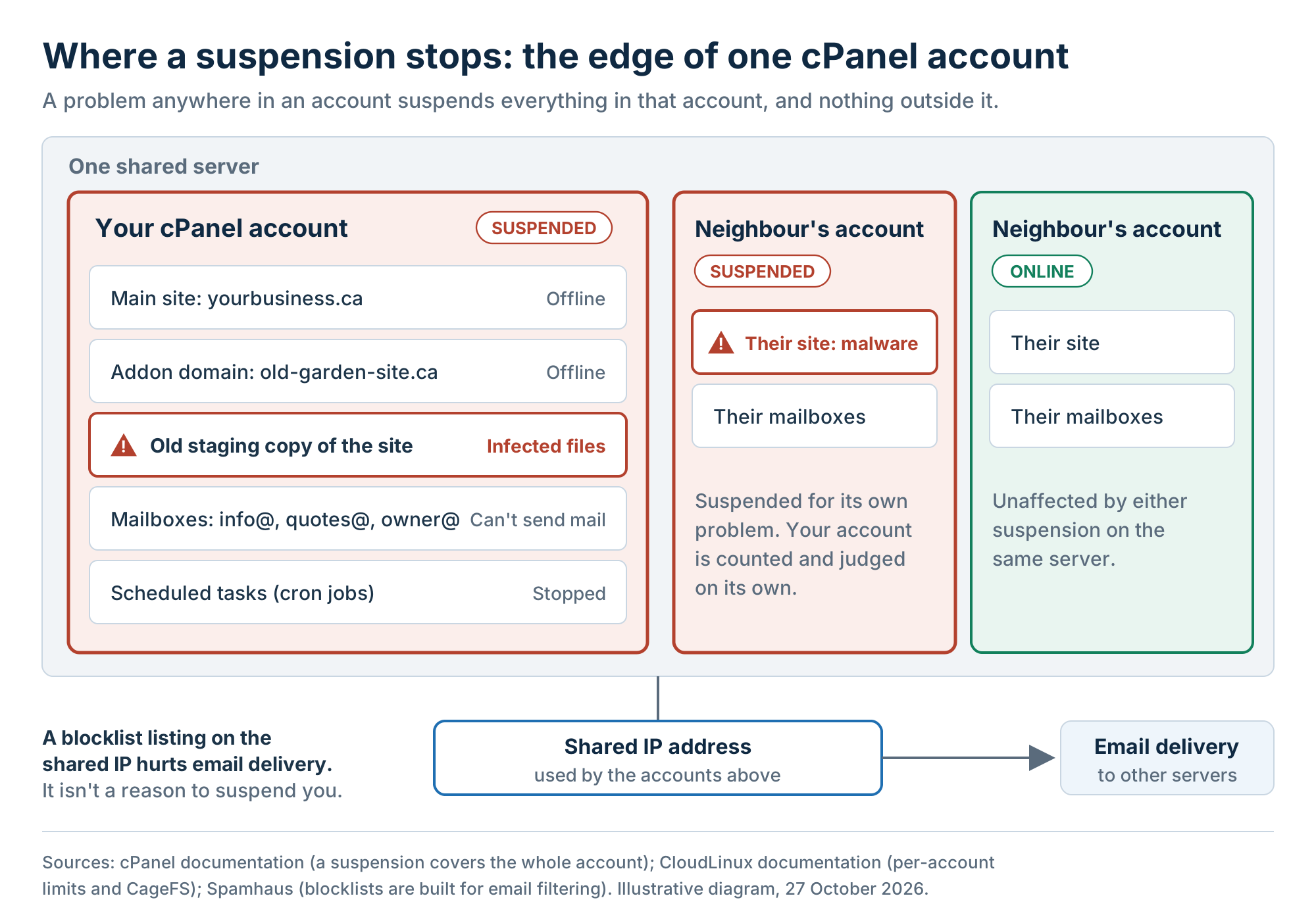 Figure 2. A suspension stops at the edge of one cPanel account, and a shared IP on a blocklist affects email, not hosting.
The details from step 1 show whose problem it is. Malware reports list file paths, and spam reports name mailboxes or scripts, all of which should sit inside your account. If a path or address isn’t yours, say so in your ticket and ask support to recheck.
7 Ways to Make Sure Your Account Isn’t Suspended (Again)
Most suspensions trace back to something the account owner can control, so most are preventable. The first three ways are suspension-specific, and the last four are general habits. Table 2 maps each cause from earlier to the ways that prevent it, so you can start with your own weak spot.
1. Clean Up Every Site and Mailbox in Your Account
Removing what you no longer use is the best protection against the neighbour inside your own account, especially in an account that several people have worked on over the years. An old site can’t be hacked once it’s gone, and a mailbox you’ve deleted can’t send spam. Fewer installs also leave fewer plugins to update, so the cleanup pays off twice and costs nothing but time.
Set aside 15 minutes or so for a small account, open cPanel, and list every domain, subdomain, app install, folder outside your main site, mailbox, and forwarder. Ask whoever built your site about any folders or installs you don’t recognize. Take a backup first, then delete old staging copies and test installs, and close mailboxes nobody uses. Give every remaining login a strong, unique password, ideally from a password manager. Repeat the audit once a year, and whenever a staff member or web designer leaves.
2. Keep Your Billing and Contact Details Current
Billing suspensions are the easiest to prevent, because they come from stale details, not from your site. The card expires, a bank replaces it after a fraud alert, or the person who set up the account leaves and their email stops working. None of that shows until a renewal payment fails.
The card, the account email, and any second contact usually live in your host’s client or billing area, not in cPanel. Keep a card there that won’t expire before the next renewal, and an account email address someone checks every week. If you have staff, add a second contact where your host allows it. Notices and abuse complaints then still reach someone when the owner is away. Turn on automatic renewal if it’s offered, and set a calendar reminder a week before each renewal date. If a payment still fails, pay it in the client area the same day.
3. Keep Your Own Off-Site Backup
A copy you hold yourself is the only backup you fully control, since a host’s backups follow its schedule and retention period. An off-site backup, a copy stored away from the hosting server, turns a termination from a loss into a rebuild. It’s also the one copy you can open yourself during a suspension.
cPanel’s Backup tool creates a full account backup with your files, databases, and email in one archive. With every mailbox inside, it can be large, and download time depends on how much mail and media you keep. Download one monthly and after any big change. Keep it in two places, such as an office computer and cloud storage, and test once a year that it restores.
The last four ways are habits worth keeping on any host:
4. Keep WordPress, plugins, and themes updated.
Outdated plugins are a common way in for injected code. N6 Cloud’s guide to updating WordPress without breaking the site covers staging and rollback.
5. Watch your resource faults before your host does.
Check the Resource Usage page after launches, sales, and campaigns, and act on the pattern (see the resources section).
6. Send bulk email through a newsletter service.
It keeps your mailboxes under the hourly sending cap and your newsletters off the shared IP.
7. Add a full security routine.
Two-factor login, a firewall, and login limits stop many attacks, and a regular malware scan of your website catches the rest early. This week, confirm that two-factor login is on for cPanel (where your host offers it) and, through a security plugin, for every WordPress administrator, and run a scan. Here’s a full security routine for shared accounts.

Why Trust N6 Cloud for Secure, Reliable Shared Hosting?
N6 Cloud sells shared hosting, so read this as a host’s own account of how it handles the causes above. The team has more than 20 years in web hosting and domains, and its shared servers run in data centres in British Columbia. Its suspension rules are published in its terms of service, so you can read them before anything goes wrong.
For security, every shared plan includes Imunify360, a security suite that automatically finds and removes malware, plus intrusion prevention, a firewall, and brute-force login protection. CloudLinux and CageFS give every account its own limits and a private file system. Nightly backups are kept for up to 30 days and can be restored in cPanel, although N6 Cloud’s terms still make you responsible for your own copies, as Way 3 recommends.
On billing, N6 Cloud charges no late or reactivation fees, and a billing suspension lifts automatically once you pay the invoice, with no ticket needed. Support is open 24/. That means if your hosting account is suspended, you can do step 1 at any hour, even on a weekend with your mailbox locked. The security tools above come standard on N6 Cloud’s secure shared hosting plans rather than as paid add-ons, and they run without any setup on your part.